Join us at FabCon Atlanta from March 16 - 20, 2026, for the ultimate Fabric, Power BI, AI and SQL community-led event. Save $200 with code FABCOMM.
Register now!Learn from the best! Meet the four finalists headed to the FINALS of the Power BI Dataviz World Championships! Register now
I'm new to Power BI and I have been testing it out. I wanted to see how it would connect with Google Analytics so I entered the credentials for my company's demo site.
However, now I know I can make it work I want to pull the data from our actual site but this has a different GA account with different credentials.
How do I change my GA preferences in Power BI so that I can pull data from our actual site, and not our demo site?
Solved! Go to Solution.
Hi @Anonymous ,
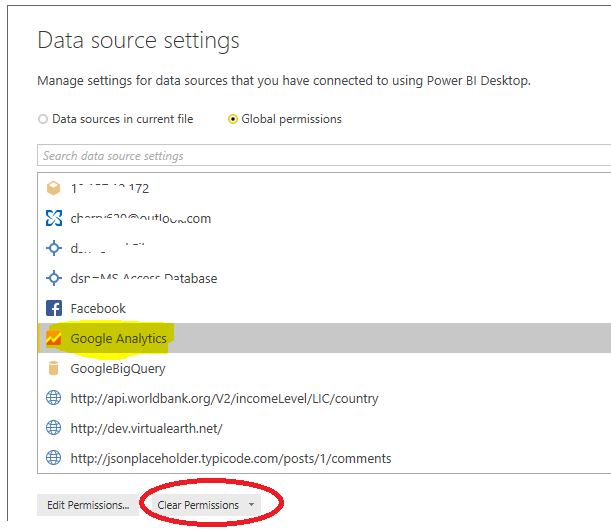
You could go to Data source settings and clear the permission for Google Analytics like below.
Then you could connect with your Google Analytics actual site and enter the credentail.
Best Regards,
Cherry
Hi @Anonymous ,
You could go to Data source settings and clear the permission for Google Analytics like below.
Then you could connect with your Google Analytics actual site and enter the credentail.
Best Regards,
Cherry
Share feedback directly with Fabric product managers, participate in targeted research studies and influence the Fabric roadmap.
Check out the February 2026 Power BI update to learn about new features.
| User | Count |
|---|---|
| 14 | |
| 12 | |
| 10 | |
| 7 | |
| 6 |