Get certified for free when you join Fabric Data Days 2026 and dive into Fabric, Power BI, SQL, AI, and other essential data skills.
Join nowTry your skills in the Power BI Dataviz World Championship! Round one ends June 26. Join now
I'm new to Power BI and I have been testing it out. I wanted to see how it would connect with Google Analytics so I entered the credentials for my company's demo site.
However, now I know I can make it work I want to pull the data from our actual site but this has a different GA account with different credentials.
How do I change my GA preferences in Power BI so that I can pull data from our actual site, and not our demo site?
Solved! Go to Solution.
Hi @Anonymous ,
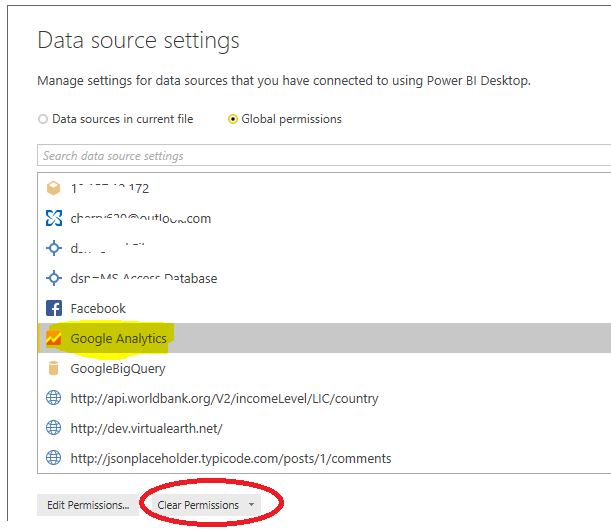
You could go to Data source settings and clear the permission for Google Analytics like below.
Then you could connect with your Google Analytics actual site and enter the credentail.
Best Regards,
Cherry
Hi @Anonymous ,
You could go to Data source settings and clear the permission for Google Analytics like below.
Then you could connect with your Google Analytics actual site and enter the credentail.
Best Regards,
Cherry
Don't miss out on Data Days, June 15 through August 7. Learn Fabric, Power BI, SQL, AI and more.
Check out the May 2026 Power BI update to learn about new features.
| User | Count |
|---|---|
| 4 | |
| 4 | |
| 2 | |
| 2 | |
| 1 |