cancel
Showing results for 
Search instead for 
Did you mean: 

The Power BI Data Visualization World Championships is back! Get ahead of the game and start preparing now! Learn more

Reply
Violet
New Member

Cannot schedule refresh dataset from SQL Server because of server port

When I use Power BI Desktop to get data from SQL Server, I use the form of 'servername : portnumber' to connect to database. Then I publish the report to Power BI on the web.


I can refresh my data in Power BI Desktop. But when I want to configure schedule refresh, the tip shows that 'Your data source can't be refreshed because the credentials are invalid. Please update your credentials and try again'. The credentials is in the form of 'servername : portnumber'. But on the web, I can only connect to database by using the form of 'servername,portnumber'. 


Now I can only refresh the data in my report and then publish it to Power BI on the web.

So, how can I configure schedule refresh successfully on the web?

PS: Gateway and datasource is good to go. The form of connection is 'servername,portnumber' on the web.

1 ACCEPTED SOLUTION
Anonymous
Not applicable

@Violet,

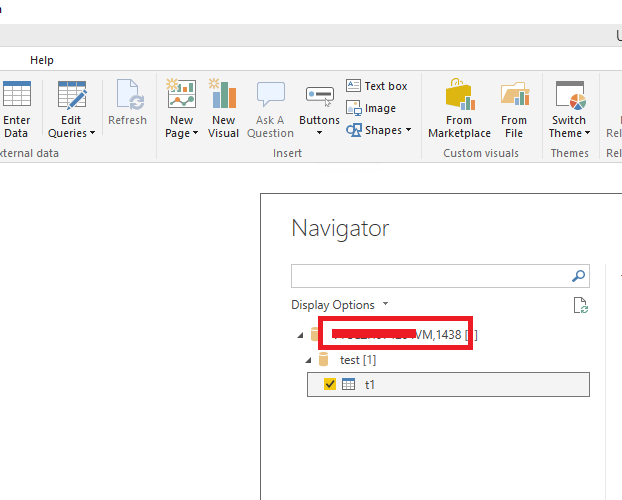
Please change your server name to "Servername,portnumber" format in Power BI Desktop. In order to successfully refresh the dataset in Power BI Service, the connection strings(server name, database name) should match between Power BI Desktop and gateway.
1.PNG

Regards,
Lydia

View solution in original post

4 REPLIES 4
Anonymous
Not applicable

@Violet,

Please change your server name to "Servername,portnumber" format in Power BI Desktop. In order to successfully refresh the dataset in Power BI Service, the connection strings(server name, database name) should match between Power BI Desktop and gateway.
1.PNG

Regards,
Lydia

Hi Lydia,@Anonymous


I tried this way before, but I cannot connect to the SQL Server if I use "Servername,portnumber" format.

Is there any configuration I need to change?


Best regards,

Violet

Anonymous
Not applicable

@Violet,

What error message do you get? Are you able to use the servername, port format in SSMS? Everything works in my Power BI Desktop.
1.PNG

Regards,
Lydia

@Anonymous,


Oh, I can connect to the database.


Thanks,

Violet

Helpful resources

Announcements
Power BI DataViz World Championships

Power BI Dataviz World Championships

The Power BI Data Visualization World Championships is back! Get ahead of the game and start preparing now!

December 2025 Power BI Update Carousel

Power BI Monthly Update - December 2025

Check out the December 2025 Power BI Holiday Recap!

FabCon Atlanta 2026 carousel

FabCon Atlanta 2026

Join us at FabCon Atlanta, March 16-20, for the ultimate Fabric, Power BI, AI and SQL community-led event. Save $200 with code FABCOMM.