cancel
Showing results for 
Search instead for 
Did you mean: 

Try your skills in the Power BI Dataviz World Championship! Round one ends June 26. Join now

Reply
Anonymous
Not applicable

Can’t upload Excel data

I am fresh to Power BI and have hit my first hurdle within 2 minutes!  I am trying to upload an excel data file with 35 columns and 2000 rows of text data but get the notification 'The data in the preview has been truncated due to size limits'.  The file is 43KB in size - why am I unable to load this?


1 ACCEPTED SOLUTION
Anonymous
Not applicable

@Anonymous,

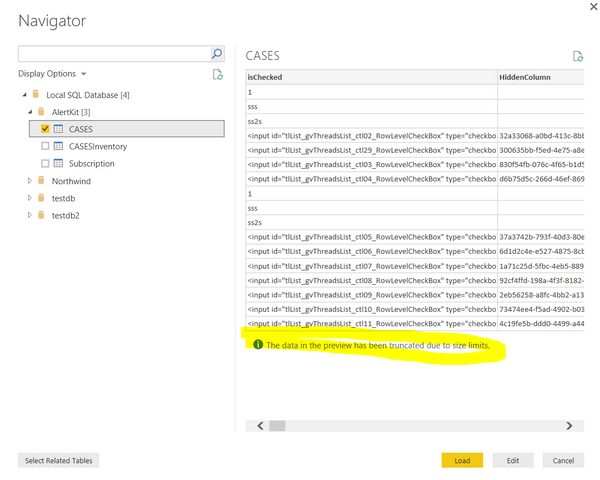
Do you see the notification in Power BI Desktop navigator as shown in the following screenshot? If so, it is simply informing the user that the table shown inside the navigator is a preview of the whole data-set. To see the full table you have to either Edit of Load the table. You are able to see whole data in query editor or Data view of Power BI Desktop
捕获.PNG

Regards,
Lydia

View solution in original post

2 REPLIES 2
Anonymous
Not applicable

@Anonymous,

Do you see the notification in Power BI Desktop navigator as shown in the following screenshot? If so, it is simply informing the user that the table shown inside the navigator is a preview of the whole data-set. To see the full table you have to either Edit of Load the table. You are able to see whole data in query editor or Data view of Power BI Desktop
捕获.PNG

Regards,
Lydia

I can't see see data in the table section .

Helpful resources

Announcements
Fabric Data Days is here Carousel

Data Days 2026

Don't miss out on Data Days, June 15 through August 7. Learn Fabric, Power BI, SQL, AI and more.

May Power BI Update Carousel

Power BI Monthly Update - May 2026

Check out the May 2026 Power BI update to learn about new features.

Power BI DataViz World Championships carousel

Power BI DataViz World Championships - June 2026

A new Power BI DataViz World Championship is coming this June! Don't miss out on submitting your entry.