This is best Fabric, Power BI, SQL and AI community event. How do we know? The last event sold out! Save €200 with code FABCMTY200.
Register nowA new Data Days event is coming soon! This time we’re going bigger than ever. Fabric, Power BI, SQL, AI and more. Don't miss out.
I am fresh to Power BI and have hit my first hurdle within 2 minutes! I am trying to upload an excel data file with 35 columns and 2000 rows of text data but get the notification 'The data in the preview has been truncated due to size limits'. The file is 43KB in size - why am I unable to load this?
Solved! Go to Solution.
@Anonymous,
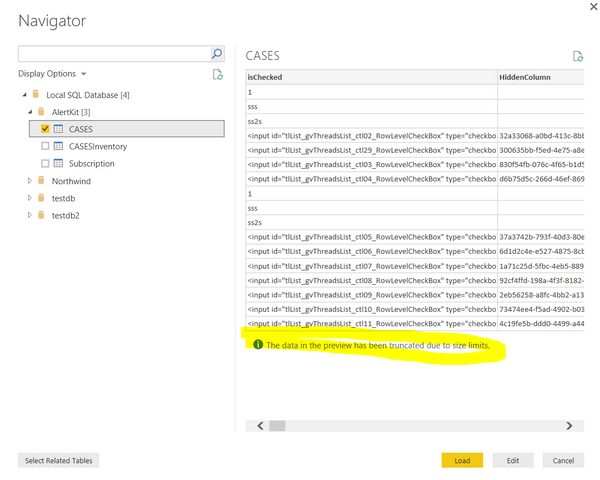
Do you see the notification in Power BI Desktop navigator as shown in the following screenshot? If so, it is simply informing the user that the table shown inside the navigator is a preview of the whole data-set. To see the full table you have to either Edit of Load the table. You are able to see whole data in query editor or Data view of Power BI Desktop
Regards,
Lydia
@Anonymous,
Do you see the notification in Power BI Desktop navigator as shown in the following screenshot? If so, it is simply informing the user that the table shown inside the navigator is a preview of the whole data-set. To see the full table you have to either Edit of Load the table. You are able to see whole data in query editor or Data view of Power BI Desktop
Regards,
Lydia
I can't see see data in the table section .
Sign up to receive a private message when registration opens and key events begin.
If you have recently started exploring Fabric, we'd love to hear how it's going. Your feedback can help with product improvements.