This time we’re going bigger than ever. Fabric, Power BI, SQL, AI and more. We're covering it all. You won't want to miss it.
Learn moreLevel up your Power BI skills this month - build one visual each week and tell better stories with data! Get started
Hello,
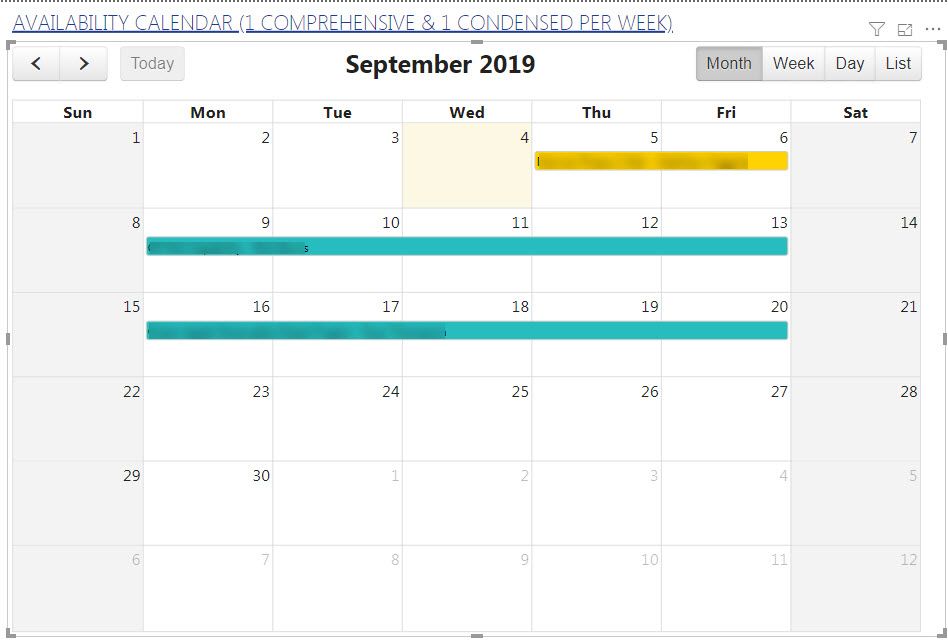
I created a calendar visual using the MAQ Software Calendar (image below). However, this version does not automatically filter to the current month. The month that displays whenever i open the calendar is the month that i created the visual in. Is there another calendar visualization in Power BI that can display the information below in the same manner, but will have the current month view functionality so that whenever i open the calendar, it will automatically show today's month? To give you some context as to the information i'm putting on the calendar, it's simply a list of tasks and how long each will take to show others how available my team is for any new assisgnments they request. Assignments in yellow take about 2 days and assignments in teal take about 5 days.
Any help would be greatly appreciated.
MAQ Software Calendar
Hi @Anonymous
How about this visual-Beyondsoft Calendar
https://www.youtube.com/watch?v=J5ZYkdtCB7g
Best Regards
Maggie
Community Support Team _ Maggie Li
If this post helps, then please consider Accept it as the solution to help the other members find it more quickly.
So that calendar will only let me put one field in as the "date field". However, my data has a start date and an end date column becuase it's a range of when the assignment starts and ends. Not sure, but this visual won't let me insert those 2 fields. It also only gives me the count instead of the actual name of the assignment on the calendar.
Check out the April 2026 Power BI update to learn about new features.
Sign up to receive a private message when registration opens and key events begin.
If you have recently started exploring Fabric, we'd love to hear how it's going. Your feedback can help with product improvements.
| User | Count |
|---|---|
| 3 | |
| 2 | |
| 2 | |
| 2 | |
| 2 |