- Power BI forums
- Get Help with Power BI
- Desktop
- Service
- Report Server
- Power Query
- Mobile Apps
- Developer
- DAX Commands and Tips
- Custom Visuals Development Discussion
- Health and Life Sciences
- Power BI Spanish forums
- Translated Spanish Desktop
- Training and Consulting
- Instructor Led Training
- Dashboard in a Day for Women, by Women
- Galleries
- Data Stories Gallery
- Themes Gallery
- Contests Gallery
- QuickViz Gallery
- Quick Measures Gallery
- Visual Calculations Gallery
- Notebook Gallery
- Translytical Task Flow Gallery
- TMDL Gallery
- R Script Showcase
- Webinars and Video Gallery
- Ideas
- Custom Visuals Ideas (read-only)
- Issues
- Issues
- Events
- Upcoming Events
Learn from the best! Meet the four finalists headed to the FINALS of the Power BI Dataviz World Championships! Register now
- Power BI forums
- Forums
- Get Help with Power BI
- Power Query
- Re: Calculation with previous month's value
- Subscribe to RSS Feed
- Mark Topic as New
- Mark Topic as Read
- Float this Topic for Current User
- Bookmark
- Subscribe
- Printer Friendly Page

- Mark as New
- Bookmark
- Subscribe
- Mute
- Subscribe to RSS Feed
- Permalink
- Report Inappropriate Content
Calculation with previous month's value
I have excel calculation that I would like to replicate in Power Query.
Is this possible in Power Query?
Solved! Go to Solution.


- Mark as New
- Bookmark
- Subscribe
- Mute
- Subscribe to RSS Feed
- Permalink
- Report Inappropriate Content
@kangx322 try this
let
    Source = Table.FromRows(Json.Document(Binary.Decompress(Binary.FromText("i45WMjIwMtQ1ACElHSUjC6VYHSQxI6CYOaqQMUiZGaqYCVDMxABVzBQoZogiZGgGEgJqjQUA", BinaryEncoding.Base64), Compression.Deflate)), let _t = ((type nullable text) meta [Serialized.Text = true]) in type table [Date = _t, Value = _t]),
    #"Changed Type" = Table.TransformColumnTypes(Source,{{"Date", type date}, {"Value", Int64.Type}}),
    Value = #"Changed Type"[Value],
    Loop = List.Generate(
                        ()=>[i=0,j=Value{i},k=j],
                        each [i]<List.Count(Value),
                        each [i=[i]+1, j=Value{i}, k=[k]*3+j*0.5],
                        each[k]
    ),
    Custom1 = Table.FromColumns(Table.ToColumns(#"Changed Type")&{Loop},List.Combine({Table.ColumnNames(#"Changed Type"),{"cumulativeValue"}}))
in
    Custom1
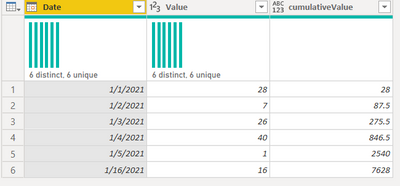
- Mark as New
- Bookmark
- Subscribe
- Mute
- Subscribe to RSS Feed
- Permalink
- Report Inappropriate Content
@smpa01 Do you have any recommendation for improving performance? When I run this with my real data, it is taking about 3 hours to run.
- Mark as New
- Bookmark
- Subscribe
- Mute
- Subscribe to RSS Feed
- Permalink
- Report Inappropriate Content
there are few things you can try out.
A. If you are querying a database, run the loop on the server side.
B. Known PQ performance tuning
https://www.thebiccountant.com/speedperformance-aspects/
C. You can try List. Buffer as @ronrsnfld mentioned
D. For calualtion if you prefre List.Generate, you can reduce one step like this
    Loop = List.Generate(
                        ()=>[i=0,k=Value{i}],
                        each [i]<List.Count(Value),
                        each [i=[i]+1, k=[k]*3+Value{i}*0.5],
                        each[k]
    )
E You can obtain same result by using an Accumulator too
  Accumulator = List.Skip(
    List.Accumulate(
      Value,
      {0},
      (state, current) =>
        if current = Value{0} then
          state & {List.Last(state) + current}
        else
          state & {List.Last(state) * 3 + current * 0.5}
    )
  )
The combinded code is here and I am not sure wich one would give you better performance, you need to test it out.
The combined code is here.
let
  Source = Table.FromRows(
    Json.Document(
      Binary.Decompress(
        Binary.FromText(
          "i45WMjIwMtQ1ACElHSUjC6VYHSQxI6CYOaqQMUiZGaqYCVDMxABVzBQoZogiZGgGEgJqjQUA",
          BinaryEncoding.Base64
        ),
        Compression.Deflate
      )
    ),
    let
      _t = ((type nullable text) meta [Serialized.Text = true])
    in
      type table [Date = _t, Value = _t]
  ),
  #"Changed Type" = Table.TransformColumnTypes(Source, {{"Date", type date}, {"Value", Int64.Type}}),
  Value = #"Changed Type"[Value],
  Loop = List.Generate(
    () => [i = 0, k = Value{i}],
    each [i] < List.Count(Value),
    each [i = [i] + 1, k = [k] * 3 + Value{i} * 0.5],
    each [k]
  ),
  Accumulator = List.Skip(
    List.Accumulate(
      Value,
      {0},
      (state, current) =>
        if current = Value{0} then
          state & {List.Last(state) + current}
        else
          state & {List.Last(state) * 3 + current * 0.5}
    )
  ),
  Custom1 = Table.FromColumns(
    Table.ToColumns(#"Changed Type") & {Accumulator},
    List.Combine({Table.ColumnNames(#"Changed Type"), {"cumulativeValue"}})
  )
in
  Custom1
Would have been a lot easier performance wise, had it been achievable in DAX and I don't know if I can do recursion of this sort in DAX@AlexisOlson


- Mark as New
- Bookmark
- Subscribe
- Mute
- Subscribe to RSS Feed
- Permalink
- Report Inappropriate Content
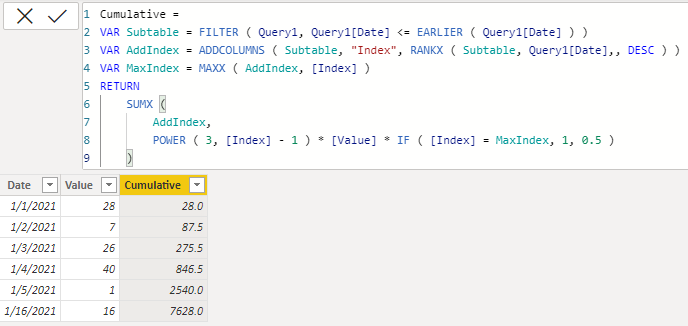
It's possible in DAX but complexity is O(n^2) rather than the O(n) in Power Query since you have to calculate each row from the beginning instead of the last row.
Cumulative =
VAR Subtable = FILTER ( Query1, Query1[Date] <= EARLIER ( Query1[Date] ) )
VAR AddIndex = ADDCOLUMNS ( Subtable, "Index", RANKX ( Subtable, Query1[Date],, DESC ) )
VAR MaxIndex = MAXX ( AddIndex, [Index] )
RETURN
    SUMX (
        AddIndex,
        POWER ( 3, [Index] - 1 ) * [Value] * IF ( [Index] = MaxIndex, 1, 0.5 )
    )
- Mark as New
- Bookmark
- Subscribe
- Mute
- Subscribe to RSS Feed
- Permalink
- Report Inappropriate Content
@AlexisOlson this is insanely awesome to say the least !!! is it kindly possible to explain the code little bit. I have been trying to disect the code to understand what is going on but I am stuck. If you can spare some time to look into this would be great.
If I only do this, I can figure out what the SUMX is doing to the code

| Date | Value | Column |
| 2021-01-01 | 28 | 28*1 |
| 2021-01-02 | 7 | 28*1+7*0.5 |
| 2021-01-03 | 26 | 28*1+7*0.5+26*0.5 |
| 2021-01-04 | 40 | 28*1+7*0.5+26*0.5+40*0.5 |
| 2021-01-05 | 1 | 28*1+7*0.5+26*0.5+40*0.5+1*0.5 |
| 2021-01-16 | 16 | 28*1+7*0.5+26*0.5+40*0.5+1*0.5+16*0.5 |
I can't however figure out how POWER is getting evalauted in every row. I can't seem to figure out the equation with POWER in each row.
- Mark as New
- Bookmark
- Subscribe
- Mute
- Subscribe to RSS Feed
- Permalink
- Report Inappropriate Content
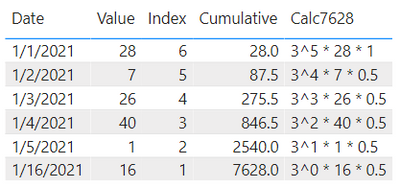
Maybe this will help?
3*(3*(3*(3*(3*a1 + 0.5*a2)+0.5*a3)+0.5*a4)+0.5*a5)+0.5*a6
    = 3^5*a1 + 3^4*0.5*a2 + 3^3*0.5*a3 + 3^2*0.5*a4 + 3^1*0.5*a5 + 3^0*0.5*a6
    = sum_i=6^1 3^(i-1) * (if i = 6 then 1 else 0.5) * a(7-i)
Maybe I should have gone with the ascending index instead:
Cumulative =
VAR Subtable = FILTER ( Query1, Query1[Date] <= EARLIER ( Query1[Date] ) )
VAR AddIndex = ADDCOLUMNS ( Subtable, "@Index", RANKX ( Subtable, Query1[Date],, ASC ) )
VAR MaxIndex = MAXX ( AddIndex, [@Index] )
RETURN
    SUMX (
        AddIndex,
        POWER ( 3, MaxIndex - [@Index] ) * [Value] * IF ( [@Index] = 1, 1, 0.5 )
    )

- Mark as New
- Bookmark
- Subscribe
- Mute
- Subscribe to RSS Feed
- Permalink
- Report Inappropriate Content
It obviously depends on whether there is anything else going on that buffering the list would interfere with, but with just your code and a 100,000 row set of data, execution time went from "too long to wait for it to finish" to almost instantaneous by using `List.Buffer`.
- Mark as New
- Bookmark
- Subscribe
- Mute
- Subscribe to RSS Feed
- Permalink
- Report Inappropriate Content
Buffer the list.
Change the third line of code to:
Value = List.Buffer(#"Changed Type"[Value]),- Mark as New
- Bookmark
- Subscribe
- Mute
- Subscribe to RSS Feed
- Permalink
- Report Inappropriate Content
@kangx322 if you change the column name Value to Current then you need to change the only one line in code, i.e. following line
Value =#"Changed Type"[Current]
I am not sure if there is any other way to achieve this, unless you are querying from a RDBMS and run a for loop on the server side
- Mark as New
- Bookmark
- Subscribe
- Mute
- Subscribe to RSS Feed
- Permalink
- Report Inappropriate Content
@kangx322 try this
let
    Source = Table.FromRows(Json.Document(Binary.Decompress(Binary.FromText("i45WMjIwMtQ1ACElHSUjC6VYHSQxI6CYOaqQMUiZGaqYCVDMxABVzBQoZogiZGgGEgJqjQUA", BinaryEncoding.Base64), Compression.Deflate)), let _t = ((type nullable text) meta [Serialized.Text = true]) in type table [Date = _t, Value = _t]),
    #"Changed Type" = Table.TransformColumnTypes(Source,{{"Date", type date}, {"Value", Int64.Type}}),
    Value = #"Changed Type"[Value],
    Loop = List.Generate(
                        ()=>[i=0,j=Value{i},k=j],
                        each [i]<List.Count(Value),
                        each [i=[i]+1, j=Value{i}, k=[k]*3+j*0.5],
                        each[k]
    ),
    Custom1 = Table.FromColumns(Table.ToColumns(#"Changed Type")&{Loop},List.Combine({Table.ColumnNames(#"Changed Type"),{"cumulativeValue"}}))
in
    Custom1
- Mark as New
- Bookmark
- Subscribe
- Mute
- Subscribe to RSS Feed
- Permalink
- Report Inappropriate Content
Thank you.
Could you explain the code little bit?
What if I change my original column name to "Current"? which part of the code would change?
Also, would this be only way? I am little worried about the performance as my real data is little big

Helpful resources

New to Fabric Survey
If you have recently started exploring Fabric, we'd love to hear how it's going. Your feedback can help with product improvements.

Power BI DataViz World Championships - June 2026
A new Power BI DataViz World Championship is coming this June! Don't miss out on submitting your entry.

Join our Fabric User Panel
Share feedback directly with Fabric product managers, participate in targeted research studies and influence the Fabric roadmap.

Power BI Community Update - March 2026
Check out the March 2026 Power BI update to learn about new features.

| User | Count |
|---|---|
| 6 | |
| 4 | |
| 3 | |
| 2 | |
| 2 |


| User | Count |
|---|---|
| 11 | |
| 10 | |
| 8 | |
| 7 | |
| 7 |


