This is best Fabric, Power BI, SQL and AI community event. How do we know? The last event sold out! Save €200 with code FABCMTY200.
Register nowA new Data Days event is coming soon! This time we’re going bigger than ever. Fabric, Power BI, SQL, AI and more. Don't miss out.
Hello,
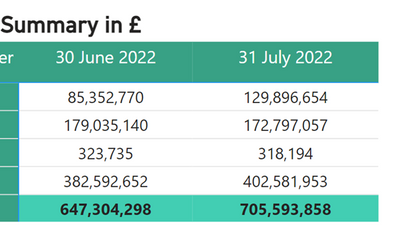
I have a dataset in PowerBi, which updates values daily so the table goes up to 23rd August right now and tomorrow will add 24th values etc.
I would like to create a table that automatically takes the last day of last month (as in August at the moment that would be 31st July) and the last day of the month previous to this.
So in August, I am interested in automatically retrieving the values for each of the 4 partners, at that date (not the sum for the month) for 30th June and 31st July.
When I get to September, the table will automatically update to have 31st July and 31st August values.
Secondly, how to calculate the difference, for each row? This may possibly be linked to the above Measure to derive the calculation?
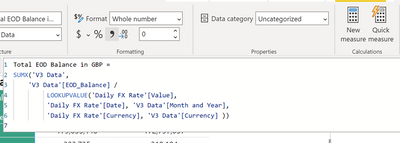
The values in the table are from a Measure:
@Anonymous You can use EOMONTH function to get the last day of the month dynamically.
Sorry, having trouble following, can you post sample data as text and expected output?
Not really enough information to go on, please first check if your issue is a common issue listed here: https://community.powerbi.com/t5/Community-Blog/Before-You-Post-Read-This/ba-p/1116882
Also, please see this post regarding How to Get Your Question Answered Quickly: https://community.powerbi.com/t5/Community-Blog/How-to-Get-Your-Question-Answered-Quickly/ba-p/38490
The most important parts are:
1. Sample data as text, use the table tool in the editing bar
2. Expected output from sample data
3. Explanation in words of how to get from 1. to 2.
Check out the May 2026 Power BI update to learn about new features.
Sign up to receive a private message when registration opens and key events begin.
If you have recently started exploring Fabric, we'd love to hear how it's going. Your feedback can help with product improvements.
| User | Count |
|---|---|
| 4 | |
| 3 | |
| 2 | |
| 2 | |
| 1 |
| User | Count |
|---|---|
| 7 | |
| 7 | |
| 6 | |
| 4 | |
| 4 |