cancel
Showing results for 
Search instead for 
Did you mean: 

The Power BI Data Visualization World Championships is back! Get ahead of the game and start preparing now! Learn more

Reply
gedwards1988
Frequent Visitor

Calculate Queue Size in Power BI

Hi all,

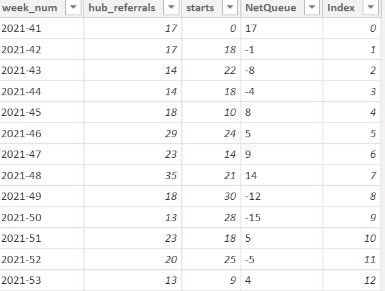
I am having a mind blank for a relatively simple calculated column in Power BI.  I am trying to clculate the queue size, defined by:

week_num   hub_referrals    starts    Queue

2021-41        17                    0             17         (hub_referrals - starts) + previous Queue = (17 - 0) + 0 = 17

2021-42         17                   18           16         (hub_referrals - starts) + previous Queue = (17 - 18) + 17 = 16

2021-43         14                   22           8           (hub_referrals - starts) + previous Queue = (14 - 22) + 16 = 8

...

...


Table.PNG

I have tried creating an index column then using that to get the value fo the previous row, then addign it to my formula, but it is not working dynamically.  Any pointers on topics I should look at, or previous solutions I coudl draw inspiration from.


thanks

Gareth

1 ACCEPTED SOLUTION
wdx223_Daniel
Community Champion
Community Champion

a calculated column in dax:

newcolumn=sumx(filter(table,table[week_num]<=earlier(table[week_num])),table[hub_referrals]-table[starts])


M code in Power Query:

NewStep=Table.FromRecords(List.Accumulate(Table.ToRecords(PreviousStepName),{{},0},(x,y)=>{x{0}&{y&[Queue=y[hub_referrals]-y[starts]+x{1}]}, y[hub_referrals]-y[starts]+x{1}}){0})

View solution in original post

2 REPLIES 2
wdx223_Daniel
Community Champion
Community Champion

a calculated column in dax:

newcolumn=sumx(filter(table,table[week_num]<=earlier(table[week_num])),table[hub_referrals]-table[starts])


M code in Power Query:

NewStep=Table.FromRecords(List.Accumulate(Table.ToRecords(PreviousStepName),{{},0},(x,y)=>{x{0}&{y&[Queue=y[hub_referrals]-y[starts]+x{1}]}, y[hub_referrals]-y[starts]+x{1}}){0})

Thanks this worked a treat, slight error in my formul and M code but now works perfectly.  Thanks

Helpful resources

Announcements
Power BI DataViz World Championships

Power BI Dataviz World Championships

The Power BI Data Visualization World Championships is back! Get ahead of the game and start preparing now!

December 2025 Power BI Update Carousel

Power BI Monthly Update - December 2025

Check out the December 2025 Power BI Holiday Recap!

FabCon Atlanta 2026 carousel

FabCon Atlanta 2026

Join us at FabCon Atlanta, March 16-20, for the ultimate Fabric, Power BI, AI and SQL community-led event. Save $200 with code FABCOMM.

Top Solution Authors