Get certified for free when you join Fabric Data Days 2026 and dive into Fabric, Power BI, SQL, AI, and other essential data skills.
Join nowJuly 7 - July 17 | Round 2 of the Power BI Dataviz World Championships. Don't miss your chance! Learn more
Hi,
I've four filters based on that i need to create Measere.
Example:
Consider P1,P2,P3& P4 as Filters
|
Note :
1.User select any priorty
P1=RED
P2=WHITE OR YELLOW OR BLUE OR NA
similarly P3 and P4.
Output measure:
| Colours | Counts |
| Red | 8 |
| white | 8 |
| Yellow | 1 |
| Blue | 1 |
Advance Thanks,
Saikiran.
Solved! Go to Solution.
Hi, @Anonymous
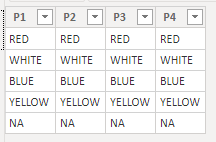
Based on your description, I created data to reproduce your scenario. The pbix file is attached in the end.
Filters:
Calculated tables:
P1 = DISTINCT('Filters'[P1])
P2 = DISTINCT('Filters'[P2])
P3 = DISTINCT('Filters'[P3])
P4 = DISTINCT('Filters'[P4])
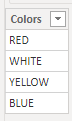
Table:
There is no relationship between tables. You may create a measure as below.
Count =
COUNTROWS(
FILTER(
DISTINCT(P1[P1]),
[P1]=SELECTEDVALUE('Table'[Colors])
)
)+
COUNTROWS(
FILTER(
DISTINCT(P2[P2]),
[P2]=SELECTEDVALUE('Table'[Colors])
)
)+
COUNTROWS(
FILTER(
DISTINCT(P3[P3]),
[P3]=SELECTEDVALUE('Table'[Colors])
)
)+
COUNTROWS(
FILTER(
DISTINCT(P4[P4]),
[P4]=SELECTEDVALUE('Table'[Colors])
)
)
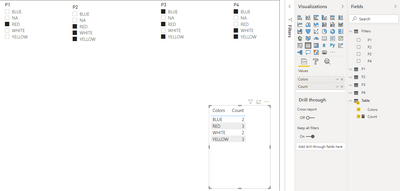
Result:
Best Regards
Allan
If this post helps, then please consider Accept it as the solution to help the other members find it more quickly.
The way I did it was a bit different, I needed a Selection Slicer to Determine which Lines to draw in a LineGraph. I drew one line in the Main Y-Axis and the second line in the Secondary Y-Axis. If there is no selection, blank graph. If "All" is selected it shows both.
1. I first created a custom column with the values I am filtering by (In my case it was Density and Sulphur Values)
2. (OPTIONAL) Add an All value in custom column if you desire to show all option
3. Create a first measure - My Example:
Hi, @Anonymous
Based on your description, I created data to reproduce your scenario. The pbix file is attached in the end.
Filters:
Calculated tables:
P1 = DISTINCT('Filters'[P1])
P2 = DISTINCT('Filters'[P2])
P3 = DISTINCT('Filters'[P3])
P4 = DISTINCT('Filters'[P4])
Table:
There is no relationship between tables. You may create a measure as below.
Count =
COUNTROWS(
FILTER(
DISTINCT(P1[P1]),
[P1]=SELECTEDVALUE('Table'[Colors])
)
)+
COUNTROWS(
FILTER(
DISTINCT(P2[P2]),
[P2]=SELECTEDVALUE('Table'[Colors])
)
)+
COUNTROWS(
FILTER(
DISTINCT(P3[P3]),
[P3]=SELECTEDVALUE('Table'[Colors])
)
)+
COUNTROWS(
FILTER(
DISTINCT(P4[P4]),
[P4]=SELECTEDVALUE('Table'[Colors])
)
)
Result:
Best Regards
Allan
If this post helps, then please consider Accept it as the solution to help the other members find it more quickly.
you will need more than just one measure. you will need one measure per color value. Use the FILTERS() function to collect the actual values for each filter.
Join us in Barcelona for FabCon and SQLCon, the Fabric, Power BI, SQL, and AI community event. Save €200 with code FABCMTY200.
Join Fabric Data Days 2026: 60 days of free live/on-demand sessions, challenges, study groups, and certification opportunities.
| User | Count |
|---|---|
| 8 | |
| 6 | |
| 5 | |
| 5 | |
| 4 |