cancel
Showing results for 
Search instead for 
Did you mean: 

The Power BI Data Visualization World Championships is back! Get ahead of the game and start preparing now! Learn more

Reply
Anonymous
Not applicable

Bad column type after expanding from merged query

Hello, 


I have a small problem : 

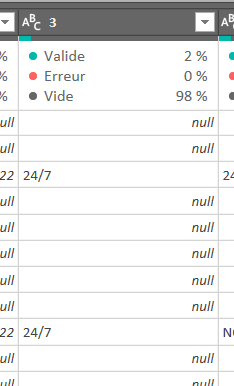
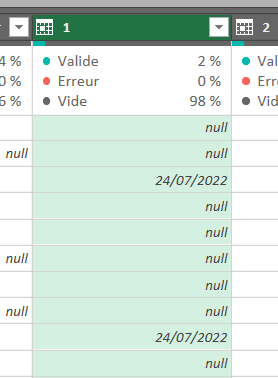
When I expand a merged query, I have some specific values wich are automatically converted to date, like "24/7" converted to "24/7/2022"

24/7 is text and dosen't have to be changed !

I tried to resolve it by changing type to text after the expand, but "2022" is still there ...

For sur I could add a query like "delete last 5 letters" but I think it's not a efficient solution


Would you have any idea ?


Thank you


Pierre


From that                                            to that

Pierrem31_1-1669922704881.png           Pierrem31_0-1669922683921.png


1 ACCEPTED SOLUTION
Manoj_Nair
Solution Supplier
Solution Supplier

@Anonymous 

I simulated your problem in the following data set

Manoj_Nair_2-1669931748513.png


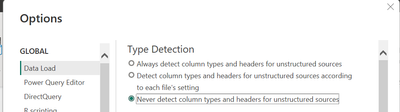
I also got the same result as you mentioned. This happens when Transformation steps automatically detect data type. To disable automatic detection of data types, disable the option as shown below from the File Menu--> Options & Settings --> Options. You have to start fresh after making this change.  

Manoj_Nair_0-1669931397858.png


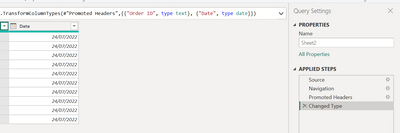
Alternatively, you can delete the "Change Type" step as shown below

Manoj_Nair_1-1669931553084.png


View solution in original post

2 REPLIES 2
Manoj_Nair
Solution Supplier
Solution Supplier

@Anonymous 

I simulated your problem in the following data set

Manoj_Nair_2-1669931748513.png


I also got the same result as you mentioned. This happens when Transformation steps automatically detect data type. To disable automatic detection of data types, disable the option as shown below from the File Menu--> Options & Settings --> Options. You have to start fresh after making this change.  

Manoj_Nair_0-1669931397858.png


Alternatively, you can delete the "Change Type" step as shown below

Manoj_Nair_1-1669931553084.png


Anonymous
Not applicable

IT helps a lot, Thnak you, 


Pierre

Helpful resources

Announcements
Power BI DataViz World Championships

Power BI Dataviz World Championships

The Power BI Data Visualization World Championships is back! Get ahead of the game and start preparing now!

December 2025 Power BI Update Carousel

Power BI Monthly Update - December 2025

Check out the December 2025 Power BI Holiday Recap!

FabCon Atlanta 2026 carousel

FabCon Atlanta 2026

Join us at FabCon Atlanta, March 16-20, for the ultimate Fabric, Power BI, AI and SQL community-led event. Save $200 with code FABCOMM.