Don't miss your chance to take the Fabric Data Engineer (DP-600) exam for FREE! Find out how by attending the DP-600 session on April 23rd (pacific time), live or on-demand.
Learn moreNext up in the FabCon + SQLCon recap series: The roadmap for Microsoft SQL and Maximizing Developer experiences in Fabric. All sessions are available on-demand after the live show. Register now
Hey guys,
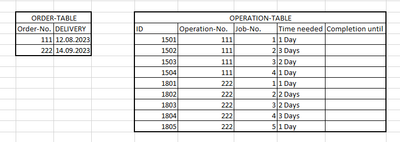
I am looking for an algorithm that will create a backward scheduling for me using the two tables shown below.
Based on the delivery date of the order table, the completion dates for the respective operations are to be scheduled backwards.
Would be great if someone could give me a basic algorithm.
Thanks a lot in advance!
Solved! Go to Solution.
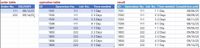
Hi, @MMZTM load tables into PQ and try this code.
let
order = Excel.CurrentWorkbook(){[Name="ORDER_TABLE"]}[Content],
operation = Excel.CurrentWorkbook(){[Name="OPERATION_TABLE"]}[Content],
order_rec = Record.FromList(order[DELIVERY], List.Transform(order[#"Order-No."], Text.From)),
f = (t as table) =>
[days = List.Buffer(List.Transform(t[Time needed], (x) => Number.From(Splitter.SplitTextByDelimiter(" ")(x){0}))),
finish = Record.Field(order_rec, Text.From(t[#"Operation-No."]{0})),
gen =
List.Generate(
() => [i = 0, d = Record.Field(order_rec, Text.From(t[#"Operation-No."]{0}))],
(x) => days{x[i]}? <> null,
(x) => [i = x[i] + 1, d = Date.AddDays(x[d], - days{x[i]})],
(x) => DateTime.Date(x[d])
),
out = Table.FromColumns(Table.ToColumns(t) & {gen}, Table.ColumnNames(t) & {"Completion until"})][out],
op_gr = Table.Group(operation, {"Operation-No."}, {{"all", each f(Table.Sort(_, {"Job-No.", Order.Descending}))}}),
z = Table.Combine(op_gr[all]),
sorted = Table.Sort(z,{{"Operation-No.", Order.Ascending}, {"Job-No.", Order.Ascending}})
in
sorted
Hey AlienSx,
awesome! Works great!
Thanks for the quick reply!
I would still have a basic question:
Would it be possible to write this logic based on the same data in DAX? An iterative solution to this problem seems to make the most sense, right?
If this is not possible I would be super grateful if you could show me an alternative DAX solution for this problem.
Hi, @MMZTM load tables into PQ and try this code.
let
order = Excel.CurrentWorkbook(){[Name="ORDER_TABLE"]}[Content],
operation = Excel.CurrentWorkbook(){[Name="OPERATION_TABLE"]}[Content],
order_rec = Record.FromList(order[DELIVERY], List.Transform(order[#"Order-No."], Text.From)),
f = (t as table) =>
[days = List.Buffer(List.Transform(t[Time needed], (x) => Number.From(Splitter.SplitTextByDelimiter(" ")(x){0}))),
finish = Record.Field(order_rec, Text.From(t[#"Operation-No."]{0})),
gen =
List.Generate(
() => [i = 0, d = Record.Field(order_rec, Text.From(t[#"Operation-No."]{0}))],
(x) => days{x[i]}? <> null,
(x) => [i = x[i] + 1, d = Date.AddDays(x[d], - days{x[i]})],
(x) => DateTime.Date(x[d])
),
out = Table.FromColumns(Table.ToColumns(t) & {gen}, Table.ColumnNames(t) & {"Completion until"})][out],
op_gr = Table.Group(operation, {"Operation-No."}, {{"all", each f(Table.Sort(_, {"Job-No.", Order.Descending}))}}),
z = Table.Combine(op_gr[all]),
sorted = Table.Sort(z,{{"Operation-No.", Order.Ascending}, {"Job-No.", Order.Ascending}})
in
sorted
If you have recently started exploring Fabric, we'd love to hear how it's going. Your feedback can help with product improvements.
A new Power BI DataViz World Championship is coming this June! Don't miss out on submitting your entry.
Share feedback directly with Fabric product managers, participate in targeted research studies and influence the Fabric roadmap.
| User | Count |
|---|---|
| 6 | |
| 3 | |
| 3 | |
| 3 | |
| 2 |