cancel
Showing results for 
Search instead for 
Did you mean: 

Try your skills in the Power BI Dataviz World Championship! Round one ends June 26. Join now

Reply
MMZTM
Frequent Visitor

Backwards scheduling

Hey guys,

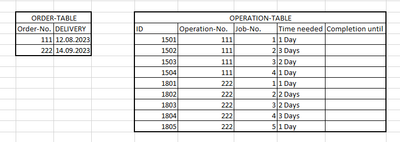
I am looking for an algorithm that will create a backward scheduling for me using the two tables shown below.
Based on the delivery date of the order table, the completion dates for the respective operations are to be scheduled backwards.
Would be great if someone could give me a basic algorithm.
Thanks a lot in advance!


MMZTM_0-1684855845671.png


1 ACCEPTED SOLUTION
AlienSx
Super User
Super User

Hi, @MMZTM load tables into PQ and try this code. 

let
    order = Excel.CurrentWorkbook(){[Name="ORDER_TABLE"]}[Content],
    operation = Excel.CurrentWorkbook(){[Name="OPERATION_TABLE"]}[Content],
    order_rec = Record.FromList(order[DELIVERY], List.Transform(order[#"Order-No."], Text.From)),
    f = (t as table) =>
        [days = List.Buffer(List.Transform(t[Time needed], (x) => Number.From(Splitter.SplitTextByDelimiter(" ")(x){0}))),
        finish = Record.Field(order_rec, Text.From(t[#"Operation-No."]{0})),
        gen = 
            List.Generate(
                () => [i = 0, d = Record.Field(order_rec, Text.From(t[#"Operation-No."]{0}))],
                (x) => days{x[i]}? <> null,
                (x) => [i = x[i] + 1, d = Date.AddDays(x[d], - days{x[i]})],
                (x) => DateTime.Date(x[d])
            ),
        out = Table.FromColumns(Table.ToColumns(t) & {gen}, Table.ColumnNames(t) & {"Completion until"})][out],
    op_gr = Table.Group(operation, {"Operation-No."}, {{"all", each f(Table.Sort(_, {"Job-No.", Order.Descending}))}}),
    z = Table.Combine(op_gr[all]),
    sorted = Table.Sort(z,{{"Operation-No.", Order.Ascending}, {"Job-No.", Order.Ascending}})
in
    sorted

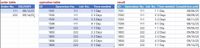
 oper.jpg

View solution in original post

2 REPLIES 2
MMZTM
Frequent Visitor

Hey AlienSx,
awesome! Works great!
Thanks for the quick reply!

I would still have a basic question:
Would it be possible to write this logic based on the same data in DAX? An iterative solution to this problem seems to make the most sense, right?
If this is not possible I would be super grateful if you could show me an alternative DAX solution for this problem.

AlienSx
Super User
Super User

Hi, @MMZTM load tables into PQ and try this code. 

let
    order = Excel.CurrentWorkbook(){[Name="ORDER_TABLE"]}[Content],
    operation = Excel.CurrentWorkbook(){[Name="OPERATION_TABLE"]}[Content],
    order_rec = Record.FromList(order[DELIVERY], List.Transform(order[#"Order-No."], Text.From)),
    f = (t as table) =>
        [days = List.Buffer(List.Transform(t[Time needed], (x) => Number.From(Splitter.SplitTextByDelimiter(" ")(x){0}))),
        finish = Record.Field(order_rec, Text.From(t[#"Operation-No."]{0})),
        gen = 
            List.Generate(
                () => [i = 0, d = Record.Field(order_rec, Text.From(t[#"Operation-No."]{0}))],
                (x) => days{x[i]}? <> null,
                (x) => [i = x[i] + 1, d = Date.AddDays(x[d], - days{x[i]})],
                (x) => DateTime.Date(x[d])
            ),
        out = Table.FromColumns(Table.ToColumns(t) & {gen}, Table.ColumnNames(t) & {"Completion until"})][out],
    op_gr = Table.Group(operation, {"Operation-No."}, {{"all", each f(Table.Sort(_, {"Job-No.", Order.Descending}))}}),
    z = Table.Combine(op_gr[all]),
    sorted = Table.Sort(z,{{"Operation-No.", Order.Ascending}, {"Job-No.", Order.Ascending}})
in
    sorted

 oper.jpg

Helpful resources

Announcements
Fabric Data Days is here Carousel

Fabric Data Days 2026

Don't miss out on Data Days, June 15 through August 7. Learn Fabric, Power BI, SQL, AI and more.

Power BI DataViz World Championships carousel

Power BI DataViz World Championships - June 2026

A new Power BI DataViz World Championship is coming this June! Don't miss out on submitting your entry.