cancel
Showing results for 
Search instead for 
Did you mean: 

Try your skills in the Power BI Dataviz World Championship! Round one ends June 26. Join now

Reply
Anonymous
Not applicable

BMI Compute

Hi all,

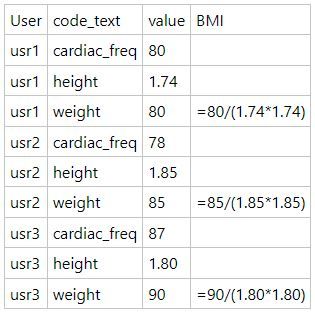
I need to add a custom column to calculate the Body Mass Index. I have two columns in the first one I have the code, where it stores the different vital measurements. This column, includes the body height and body weight. In the other column stores the values from different vital signs, including body height and body weight. The formula for the BMI is body weight/ body height square.
I realize that I have to split the values to other columns named height and weight, but my problem is, that in the same column I have not find a way to store in the same row the measurements for weight and height, since this measurements are in disctinct rows.

Any ideas?

Thank you in advance.

Miguel.

1 ACCEPTED SOLUTION

Hi, 

to obtain this:

serpiva64_0-1644170870124.png

you need to apply these steps (from Reordered Columns to the end, previous steps were needed to insert your sample data)
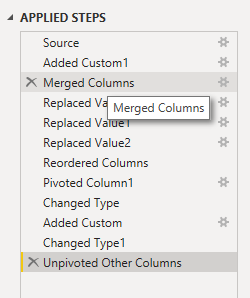
serpiva64_2-1644171028804.png

You need to reorder Code_Text before User

then Pivot column
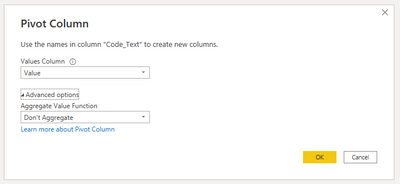
serpiva64_3-1644171337068.png

Change type to numeric if they aren't

and finally Add BMI column
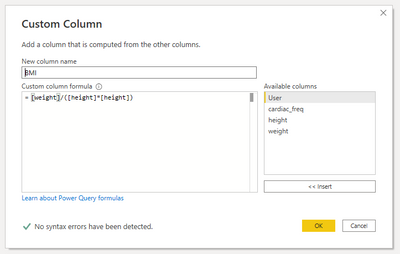
serpiva64_4-1644171440844.png


If you prefer this table you have to select User and unpivot other columns
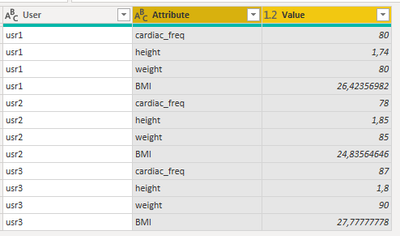
serpiva64_1-1644170961347.png


This is what you get in Advanced editor:

let
Source = Table.FromRows(Json.Document(Binary.Decompress(Binary.FromText("i45WMlTSUUoGYgsDpVgdCDcDiA11zE3gAuUIeSOocnMLOBei3MIULgBWDuEaw0w3h3Ohyg3gAiDllkBuLAA=", BinaryEncoding.Base64), Compression.Deflate)), let _t = ((type nullable text) meta [Serialized.Text = true]) in type table [User = _t, Code_Text = _t, Value = _t]),
#"Added Custom1" = Table.AddColumn(Source, "usr", each "usr"),
#"Merged Columns" = Table.CombineColumns(Table.TransformColumnTypes(#"Added Custom1", {{"User", type text}}, "it-IT"),{"usr", "User"},Combiner.CombineTextByDelimiter("", QuoteStyle.None),"User"),
#"Replaced Value" = Table.ReplaceValue(#"Merged Columns","c","cardiac_freq",Replacer.ReplaceText,{"Code_Text"}),
#"Replaced Value1" = Table.ReplaceValue(#"Replaced Value","h","height",Replacer.ReplaceText,{"Code_Text"}),
#"Replaced Value2" = Table.ReplaceValue(#"Replaced Value1","w","weight",Replacer.ReplaceText,{"Code_Text"}),
#"Reordered Columns" = Table.ReorderColumns(#"Replaced Value2",{"Code_Text", "User", "Value"}),
#"Pivoted Column1" = Table.Pivot(#"Reordered Columns", List.Distinct(#"Reordered Columns"[Code_Text]), "Code_Text", "Value"),
#"Changed Type" = Table.TransformColumnTypes(#"Pivoted Column1",{{"cardiac_freq", Int64.Type}, {"height", Currency.Type}, {"weight", Int64.Type}}),
#"Added Custom" = Table.AddColumn(#"Changed Type", "BMI", each [weight]/([height]*[height])),
#"Changed Type1" = Table.TransformColumnTypes(#"Added Custom",{{"BMI", type number}}),
#"Unpivoted Other Columns" = Table.UnpivotOtherColumns(#"Changed Type1", {"User"}, "Attribute", "Value")
in
#"Unpivoted Other Columns"


If this post isuseful to help you to solve your issue consider giving the post a thumbs up and accepting it as a solution !

View solution in original post

3 REPLIES 3
serpiva64
Solution Sage
Solution Sage

Hi, 

i think it is possible.

please provide soma sample data and, if possible, the result you want to obtain

Anonymous
Not applicable

Hi serpiva64,

Here is a data sample. And the custom column with the values (BMI).

tabla-pbi.JPG

Thank you in advance.

Miguel.

Hi, 

to obtain this:

serpiva64_0-1644170870124.png

you need to apply these steps (from Reordered Columns to the end, previous steps were needed to insert your sample data)

serpiva64_2-1644171028804.png

You need to reorder Code_Text before User

then Pivot column

serpiva64_3-1644171337068.png

Change type to numeric if they aren't

and finally Add BMI column

serpiva64_4-1644171440844.png


If you prefer this table you have to select User and unpivot other columns

serpiva64_1-1644170961347.png


This is what you get in Advanced editor:

let
Source = Table.FromRows(Json.Document(Binary.Decompress(Binary.FromText("i45WMlTSUUoGYgsDpVgdCDcDiA11zE3gAuUIeSOocnMLOBei3MIULgBWDuEaw0w3h3Ohyg3gAiDllkBuLAA=", BinaryEncoding.Base64), Compression.Deflate)), let _t = ((type nullable text) meta [Serialized.Text = true]) in type table [User = _t, Code_Text = _t, Value = _t]),
#"Added Custom1" = Table.AddColumn(Source, "usr", each "usr"),
#"Merged Columns" = Table.CombineColumns(Table.TransformColumnTypes(#"Added Custom1", {{"User", type text}}, "it-IT"),{"usr", "User"},Combiner.CombineTextByDelimiter("", QuoteStyle.None),"User"),
#"Replaced Value" = Table.ReplaceValue(#"Merged Columns","c","cardiac_freq",Replacer.ReplaceText,{"Code_Text"}),
#"Replaced Value1" = Table.ReplaceValue(#"Replaced Value","h","height",Replacer.ReplaceText,{"Code_Text"}),
#"Replaced Value2" = Table.ReplaceValue(#"Replaced Value1","w","weight",Replacer.ReplaceText,{"Code_Text"}),
#"Reordered Columns" = Table.ReorderColumns(#"Replaced Value2",{"Code_Text", "User", "Value"}),
#"Pivoted Column1" = Table.Pivot(#"Reordered Columns", List.Distinct(#"Reordered Columns"[Code_Text]), "Code_Text", "Value"),
#"Changed Type" = Table.TransformColumnTypes(#"Pivoted Column1",{{"cardiac_freq", Int64.Type}, {"height", Currency.Type}, {"weight", Int64.Type}}),
#"Added Custom" = Table.AddColumn(#"Changed Type", "BMI", each [weight]/([height]*[height])),
#"Changed Type1" = Table.TransformColumnTypes(#"Added Custom",{{"BMI", type number}}),
#"Unpivoted Other Columns" = Table.UnpivotOtherColumns(#"Changed Type1", {"User"}, "Attribute", "Value")
in
#"Unpivoted Other Columns"


If this post isuseful to help you to solve your issue consider giving the post a thumbs up and accepting it as a solution !

Helpful resources

Announcements
Fabric Data Days is here Carousel

Fabric Data Days 2026

Don't miss out on Data Days, June 15 through August 7. Learn Fabric, Power BI, SQL, AI and more.

Power BI DataViz World Championships carousel

Power BI DataViz World Championships - June 2026

A new Power BI DataViz World Championship is coming this June! Don't miss out on submitting your entry.