cancel
Showing results for 
Search instead for 
Did you mean: 

Vote for your favorite vizzies from the Power BI Dataviz World Championship submissions. Vote now!

Reply
Anonymous
Not applicable

Axis issue

Dear Power BI community,


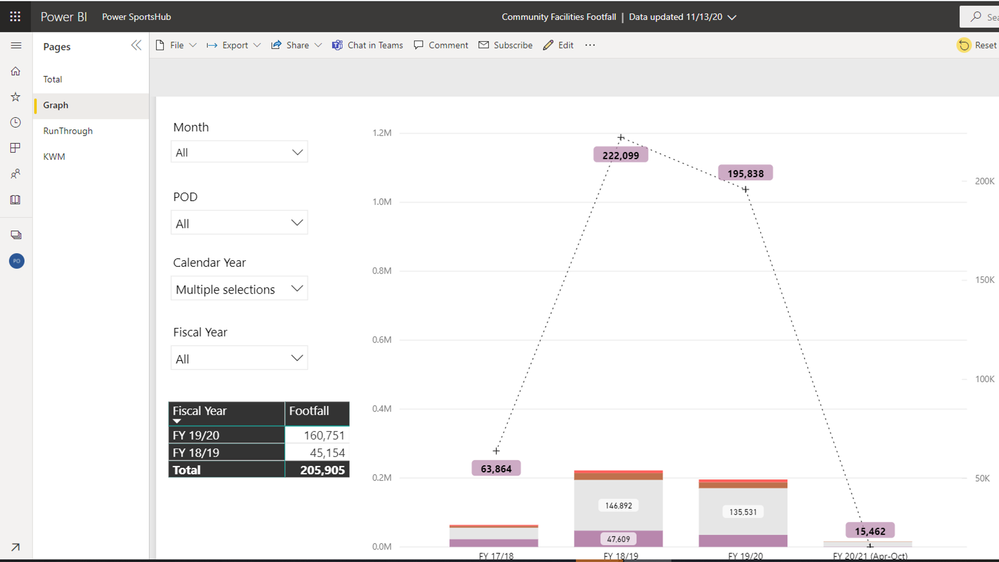
I am facing a persistent issue which I have tried to rectify it several times but nothing seem to work. Could someone please advise how could I align both my line and column graphs to the y-axis because if you see below, the column graphs is able to map to the y axis but not the line graph... 


Appreciate if you could assist on this issue.


Thanks!


SampleSample

1 ACCEPTED SOLUTION
Nathaniel_C
Community Champion
Community Champion

Hi @Anonymous ,

I think you have both Y axis turned on, and your line is mapping to the right hand Y.

You can change that in the format section, the paint brush.


Let me know if you have any questions.

If this solves your issues, please mark it as the solution, so that others can find it easily. Kudos 👍are nice too.
Nathaniel


Did I answer your question? Mark my post as a solution!

Proud to be a Super User!


View solution in original post

1 REPLY 1
Nathaniel_C
Community Champion
Community Champion

Hi @Anonymous ,

I think you have both Y axis turned on, and your line is mapping to the right hand Y.

You can change that in the format section, the paint brush.


Let me know if you have any questions.

If this solves your issues, please mark it as the solution, so that others can find it easily. Kudos 👍are nice too.
Nathaniel


Did I answer your question? Mark my post as a solution!

Proud to be a Super User!


Helpful resources

Announcements
Power BI DataViz World Championships

Power BI Dataviz World Championships

Vote for your favorite vizzies from the Power BI World Championship submissions!

Sticker Challenge 2026 Carousel

Join our Community Sticker Challenge 2026

If you love stickers, then you will definitely want to check out our Community Sticker Challenge!

January Power BI Update Carousel

Power BI Monthly Update - January 2026

Check out the January 2026 Power BI update to learn about new features.

FabCon Atlanta 2026 carousel

FabCon Atlanta 2026

Join us at FabCon Atlanta, March 16-20, for the ultimate Fabric, Power BI, AI and SQL community-led event. Save $200 with code FABCOMM.