cancel
Showing results for 
Search instead for 
Did you mean: 

Data Days is here! Join us now for 60+ days of learning, challenges, and connection. Learn more

Reply
dbrown6
New Member

Average Multiple Columns


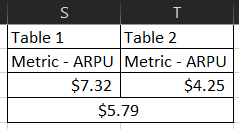
So I've tried everything to reproduce what in excel would be a simple average of - Average(S3:T3) to produce $5.79. How would I write this as a query in PowerBI to produce $5.79 as an average? They are essentially the exact same metrics from two separate tables.


image_2022-06-19_121307673.png

1 REPLY 1
Vijay_A_Verma
Most Valuable Professional

Use following construct where you would need to replace Column1 and 2 by your column names in PQ.

= List.Average({[Column1],[Column2]})


Helpful resources

Announcements
Fabric Data Days is here Carousel

Fabric Data Days 2026

Don't miss out on Data Days, June 15 through August 7. Learn Fabric, Power BI, SQL, AI and more.

May Power BI Update Carousel

Power BI Monthly Update - May 2026

Check out the May 2026 Power BI update to learn about new features.

Power BI DataViz World Championships carousel

Power BI DataViz World Championships - June 2026

A new Power BI DataViz World Championship is coming this June! Don't miss out on submitting your entry.