This time we’re going bigger than ever. Fabric, Power BI, SQL, AI and more. We're covering it all. You won't want to miss it.
Learn moreDid you hear? There's a new SQL AI Developer certification (DP-800). Start preparing now and be one of the first to get certified. Register now
Hello
I have a .pbix published in my work environment with data in sharepoint.
Does not update the environment every hour, what can be the cause?
sharepoint updates in PBI every hour?
Solved! Go to Solution.
@Anonymous ,
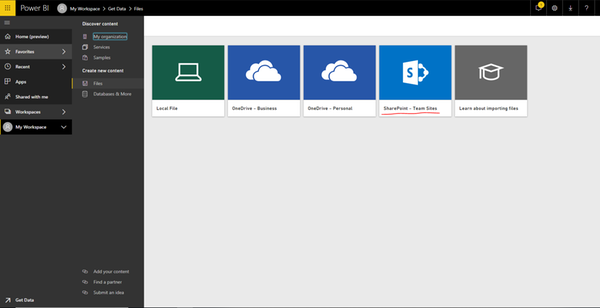
Do you connect to SharePoint online files such as csv or Excel in Power BI Desktop? And do you want to get updated data in Power BI report when you change data in the file data source within one hour? If so, you would need to directly connect to the SharePoint online file in Power BI Service using Get Data->Files->SharePoint option. Then create report in Power BI Service and configure OneDrive Refresh for the dataset.
Regards,
Lydia
Hi @Anonymous,
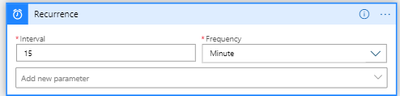
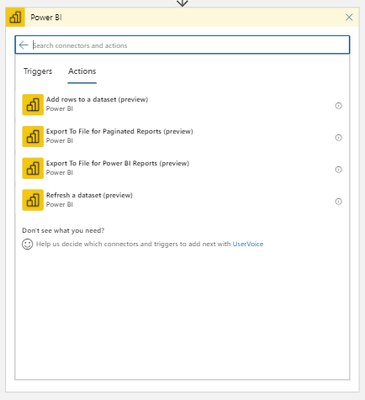
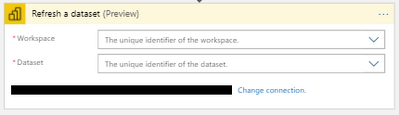
It's also possible to update the dataset via Azure Logic Apps (and possibly PowerApps/Flow). You can set it up like this:
@Anonymous ,
Do you connect to SharePoint online files such as csv or Excel in Power BI Desktop? And do you want to get updated data in Power BI report when you change data in the file data source within one hour? If so, you would need to directly connect to the SharePoint online file in Power BI Service using Get Data->Files->SharePoint option. Then create report in Power BI Service and configure OneDrive Refresh for the dataset.
Regards,
Lydia
Is this to be done in addition to connecting to the excel file in Sharepoint through Desktop or do you only connect this way and then export the .pbix back to Desktop in order to edit it?
I have a similar question but my data source is a sharepoint list. Is it possible to set up an automatic refresh? I would like to be able to update data in the list then see the results in the Power BI web app on the SharePoint site.
Thanks!
thank you very much, I'll try it
Check out the April 2026 Power BI update to learn about new features.
Sign up to receive a private message when registration opens and key events begin.
If you have recently started exploring Fabric, we'd love to hear how it's going. Your feedback can help with product improvements.