cancel
Showing results for 
Search instead for 
Did you mean: 

Get Fabric certified for FREE! Don't miss your chance! Learn more

Reply
salta
Frequent Visitor

Automatically scrolling date bar


Hi,

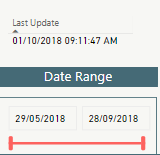
I need to achieve the automation of date range bar acording to the automation of Last Update.

For example, if Last Update is 01/10/2018, then the date range bar should move to the 01/10/2018, automatically and not manually.

Any suggestions?

Thanks

Regards


    slicer dates Sol.png

1 ACCEPTED SOLUTION
Anonymous
Not applicable

@salta,

The method I can think of is to create a calendar table using DAX below. Then create relationship using date field of the date table and the date field of your original table. And create a slicer using date field of date table.

Date = CALENDAR("5/29/2018",TODAY())


Regards,
Lydia

View solution in original post

1 REPLY 1
Anonymous
Not applicable

@salta,

The method I can think of is to create a calendar table using DAX below. Then create relationship using date field of the date table and the date field of your original table. And create a slicer using date field of date table.

Date = CALENDAR("5/29/2018",TODAY())


Regards,
Lydia

Helpful resources

Announcements
Join our Fabric User Panel

Join our Fabric User Panel

Share feedback directly with Fabric product managers, participate in targeted research studies and influence the Fabric roadmap.

Sticker Challenge 2026 Carousel

Join our Community Sticker Challenge 2026

If you love stickers, then you will definitely want to check out our Community Sticker Challenge!

January Power BI Update Carousel

Power BI Monthly Update - January 2026

Check out the January 2026 Power BI update to learn about new features.

FabCon Atlanta 2026 carousel

FabCon Atlanta 2026

Join us at FabCon Atlanta, March 16-20, for the ultimate Fabric, Power BI, AI and SQL community-led event. Save $200 with code FABCOMM.