This time we’re going bigger than ever. Fabric, Power BI, SQL, AI and more. We're covering it all. You won't want to miss it.
Learn moreLevel up your Power BI skills this month - build one visual each week and tell better stories with data! Get started
Hi,
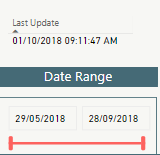
I need to achieve the automation of date range bar acording to the automation of Last Update.
For example, if Last Update is 01/10/2018, then the date range bar should move to the 01/10/2018, automatically and not manually.
Any suggestions?
Thanks
Regards
Solved! Go to Solution.
@salta,
The method I can think of is to create a calendar table using DAX below. Then create relationship using date field of the date table and the date field of your original table. And create a slicer using date field of date table.
Date = CALENDAR("5/29/2018",TODAY())
Regards,
Lydia
@salta,
The method I can think of is to create a calendar table using DAX below. Then create relationship using date field of the date table and the date field of your original table. And create a slicer using date field of date table.
Date = CALENDAR("5/29/2018",TODAY())
Regards,
Lydia
Check out the April 2026 Power BI update to learn about new features.
Sign up to receive a private message when registration opens and key events begin.
If you have recently started exploring Fabric, we'd love to hear how it's going. Your feedback can help with product improvements.
| User | Count |
|---|---|
| 3 | |
| 2 | |
| 2 | |
| 2 | |
| 2 |