cancel
Showing results for 
Search instead for 
Did you mean: 

The Power BI Data Visualization World Championships is back! Get ahead of the game and start preparing now! Learn more

Reply
Heroof323
Regular Visitor

Auto Created Relationship when referencing an SQL database?

Screenshot 2021-01-15 123750.png

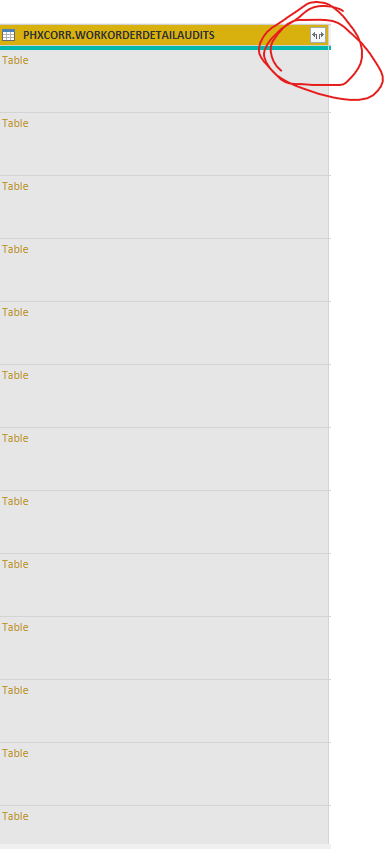
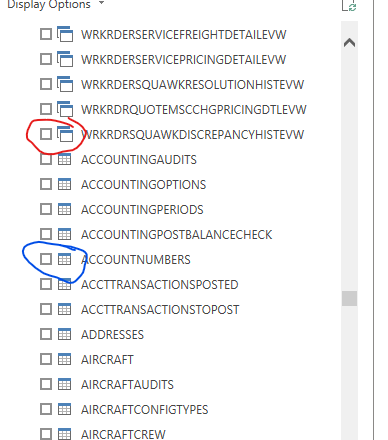
I have a few questions on this image and they may not be worded correctly so bear with me. I am accessing my SQL database for the first time and after a few days noticed this new icon. My first question is what is this icon referencing. I think it is pulling in the auto relationship feature of Power BI to automatically create relationships it believes can be beneficial for this data set, which is great. When I tried another data set to see if there was a similar auto relationship generation it was non-existent. What's the difference between the two circled icons in this Navigation window. I'd really like to transform the data where my columns are datasets and I can pick and choose which to include, for performance reasons. I feel like this is a pipe dream. Any help would be appreciated.


Screenshot 2021-01-15 134130.png

1 REPLY 1
lbendlin
Super User
Super User

These icons have nothing to do with the relationships.  The top icons indicate views, the bottom ones tables - on your SQL server. From a Power BI perspective it doesn't really matter, as they are treated the same in data source terms.

Helpful resources

Announcements
Power BI DataViz World Championships

Power BI Dataviz World Championships

The Power BI Data Visualization World Championships is back! Get ahead of the game and start preparing now!

December 2025 Power BI Update Carousel

Power BI Monthly Update - December 2025

Check out the December 2025 Power BI Holiday Recap!

FabCon Atlanta 2026 carousel

FabCon Atlanta 2026

Join us at FabCon Atlanta, March 16-20, for the ultimate Fabric, Power BI, AI and SQL community-led event. Save $200 with code FABCOMM.

Top Solution Authors