Don't miss your chance to take the Fabric Data Engineer (DP-600) exam for FREE! Find out how by watching the DP-600 session on-demand now through April 28th.
Learn moreJoin the FabCon + SQLCon recap series. Up next: Power BI, Real-Time Intelligence, IQ and AI, and Data Factory take center stage. All sessions are available on-demand after the live show. Register now
Hello,
I am at a total loss on how to approach this problem. I have two tables (bill table & bill payments table) including fields shown below:
Bill Table:
| Bill# | Item# | Amount |
| Bill1 | Item1 | 8 |
| Bill1 | Item2 | 12 |
| Bill1 | Item3 | 18 |
| Bill2 | Item1 | 6 |
| Bill2 | Item2 | 14 |
| Bill3 | Item1 | 20 |
| Bill4 | Item1 | 30 |
and
Bill Payment Table
| Bill Payment # | Bill # | Paid Amount |
| BillPmnt1 | Bill2 | 20 |
| BillPmnt1 | Bill1 | 19 |
| BillPmnt2 | Bill3 | 10 |
| BillPmnt3 | Bill4 | 30 |
I need to figure out a way to allocate the paid amount across the items when a partial payment has been made. For example, Bill1 has 3 items costing $8, $12, and $18 for a total of $38. BillPmnt1 includes a $19 payment on Bill1. So, I need the results table to allocate how much was paid at the item level (ex. Item1 Paid Amount = $8 * $19/$38 = $4).
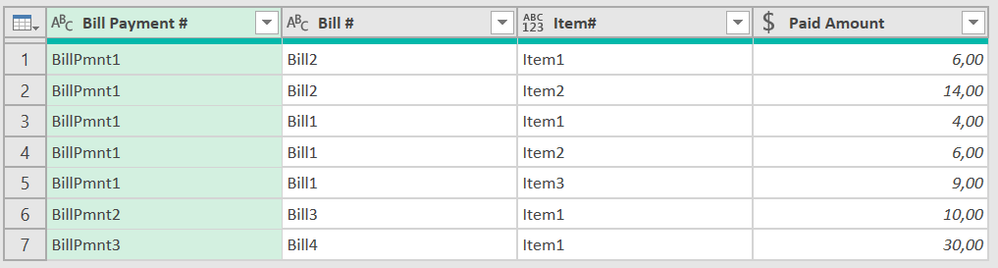
Desired Result
| Bill Payment # | Bill # | Item # | Paid Amount |
| BillPmnt1 | Bill2 | Item1 | 6 |
| BillPmnt1 | Bill2 | Item2 | 14 |
| BillPmnt1 | Bill1 | Item1 | 4 |
| BillPmnt1 | Bill1 | Item2 | 6 |
| BillPmnt1 | Bill1 | Item3 | 9 |
| BillPmnt2 | Bill3 | Item1 | 10 |
| BillPmnt3 | Bill4 | Item1 | 30 |
First, is this even possible in Power Query? If so, how would I approach this? I thought maybe I'd need to first group the Bill table by Bill # to figure out how much was paid, but I don't really know how I'd proceed from there. Any help is greatly appreciated!!
Thanks!
Solved! Go to Solution.
Hi @Anonymous, try this. You have to replace selected code for both tables with your table references:
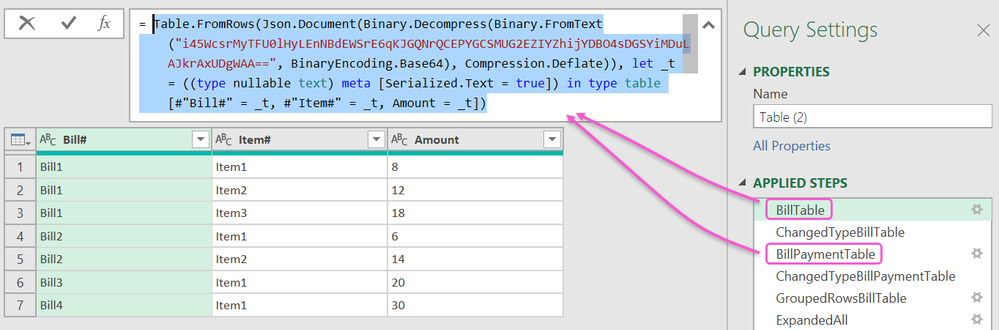
Result
let
BillTable = Table.FromRows(Json.Document(Binary.Decompress(Binary.FromText("i45WcsrMyTFU0lHyLEnNBdEWSrE6qKJGQNrQCEPYGCSMUG2EZIYZhijYDBO4sDGSYiMDuLAJkrAxUDgWAA==", BinaryEncoding.Base64), Compression.Deflate)), let _t = ((type nullable text) meta [Serialized.Text = true]) in type table [#"Bill#" = _t, #"Item#" = _t, Amount = _t]),
ChangedTypeBillTable = Table.TransformColumnTypes(BillTable,{{"Amount", Currency.Type}}),
BillPaymentTable = Table.FromRows(Json.Document(Binary.Decompress(Binary.FromText("i45WcsrMyQnIzSsxVNIBs42AtJGBUqwOphSINrREkTKCShmDpFB1GUOlTIC0MVAqFgA=", BinaryEncoding.Base64), Compression.Deflate)), let _t = ((type nullable text) meta [Serialized.Text = true]) in type table [#"Bill Payment #" = _t, #"Bill #" = _t, #"Paid Amount" = _t]),
ChangedTypeBillPaymentTable = Table.TransformColumnTypes(BillPaymentTable,{{"Paid Amount", Currency.Type}}),
GroupedRowsBillTable = Table.Group(ChangedTypeBillTable, {"Bill#"}, {{"All", each _, type table}, {"Total Amount", each List.Sum([Amount]), Currency.Type} }),
ExpandedAll = Table.ExpandTableColumn(GroupedRowsBillTable, "All", {"Item#", "Amount"}, {"Item#", "Amount"}),
MergedQueryItself = Table.NestedJoin(ChangedTypeBillPaymentTable, {"Bill #"}, ExpandedAll, {"Bill#"}, "Bill Table", JoinKind.LeftOuter),
RenamedColumns = Table.RenameColumns(MergedQueryItself,{{"Paid Amount", "Paid Amount Bill"}}),
ExpandedBillTable = Table.ExpandTableColumn(RenamedColumns, "Bill Table", {"Item#", "Amount", "Total Amount"}, {"Item#", "Amount", "Total Amount"}),
Ad_PaidAmount = Table.AddColumn(ExpandedBillTable, "Paid Amount", each [Amount] * [Paid Amount Bill] / [Total Amount], Currency.Type),
RemovedOtherColumns = Table.SelectColumns(Ad_PaidAmount,{"Bill Payment #", "Bill #", "Item#", "Paid Amount"})
in
RemovedOtherColumns
Hi @Anonymous, try this. You have to replace selected code for both tables with your table references:
Result
let
BillTable = Table.FromRows(Json.Document(Binary.Decompress(Binary.FromText("i45WcsrMyTFU0lHyLEnNBdEWSrE6qKJGQNrQCEPYGCSMUG2EZIYZhijYDBO4sDGSYiMDuLAJkrAxUDgWAA==", BinaryEncoding.Base64), Compression.Deflate)), let _t = ((type nullable text) meta [Serialized.Text = true]) in type table [#"Bill#" = _t, #"Item#" = _t, Amount = _t]),
ChangedTypeBillTable = Table.TransformColumnTypes(BillTable,{{"Amount", Currency.Type}}),
BillPaymentTable = Table.FromRows(Json.Document(Binary.Decompress(Binary.FromText("i45WcsrMyQnIzSsxVNIBs42AtJGBUqwOphSINrREkTKCShmDpFB1GUOlTIC0MVAqFgA=", BinaryEncoding.Base64), Compression.Deflate)), let _t = ((type nullable text) meta [Serialized.Text = true]) in type table [#"Bill Payment #" = _t, #"Bill #" = _t, #"Paid Amount" = _t]),
ChangedTypeBillPaymentTable = Table.TransformColumnTypes(BillPaymentTable,{{"Paid Amount", Currency.Type}}),
GroupedRowsBillTable = Table.Group(ChangedTypeBillTable, {"Bill#"}, {{"All", each _, type table}, {"Total Amount", each List.Sum([Amount]), Currency.Type} }),
ExpandedAll = Table.ExpandTableColumn(GroupedRowsBillTable, "All", {"Item#", "Amount"}, {"Item#", "Amount"}),
MergedQueryItself = Table.NestedJoin(ChangedTypeBillPaymentTable, {"Bill #"}, ExpandedAll, {"Bill#"}, "Bill Table", JoinKind.LeftOuter),
RenamedColumns = Table.RenameColumns(MergedQueryItself,{{"Paid Amount", "Paid Amount Bill"}}),
ExpandedBillTable = Table.ExpandTableColumn(RenamedColumns, "Bill Table", {"Item#", "Amount", "Total Amount"}, {"Item#", "Amount", "Total Amount"}),
Ad_PaidAmount = Table.AddColumn(ExpandedBillTable, "Paid Amount", each [Amount] * [Paid Amount Bill] / [Total Amount], Currency.Type),
RemovedOtherColumns = Table.SelectColumns(Ad_PaidAmount,{"Bill Payment #", "Bill #", "Item#", "Paid Amount"})
in
RemovedOtherColumns
I need to figure out a way to allocate the paid amount across the items when a partial payment has been made
While this is possible in Power Query it must be stated very strongly that Power BI is a reporting tool, not a resource allocation tool. Power BI has no memory and no concept of variables. You are better off using a specialized tool.
Thanks, @lbendlin . The results will actually be used in Excel. I looked up the Power Query forum and it brought me here. Can you still help?
The results will actually be used in Excel
Then do the computations in Excel too.
Check out the April 2026 Power BI update to learn about new features.
If you have recently started exploring Fabric, we'd love to hear how it's going. Your feedback can help with product improvements.
A new Power BI DataViz World Championship is coming this June! Don't miss out on submitting your entry.
| User | Count |
|---|---|
| 3 | |
| 3 | |
| 3 | |
| 2 | |
| 2 |
| User | Count |
|---|---|
| 8 | |
| 6 | |
| 5 | |
| 5 | |
| 4 |