cancel
Showing results for 
Search instead for 
Did you mean: 

The Power BI Data Visualization World Championships is back! Get ahead of the game and start preparing now! Learn more

Reply
ciaranmcmullan
New Member

Aggregation

Please help me as I am new to Power Query and I dont know how to calculate this following:


I have to calculate the Whole Time Equivalent for 25,000 staff.  It is relatively easy when the person has one employment record however I have people with 2 and 3 employment records. and I have calculate the combined total per person.  I have attached a sample of what I am trying to achieve i.e. to calcultate the total WTE for each scenario ie a person may have one post (person A below) or multiple posts (persons B and C with 2 and  3 posts respectively)  This is most likely very easy but I have tried to do some research myself and can't find an answer.  Any help would be greatly appreciated. Many thanks in advance.


Person A has 1 post. WTE for that post is 1.0 making a total of 1.0

Person B has 2 posts. WTE for post 1 is 0.5 and for post 2 0.3 making a combined total of 0.8

Person C has 3 posts. WTE for post 1 is 0.3, for post 2 is 0.5 and for post 3 is 0.2 making a combined total of 1.0

1 ACCEPTED SOLUTION

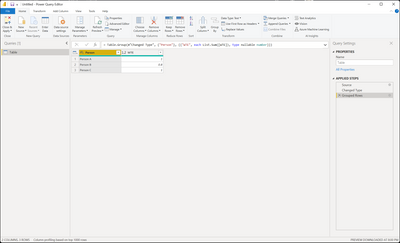
@ciaranmcmullan Doesn't make the least bit of sense. 🙂


let
    Source = Table.FromRows(Json.Document(Binary.Decompress(Binary.FromText("i45WCkgtKs7PU3BU0lEyVIrVgQs4AQX0TDFEjJFFnLGLmGKIGCnFxgIA", BinaryEncoding.Base64), Compression.Deflate)), let _t = ((type nullable text) meta [Serialized.Text = true]) in type table [Person = _t, WTE = _t]),
    #"Changed Type" = Table.TransformColumnTypes(Source,{{"Person", type text}, {"WTE", type number}}),
    #"Grouped Rows" = Table.Group(#"Changed Type", {"Person"}, {{"WTE", each List.Sum([WTE]), type nullable number}})
in
    #"Grouped Rows"

Greg_Deckler_0-1664668878151.png


Follow on LinkedIn
@ me in replies or I'll lose your thread!!!
Instead of a Kudo, please vote for this idea
Become an expert!: Enterprise DNA
External Tools: MSHGQM
YouTube Channel!: Microsoft Hates Greg
Latest book!:
DAX For Humans

DAX is easy, CALCULATE makes DAX hard...

View solution in original post

4 REPLIES 4
ciaranmcmullan
New Member

Hi Greg thanks for the super fast response. thank you for the advice, I grouped by person and the summed up the WTE however it gives me the Summed up WTE against each row for those with multiple positions whereas I need only one total.  I hope that makes sense?

@ciaranmcmullan Doesn't make the least bit of sense. 🙂


let
    Source = Table.FromRows(Json.Document(Binary.Decompress(Binary.FromText("i45WCkgtKs7PU3BU0lEyVIrVgQs4AQX0TDFEjJFFnLGLmGKIGCnFxgIA", BinaryEncoding.Base64), Compression.Deflate)), let _t = ((type nullable text) meta [Serialized.Text = true]) in type table [Person = _t, WTE = _t]),
    #"Changed Type" = Table.TransformColumnTypes(Source,{{"Person", type text}, {"WTE", type number}}),
    #"Grouped Rows" = Table.Group(#"Changed Type", {"Person"}, {{"WTE", each List.Sum([WTE]), type nullable number}})
in
    #"Grouped Rows"

Greg_Deckler_0-1664668878151.png


Follow on LinkedIn
@ me in replies or I'll lose your thread!!!
Instead of a Kudo, please vote for this idea
Become an expert!: Enterprise DNA
External Tools: MSHGQM
YouTube Channel!: Microsoft Hates Greg
Latest book!:
DAX For Humans

DAX is easy, CALCULATE makes DAX hard...

Sorry if I was a little unclear.  In Excel I use the following formula which calculates it for me and essentially I am looking Power Query to replicate it exactly.

=IF(COUNTIF($A$2:A2,A2)=COUNTIF(A:A,A2),SUMIF(A:A,A2,B:B),"")

A represents the column with the person and B is the column with each WTE

The result is that it adds the WTE for each person and gives me one total.  EG

0.21 
1.001.21
0.33 
0.671.00
0.27 
0.670.93


Greg_Deckler
Community Champion
Community Champion

@ciaranmcmullan Sounds like you need to do a Group By in Power Query based upon the "Person" column.


Follow on LinkedIn
@ me in replies or I'll lose your thread!!!
Instead of a Kudo, please vote for this idea
Become an expert!: Enterprise DNA
External Tools: MSHGQM
YouTube Channel!: Microsoft Hates Greg
Latest book!:
DAX For Humans

DAX is easy, CALCULATE makes DAX hard...

Helpful resources

Announcements
Power BI DataViz World Championships

Power BI Dataviz World Championships

The Power BI Data Visualization World Championships is back! Get ahead of the game and start preparing now!

December 2025 Power BI Update Carousel

Power BI Monthly Update - December 2025

Check out the December 2025 Power BI Holiday Recap!

FabCon Atlanta 2026 carousel

FabCon Atlanta 2026

Join us at FabCon Atlanta, March 16-20, for the ultimate Fabric, Power BI, AI and SQL community-led event. Save $200 with code FABCOMM.

Top Solution Authors