cancel
Showing results for 
Search instead for 
Did you mean: 

The Power BI Data Visualization World Championships is back! It's time to submit your entry. Live now!

Reply
ciaranmcmullan
New Member

Aggregation

Please help me as I am new to Power Query and I dont know how to calculate this following:


I have to calculate the Whole Time Equivalent for 25,000 staff.  It is relatively easy when the person has one employment record however I have people with 2 and 3 employment records. and I have calculate the combined total per person.  I have attached a sample of what I am trying to achieve i.e. to calcultate the total WTE for each scenario ie a person may have one post (person A below) or multiple posts (persons B and C with 2 and  3 posts respectively)  This is most likely very easy but I have tried to do some research myself and can't find an answer.  Any help would be greatly appreciated. Many thanks in advance.


Person A has 1 post. WTE for that post is 1.0 making a total of 1.0

Person B has 2 posts. WTE for post 1 is 0.5 and for post 2 0.3 making a combined total of 0.8

Person C has 3 posts. WTE for post 1 is 0.3, for post 2 is 0.5 and for post 3 is 0.2 making a combined total of 1.0

1 ACCEPTED SOLUTION

@ciaranmcmullan Doesn't make the least bit of sense. 🙂


let
    Source = Table.FromRows(Json.Document(Binary.Decompress(Binary.FromText("i45WCkgtKs7PU3BU0lEyVIrVgQs4AQX0TDFEjJFFnLGLmGKIGCnFxgIA", BinaryEncoding.Base64), Compression.Deflate)), let _t = ((type nullable text) meta [Serialized.Text = true]) in type table [Person = _t, WTE = _t]),
    #"Changed Type" = Table.TransformColumnTypes(Source,{{"Person", type text}, {"WTE", type number}}),
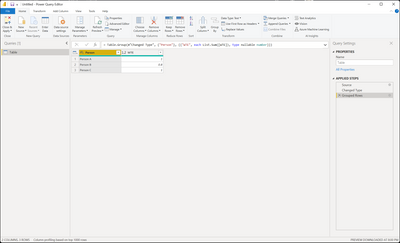
    #"Grouped Rows" = Table.Group(#"Changed Type", {"Person"}, {{"WTE", each List.Sum([WTE]), type nullable number}})
in
    #"Grouped Rows"

Greg_Deckler_0-1664668878151.png


Follow on LinkedIn
@ me in replies or I'll lose your thread!!!
Instead of a Kudo, please vote for this idea
Become an expert!: Enterprise DNA
External Tools: MSHGQM
YouTube Channel!: Microsoft Hates Greg
Latest book!:
DAX For Humans

DAX is easy, CALCULATE makes DAX hard...

View solution in original post

4 REPLIES 4
ciaranmcmullan
New Member

Hi Greg thanks for the super fast response. thank you for the advice, I grouped by person and the summed up the WTE however it gives me the Summed up WTE against each row for those with multiple positions whereas I need only one total.  I hope that makes sense?

@ciaranmcmullan Doesn't make the least bit of sense. 🙂


let
    Source = Table.FromRows(Json.Document(Binary.Decompress(Binary.FromText("i45WCkgtKs7PU3BU0lEyVIrVgQs4AQX0TDFEjJFFnLGLmGKIGCnFxgIA", BinaryEncoding.Base64), Compression.Deflate)), let _t = ((type nullable text) meta [Serialized.Text = true]) in type table [Person = _t, WTE = _t]),
    #"Changed Type" = Table.TransformColumnTypes(Source,{{"Person", type text}, {"WTE", type number}}),
    #"Grouped Rows" = Table.Group(#"Changed Type", {"Person"}, {{"WTE", each List.Sum([WTE]), type nullable number}})
in
    #"Grouped Rows"

Greg_Deckler_0-1664668878151.png


Follow on LinkedIn
@ me in replies or I'll lose your thread!!!
Instead of a Kudo, please vote for this idea
Become an expert!: Enterprise DNA
External Tools: MSHGQM
YouTube Channel!: Microsoft Hates Greg
Latest book!:
DAX For Humans

DAX is easy, CALCULATE makes DAX hard...

Sorry if I was a little unclear.  In Excel I use the following formula which calculates it for me and essentially I am looking Power Query to replicate it exactly.

=IF(COUNTIF($A$2:A2,A2)=COUNTIF(A:A,A2),SUMIF(A:A,A2,B:B),"")

A represents the column with the person and B is the column with each WTE

The result is that it adds the WTE for each person and gives me one total.  EG

0.21 
1.001.21
0.33 
0.671.00
0.27 
0.670.93


Greg_Deckler
Community Champion
Community Champion

@ciaranmcmullan Sounds like you need to do a Group By in Power Query based upon the "Person" column.


Follow on LinkedIn
@ me in replies or I'll lose your thread!!!
Instead of a Kudo, please vote for this idea
Become an expert!: Enterprise DNA
External Tools: MSHGQM
YouTube Channel!: Microsoft Hates Greg
Latest book!:
DAX For Humans

DAX is easy, CALCULATE makes DAX hard...

Helpful resources

Announcements
FabCon Atlanta 2026 carousel

FabCon Atlanta 2026

Join us at FabCon Atlanta, March 16-20, for the ultimate Fabric, Power BI, AI and SQL community-led event. Save $200 with code FABCOMM.