cancel
Showing results for 
Search instead for 
Did you mean: 

Level up your Power BI skills this month - build one visual each week and tell better stories with data! Get started

Reply
tomasmartinek
Frequent Visitor

Adobe Connector and date range parameter

Hello,


I am trying to change date to relative in adobe analytics connector from "anything" (last 60 days or from 1/1/2021) to today.


{Cube.ApplyParameter, "DateRange", {#date(2021, 7, 13), #date(2021, 7, 13)}},


I tried change date to 2021, 12, 31 - but with errors and tried used LocalNow, but I have errors here

{Cube.ApplyParameter, "DateRange", {#date(2021, 7, 13), #date(DateTime.LocalNow())}},


Is here any solution how to create auto update time in adobe analytics connector?


Thanks

Tomas

Thank

2 ACCEPTED SOLUTIONS
ImkeF
Community Champion
Community Champion

Hi @tomasmartinek ,

use Date.From ( DateTime.LocalNow() ) instead of #date.


Imke Feldmann (The BIccountant)

If you liked my solution, please give it a thumbs up. And if I did answer your question, please mark this post as a solution. Thanks!

How to integrate M-code into your solution -- How to get your questions answered quickly -- How to provide sample data -- Check out more PBI- learning resources here -- Performance Tipps for M-queries

View solution in original post

Anonymous
Not applicable

@tomasmartinek "
This is because you your first date return Date only, and DateTime.LocalNow() returns Date and Time. Change it to the expression below.


DateTime.Date(DateTime.LocalNow())


Paul Zheng _ Community Support Team
If this post helps, please Accept it as the solution to help the other members find it more quickly.

View solution in original post

3 REPLIES 3
ReportMaster
Post Partisan
Post Partisan

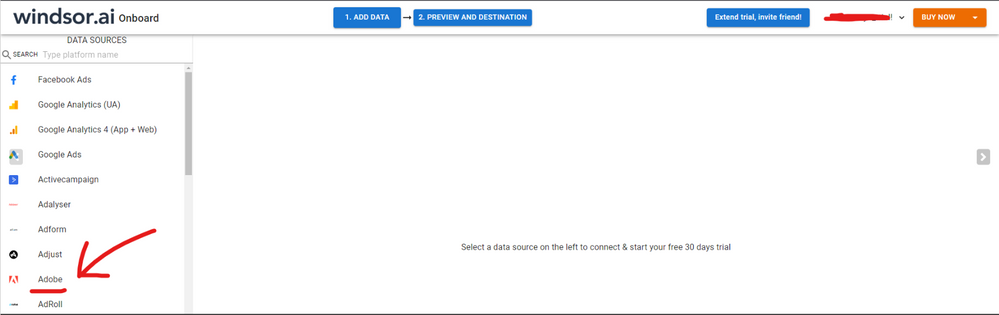
Hi @tomasmartinek As a workaround, maybe you can connect your Adobe data using a 3rd party connector. I've tried windsor.ai , supemetrics and funnel.io. I currently use windsor.ai 's Adobe connector and I can filter my data by date range or fields before exporting to PBI. In case you wonder,  to make the connection first search for the Adobe connector in the data sources list:


ADOBE-1.png


Then, you should enter your Adobe credentials to make the connection. After that, you'll see a preview of your data where you can select the fields you want to see in PBI. 


ADOBE-2.png


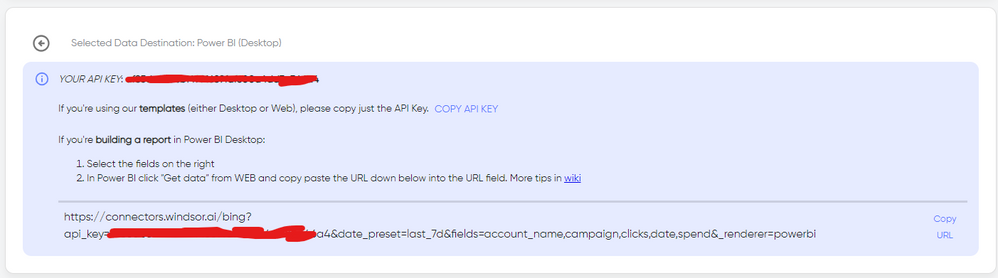
Finally, you just have to choose PBI as destination and copy and paste the url that will appear there in PBI desktop --> Get Data --Web > --> Paste the link


SELECT_DESTINATION_NEW.png

Anonymous
Not applicable

@tomasmartinek "
This is because you your first date return Date only, and DateTime.LocalNow() returns Date and Time. Change it to the expression below.


DateTime.Date(DateTime.LocalNow())


Paul Zheng _ Community Support Team
If this post helps, please Accept it as the solution to help the other members find it more quickly.

ImkeF
Community Champion
Community Champion

Hi @tomasmartinek ,

use Date.From ( DateTime.LocalNow() ) instead of #date.


Imke Feldmann (The BIccountant)

If you liked my solution, please give it a thumbs up. And if I did answer your question, please mark this post as a solution. Thanks!

How to integrate M-code into your solution -- How to get your questions answered quickly -- How to provide sample data -- Check out more PBI- learning resources here -- Performance Tipps for M-queries

Helpful resources

Announcements
April Power BI Update Carousel

Power BI Monthly Update - April 2026

Check out the April 2026 Power BI update to learn about new features.

Fabric SQL PBI Data Days

Data Days 2026 coming soon!

Sign up to receive a private message when registration opens and key events begin.

New to Fabric survey Carousel

New to Fabric Survey

If you have recently started exploring Fabric, we'd love to hear how it's going. Your feedback can help with product improvements.

Power BI DataViz World Championships carousel

Power BI DataViz World Championships - June 2026

A new Power BI DataViz World Championship is coming this June! Don't miss out on submitting your entry.