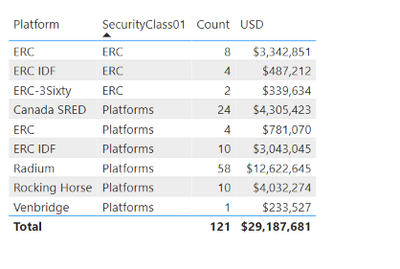
Try this.
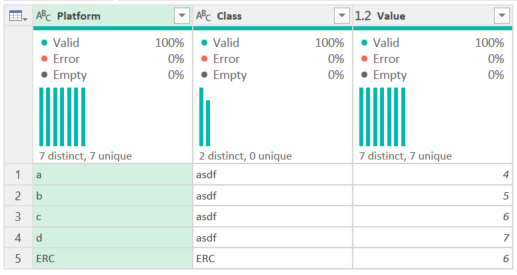
let
    Source = Table.FromRows(Json.Document(Binary.Decompress(Binary.FromText("i45WCshJLEnLL8pV0lFyzkksLgbSYYk5palKsTrRSq5BzkA+hDSEiSQWw8WMYGLBrm5wQWOwYCKQlVickgakTMACSQgBU7BAMkLADCyQghAwV4qNBQA=", BinaryEncoding.Base64), Compression.Deflate)), let _t = ((type nullable text) meta [Serialized.Text = true]) in type table [Column1 = _t, Column2 = _t, Column3 = _t]),
    #"Promoted Headers" = Table.PromoteHeaders(Source, [PromoteAllScalars=true]),
    #"Changed Type" = Table.TransformColumnTypes(#"Promoted Headers",{{"Value", Int64.Type}}),
    ERCFilter = Table.SelectRows(#"Changed Type", each Text.Contains([Platform], "ERC") and [Class] = "ERC"),
    ERCGroup = Table.Group(ERCFilter, {"Class"}, {{"Platform", each List.Min([Platform]), type nullable text}, {"Value", each List.Sum([Value]), type nullable number}}),
    OtherFilter = Table.SelectRows(#"Changed Type", each not Text.Contains([Class], "ERC")),
    #"Appended Query1" = Table.Combine({OtherFilter, ERCGroup})
in
    #"Appended Query1"
This is the logic:
- Filter the data you want to group by
- Create your group - this is the ERCGroup line
- Create a step and filter the original table to exclude what you want - the original table is the #"Changed Type" step.
- Append the query to itself, then change the Table.Combine function to combine ERCGroup and OtherFilter.
How to use M code provided in a blank query:
1) In Power Query, select New Source, then Blank Query
2) On the Home ribbon, select "Advanced Editor" button
3) Remove everything you see, then paste the M code I've given you in that box.
4) Press Done
5) See this article if you need help using this M code in your model.
If you need more help, please provide valid data. I cannot paste an image in to Power Query, and I'm not typing all of that. 😁
How to get good help fast. Help us help you.
How To Ask A Technical Question If you Really Want An Answer
How to Get Your Question Answered Quickly - Give us a good and concise explanation
How to provide sample data in the Power BI Forum - Provide data in a table format per the link, or share an Excel/CSV file via OneDrive, Dropbox, etc.. Provide expected output using a screenshot of Excel or other image. Do not provide a screenshot of the source data. I cannot paste an image into Power BI tables.
Did I answer your question? Mark my post as a solution!Did my answers help arrive at a solution? Give it a kudos by clicking the Thumbs Up!DAX is for Analysis. Power Query is for Data Modeling
Proud to be a Super User!
MCSA: BI Reporting