cancel
Showing results for 
Search instead for 
Did you mean: 

Learn from the best! Meet the four finalists headed to the FINALS of the Power BI Dataviz World Championships! Register now

Reply
Codemunchkin
Frequent Visitor

Adding a Custom Dynamically Changing Index Column in a Table based on Another Table's Index Column

Hi, 

I have spent a lot of time trying to find a way to add an index (in Table B) based on the index values of another table (Table A).
Table A is:

Index    | Country |

   1        |   USA     |

   2        |   UK       |

   3        |   CA       |


Note Table A is dynamic it can change to this:

Index    | Country |

   1        |   USA     |

   2        |   UK       |

   3        |   CA       |

   4        |   AUS     |

   5        |   NZ       |


Now I wanted to add an index column in Table B which just copies index column from Table A and basically does this:

for example if index is going till 5 in Table A then Table B's index column should be like this

Index    |

   1        | 

   2        | 

   3        | 

   4        | 

   5        | 

   1        | 

   2        | 

   3        | 

   4        | 

   5        | 

   1        | 

   2        | 

   3        | 

   4        | 

   5        | 


for example if index is going till 3 in Table A then Table B's index column should be like this

Index    |

   1        | 

   2        | 

   3        | 

   1        | 

   2        | 

   3        | 

   1        | 

   2        | 

   3        | 


until there are no more rows to be filled in Table B


I am doing this so that I can merge the two tables to get this output:


Index    | Country |

   1        |   USA     |

   2        |   UK       |

   3        |   CA       |

   4        |   AUS     |

   5        |   NZ       |

   1        |   USA     |

   2        |   UK       |

   3        |   CA       |

   4        |   AUS     |

   5        |   NZ       |


I really appreciate your help. I wish there was a way to have a max value placeholder in this formula which could be used to solve this.

Table.AddIndexColumn(table as table, newColumnName as text, optional initialValue as nullable number, optional increment as nullable number, optional columnType as nullable type) as table


I look forward to learning how to solve this.

1 ACCEPTED SOLUTION
AlexisOlson
Super User
Super User

It matters here what TableB looks like. Otherwise, you're just appending TableA to itself however many times.


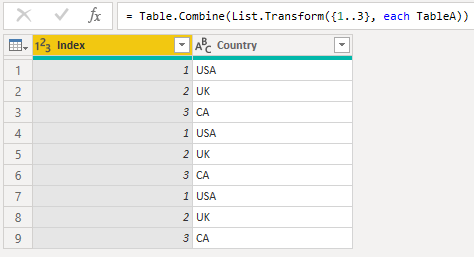
If this is what you want, you can do this for 3 copies of A:

Table.Combine(List.Transform({1..3}, each TableA))


AlexisOlson_0-1635541545161.png

View solution in original post

4 REPLIES 4
AlexisOlson
Super User
Super User

It matters here what TableB looks like. Otherwise, you're just appending TableA to itself however many times.


If this is what you want, you can do this for 3 copies of A:

Table.Combine(List.Transform({1..3}, each TableA))


AlexisOlson_0-1635541545161.png

Thank you so much. This did the trick!

BA_Pete
Super User
Super User

Hi @Codemunchkin ,


I think this should be relatively easy to do by creating a custom list in TableB based on MIN/MAX index values from TableA.

My question is: what does "until there are no more rows to be filled in Table B" mean?

Your examples don't show any existing values in TableB, so how many rows should be created in there?

And, if there are values in TableB, how do we know which row should get a 1, a 2 etc.?


Pete


Now accepting Kudos! If my post helped you, why not give it a thumbs-up?

Proud to be a Datanaut!


What seems easy for you, is clearly not for me as I am new to power query. List.Range({min..max}, count_of_rows) should be used?


This "until there are no more rows to be filled in Table B" should be ignored as this can be dealt with later.


Pete "if there are values in TableB, how do we know which row should get a 1, a 2 etc" it always starts from 1 and then the pattern continues until all of the rows of Table A has been completed as shown in the sample output table.


Helpful resources

Announcements
New to Fabric survey Carousel

New to Fabric Survey

If you have recently started exploring Fabric, we'd love to hear how it's going. Your feedback can help with product improvements.

Power BI DataViz World Championships carousel

Power BI DataViz World Championships - June 2026

A new Power BI DataViz World Championship is coming this June! Don't miss out on submitting your entry.

Join our Fabric User Panel

Join our Fabric User Panel

Share feedback directly with Fabric product managers, participate in targeted research studies and influence the Fabric roadmap.

March Power BI Update Carousel

Power BI Community Update - March 2026

Check out the March 2026 Power BI update to learn about new features.