Share feedback directly with Fabric product managers, participate in targeted research studies and influence the Fabric roadmap.
Sign up nowGet Fabric certified for FREE! Don't miss your chance! Learn more
Hi,
I would like to add new row, Using M Query, for each word after a comma, where all data is the same except for the word after the comma:
Would become:
Solved! Go to Solution.
hi @BrianPBI37QF ,
sample input:
See output using sample data:
the steps are below:
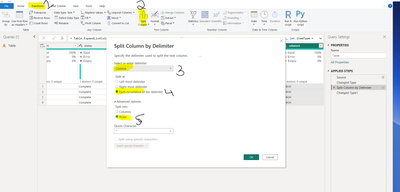
select the column you want to split then:
step1: click on "Transform" tab.
step2: Select split column by delimiter
step3: select the delimeter ( in this case Comma)
step4: Each occurence of delimiter
step5: choose advanced options, select split into rows. then OK.
Alterntatively:
create a blank query. Copy and paste the code below into the advanced editor:
let
Source = Table.FromRows(Json.Document(Binary.Decompress(Binary.FromText("i45WclTSUXLOzy3ISS1JBTKN9Q2M9I0MjIyBbCN9A2MY29nfN8AvBMjw9AsOcfTxAbJ8XZ09dOCEUqxOtJITHsMskDg4TFOKjQUA", BinaryEncoding.Base64), Compression.Deflate)), let _t = ((type nullable text) meta [Serialized.Text = true]) in type table [part = _t, status = _t, date = _t, date2 = _t, column1 = _t, column2 = _t, column3 = _t]),
#"Changed Type" = Table.TransformColumnTypes(Source,{{"part", type text}, {"status", type text}, {"date", type date}, {"date2", type text}, {"column1", type text}, {"column2", type text}, {"column3", type text}}),
#"Split Column by Delimiter" = Table.ExpandListColumn(Table.TransformColumns(#"Changed Type", {{"column3", Splitter.SplitTextByDelimiter(",", QuoteStyle.Csv), let itemType = (type nullable text) meta [Serialized.Text = true] in type {itemType}}}), "column3")
in
#"Split Column by Delimiter"
hi @BrianPBI37QF ,
sample input:
See output using sample data:
the steps are below:
select the column you want to split then:
step1: click on "Transform" tab.
step2: Select split column by delimiter
step3: select the delimeter ( in this case Comma)
step4: Each occurence of delimiter
step5: choose advanced options, select split into rows. then OK.
Alterntatively:
create a blank query. Copy and paste the code below into the advanced editor:
let
Source = Table.FromRows(Json.Document(Binary.Decompress(Binary.FromText("i45WclTSUXLOzy3ISS1JBTKN9Q2M9I0MjIyBbCN9A2MY29nfN8AvBMjw9AsOcfTxAbJ8XZ09dOCEUqxOtJITHsMskDg4TFOKjQUA", BinaryEncoding.Base64), Compression.Deflate)), let _t = ((type nullable text) meta [Serialized.Text = true]) in type table [part = _t, status = _t, date = _t, date2 = _t, column1 = _t, column2 = _t, column3 = _t]),
#"Changed Type" = Table.TransformColumnTypes(Source,{{"part", type text}, {"status", type text}, {"date", type date}, {"date2", type text}, {"column1", type text}, {"column2", type text}, {"column3", type text}}),
#"Split Column by Delimiter" = Table.ExpandListColumn(Table.TransformColumns(#"Changed Type", {{"column3", Splitter.SplitTextByDelimiter(",", QuoteStyle.Csv), let itemType = (type nullable text) meta [Serialized.Text = true] in type {itemType}}}), "column3")
in
#"Split Column by Delimiter"
Share feedback directly with Fabric product managers, participate in targeted research studies and influence the Fabric roadmap.
| User | Count |
|---|---|
| 7 | |
| 4 | |
| 4 | |
| 3 | |
| 3 |
| User | Count |
|---|---|
| 11 | |
| 11 | |
| 10 | |
| 7 | |
| 6 |

