Join us at FabCon Atlanta from March 16 - 20, 2026, for the ultimate Fabric, Power BI, AI and SQL community-led event. Save $200 with code FABCOMM.
Register now!The Power BI Data Visualization World Championships is back! Get ahead of the game and start preparing now! Learn more
Hi,
I have a table that using Direct Query. A column contain string of Month name that I need to manipulate a bit.
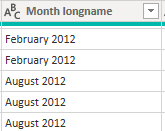
Something like this :
I need to change this to 3 digit string of month and then the year. So the result is like 'Feb 2012' or 'Aug 2012'
How can I achieve this in Direct Query ?
Thanks in advance
Solved! Go to Solution.
Hi all,
Found a solution ! and GOD BLESS THIS MAN -> Month Labels in Direct Query - Power BI - YouTube
So I created Calculated Column like this =
If you can create a date column from that column with Direct Query, you could then do a custom format string on the DAX side with "MMM yyyy".
Creating a simpler and chart-friendly Date table in Power BI - SQLBI
Regards,
Pat
To learn more about Power BI, follow me on Twitter or subscribe on YouTube.
Hi @mahoneypat
It looks tempting, but both FORMAT and ADDCOLUMNS is not supprted by Direct Query. Am I right to say that ?
It does give me some idea of using Date.ToText in QueryEditor but still it's force me to switch to Import Mode.
Thanks,
Hi all,
Found a solution ! and GOD BLESS THIS MAN -> Month Labels in Direct Query - Power BI - YouTube
So I created Calculated Column like this =
You cannot. Unfortunately the Text.Start/Middle/End() functions will not fold, and therefore will not work with Direct Query.
YOu will need to work with your DBA to create a view for you that has this column, or provide the entire SQL statement and put it in the Advanced Options/SQL Statement, but I recommend going the View route.
DAX is for Analysis. Power Query is for Data Modeling
Proud to be a Super User!
MCSA: BI ReportingHi @edhans
Alright Thanks. I was hoping if there is some workaround. It looks like there is none 🙂
Thanks again
The Power BI Data Visualization World Championships is back! Get ahead of the game and start preparing now!