Get certified for free when you join Fabric Data Days 2026 and dive into Fabric, Power BI, SQL, AI, and other essential data skills.
Join nowData Days is here! Join us now for 60+ days of learning, challenges, and connection. Learn more
Hi,
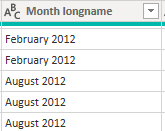
I have a table that using Direct Query. A column contain string of Month name that I need to manipulate a bit.
Something like this :
I need to change this to 3 digit string of month and then the year. So the result is like 'Feb 2012' or 'Aug 2012'
How can I achieve this in Direct Query ?
Thanks in advance
Solved! Go to Solution.
Hi all,
Found a solution ! and GOD BLESS THIS MAN -> Month Labels in Direct Query - Power BI - YouTube
So I created Calculated Column like this =
If you can create a date column from that column with Direct Query, you could then do a custom format string on the DAX side with "MMM yyyy".
Creating a simpler and chart-friendly Date table in Power BI - SQLBI
Regards,
Pat
To learn more about Power BI, follow me on Twitter or subscribe on YouTube.
Hi @mahoneypat
It looks tempting, but both FORMAT and ADDCOLUMNS is not supprted by Direct Query. Am I right to say that ?
It does give me some idea of using Date.ToText in QueryEditor but still it's force me to switch to Import Mode.
Thanks,
Hi all,
Found a solution ! and GOD BLESS THIS MAN -> Month Labels in Direct Query - Power BI - YouTube
So I created Calculated Column like this =
You cannot. Unfortunately the Text.Start/Middle/End() functions will not fold, and therefore will not work with Direct Query.
YOu will need to work with your DBA to create a view for you that has this column, or provide the entire SQL statement and put it in the Advanced Options/SQL Statement, but I recommend going the View route.
DAX is for Analysis. Power Query is for Data Modeling
Proud to be a Super User!
MCSA: BI ReportingHi @edhans
Alright Thanks. I was hoping if there is some workaround. It looks like there is none 🙂
Thanks again
Don't miss out on Data Days, June 15 through August 7. Learn Fabric, Power BI, SQL, AI and more.
Check out the May 2026 Power BI update to learn about new features.
| User | Count |
|---|---|
| 4 | |
| 4 | |
| 3 | |
| 2 | |
| 1 |
| User | Count |
|---|---|
| 11 | |
| 11 | |
| 5 | |
| 4 | |
| 4 |