cancel
Showing results for 
Search instead for 
Did you mean: 

Learn from the best! Meet the four finalists headed to the FINALS of the Power BI Dataviz World Championships! Register now

Reply
dinovic
Frequent Visitor

Add a custom column based on source - Power Query / Dynamics NAV

let
Source = Sql.Databases("xx.x.x.x"),
zzz_LIVE = Source{[Name="NAVzzz_LIVE"]}[Data],
#"COMPANY1$G_L Entry" = NAVzzzLIVE{[Schema="dbo",Item="COMPANY1$G_L Entry"]}[Data],

Pulling data from several entities (companies) in Microsoft Dynamics Navision with above code (Company1 as an example).

Trying to add a custom column with an unique identifier based on the name of the company.

G_L Account number     G_L Account name   Amount   Company
10010                  Revenue            100      Company1
22000                  Rent               50       Company1

Is it possible to achieve this by M code? My goal is to then append multiple tables from NAV with a column that specifies the source.

Many thanks.

1 ACCEPTED SOLUTION
Anonymous
Not applicable

@dinovic,

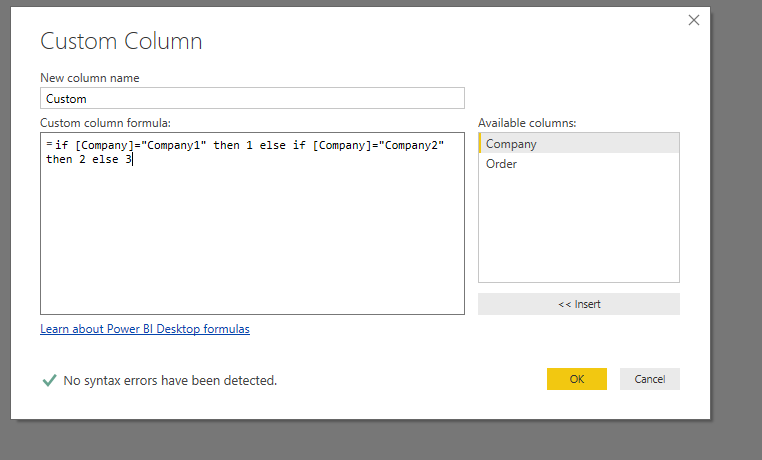
How about adding a conditional column  or adding a custom column with if statement?

1.PNG2.PNG

Regards,
Lydia

View solution in original post

1 REPLY 1
Anonymous
Not applicable

@dinovic,

How about adding a conditional column  or adding a custom column with if statement?

1.PNG2.PNG

Regards,
Lydia

Helpful resources

Announcements
Power BI DataViz World Championships carousel

Power BI DataViz World Championships - June 2026

A new Power BI DataViz World Championship is coming this June! Don't miss out on submitting your entry.

Join our Fabric User Panel

Join our Fabric User Panel

Share feedback directly with Fabric product managers, participate in targeted research studies and influence the Fabric roadmap.

March Power BI Update Carousel

Power BI Community Update - March 2026

Check out the March 2026 Power BI update to learn about new features.