cancel
Showing results for 
Search instead for 
Did you mean: 

July 28 - August 9 | Final Round of the Power BI Dataviz World Championships. This is your chance. Learn more

Reply
Anonymous
Not applicable

Add a column under a condition

Hello,


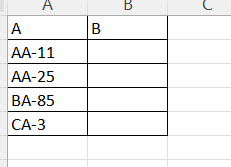
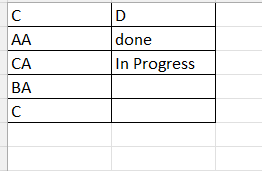
I have the following tables:


pic1.pngpic2.png


I aim to take column "A" from the first excel file and compare it with column "C" from the second excel file, if the string part in column "C" is contained in column "A"  (ex AA is contained in AA-11) then I need to add a column in the first excel sheet and fill it with the value of column "D" from the second excel file. (I think I need a nested loop because I need to compare every row from "A" with every row from "C").


I would be very thankful if one could help me.


Thanks

Best Regards

4 REPLIES 4
Vijay_A_Verma
Most Valuable Professional

In a custom column, put following where Table2 is your Lookup table

= try Table2{[C=Text.BeforeDelimiter([A],"-")]}[D] otherwise null

 See the working here - Open a blank query - Home - Advanced Editor - Remove everything from there and paste the below code to test 

Table2 Code

let
    Source = Table.FromRows(Json.Document(Binary.Decompress(Binary.FromText("i45WcnRU0lFKyc9LVYrViVZyBvE88xQCivLTi1KLi8GCTiBBiDSYEQsA", BinaryEncoding.Base64), Compression.Deflate)), let _t = ((type nullable text) meta [Serialized.Text = true]) in type table [C = _t, D = _t])
in
    Source

Table1 Code

let
    Source = Table.FromRows(Json.Document(Binary.Decompress(Binary.FromText("i45WcnTUNTRUitUBs4xMwSwnR10LCMvZUddYKTYWAA==", BinaryEncoding.Base64), Compression.Deflate)), let _t = ((type nullable text) meta [Serialized.Text = true]) in type table [A = _t]),
    #"Added Custom" = Table.AddColumn(Source, "Custom", each try Table2{[C=Text.BeforeDelimiter([A],"-")]}[D] otherwise null)
in
    #"Added Custom"
Anonymous
Not applicable

Thanks a lot for your detailed answer, but the two tables that I put were an example (I forget to mention that).

it's a confidential document so...

When I paste the code of table 2, the confidential table turned on the example table.

Could you please help me

Thanks

Vijay_A_Verma
Most Valuable Professional

Table2 code is for testing. Just make sure that name of your query is Table2. Don't use Table2 code, only Table1 code. 
Basically, in both Table1 and Table2, you just need to replace the Source with your Source. And make sure Table2 is named Table2 only.

Anonymous
Not applicable

Hello again,


I think I am missing something or I don't get something.

I have again paste only the code of Table1  and got  my table turned to the example table.

PS: I am not sure what do you mean by "Replace the Source with your Source"


Thank you

Best regards


Helpful resources

Announcements
Fabric Community Sticker Design Challenge Barcelona Carousel

Fabric Community Sticker Challenge - Barcelona 2026

If you love stickers, then you will definitely want to check out our community sticker challenge, Barcelona edition!

July Power BI Update Carousel

Power BI Monthly Update - July 2026

Check out the July 2026 Power BI update to learn about new features.

Power BI DataViz World Championships carousel

Power BI DataViz World Championships - June 2026

A new Power BI DataViz World Championship is coming this June! Don't miss out on submitting your entry.