Join us at FabCon Atlanta from March 16 - 20, 2026, for the ultimate Fabric, Power BI, AI and SQL community-led event. Save $200 with code FABCOMM.
Register now!The Power BI Data Visualization World Championships is back! Get ahead of the game and start preparing now! Learn more
Hi guys,
Im a bit noob still. I need to see the maximum of e.g. the active users while now it filters to the max of the category selected.
The use case is:
I have active users e.g. 5000
I have actions / features the users use e.g. digital signatures, workflow, reporting
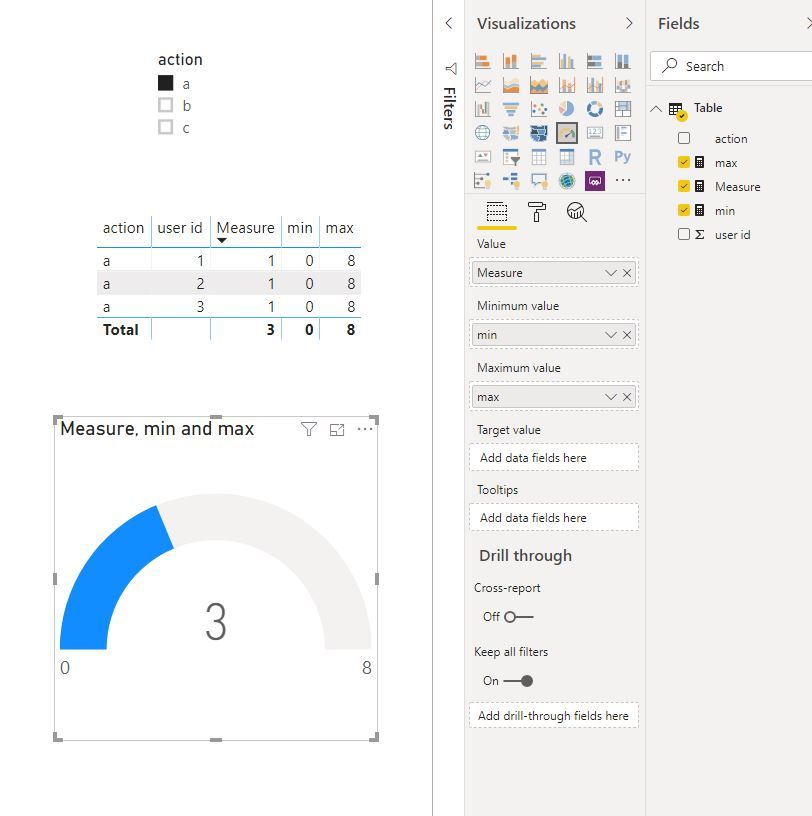
What i would like to see is that when i select one of the categories e.g. digital signatures, that it will show 2000 users (out of a total of 5000) in a gauge visual for example. Now it always shows the total of the category, 2000 out of 2000.
I have used the following measurement for the users:
active users = DISTINCTCOUNT(Sheet0[loginname])
(Sheet0[action]) =the column i use for the actions.
Does anyone know what the formula should be to show the absolute max or ignore filtering?
Solved! Go to Solution.
Hi @Anonymous
Create measures
min = 0
max = CALCULATE(DISTINCTCOUNT('Table'[user id]),ALL('Table'))
Measure = DISTINCTCOUNT('Table'[user id])
Best Regards
Maggie
Community Support Team _ Maggie Li
If this post helps, then please consider Accept it as the solution to help the other members find it more quickly.
Hi @Anonymous
Create measures
min = 0
max = CALCULATE(DISTINCTCOUNT('Table'[user id]),ALL('Table'))
Measure = DISTINCTCOUNT('Table'[user id])
Best Regards
Maggie
Community Support Team _ Maggie Li
If this post helps, then please consider Accept it as the solution to help the other members find it more quickly.
Hi,
Maybe you should look after the ALL() function ?
like in this discussion :
https://community.powerbi.com/t5/Desktop/ALL-function/td-p/194108
A very similar case.
Enjoy
The Power BI Data Visualization World Championships is back! Get ahead of the game and start preparing now!
| User | Count |
|---|---|
| 19 | |
| 10 | |
| 9 | |
| 7 | |
| 7 |