Get Fabric or SQL Certified for Free.
Get certified for free when you join Fabric Data Days 2026 and dive into Fabric, Power BI, SQL, AI, and other essential data skills.
Join now- Power BI forums
- Get Help with Power BI
- Desktop
- Service
- Report Server
- Power Query
- Mobile Apps
- Developer
- DAX Commands and Tips
- Custom Visuals Development Discussion
- Health and Life Sciences
- Power BI Spanish forums
- Translated Spanish Desktop
- Training and Consulting
- Instructor Led Training
- Dashboard in a Day for Women, by Women
- Galleries
- Data Stories Gallery
- Themes Gallery
- Contests Gallery
- QuickViz Gallery
- Quick Measures Gallery
- Visual Calculations Gallery
- Fabric Apps Gallery
- Notebook Gallery
- Translytical Task Flow Gallery
- TMDL Gallery
- R Script Showcase
- Webinars and Video Gallery
- Ideas
- Custom Visuals Ideas (read-only)
- Issues
- Issues
- Events
- Upcoming Events
July 28 - August 9 | Final Round of the Power BI Dataviz World Championships. This is your chance. Learn more
- Power BI forums
- Forums
- Get Help with Power BI
- Power Query
- A complex remove duplicates. Please help.
- Subscribe to RSS Feed
- Mark Topic as New
- Mark Topic as Read
- Float this Topic for Current User
- Bookmark
- Subscribe
- Printer Friendly Page

- Mark as New
- Bookmark
- Subscribe
- Mute
- Subscribe to RSS Feed
- Permalink
- Report Inappropriate Content
A complex remove duplicates. Please help.
Example data:
| Row # | New Hire Name | Start Date |
| 1. | John_Doe | 1/1/2020 |
| 2. | John_Doe | 5/1/2020 |
| 3. | John_Doe | null |
| 4. | Jane_Doe | null |
I need to remove line 3, but if I select both columns New Hire Name and Start Date and hit remove duplicates it will keep all of them. If I only use the New Hire name column. It will delete lines 2 and 3. I am pretty new to DAX and power query, but is there a way to do this?
Solved! Go to Solution.


- Mark as New
- Bookmark
- Subscribe
- Mute
- Subscribe to RSS Feed
- Permalink
- Report Inappropriate Content
Hi, @Anonymous
Based on your description, I created data to reproduce your scenario. The pbix file is attached in the end.
Table:
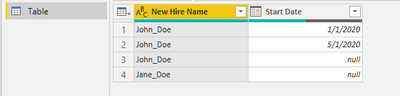
You may add a new step like below.
= Table.SelectRows(#"Changed Type",each
let x = [New Hire Name],
y=Table.RowCount(
    Table.SelectRows(#"Changed Type",each [New Hire Name]=x)
)
in
(y>1 and [Start Date]<>null) or y=1
)
Result:
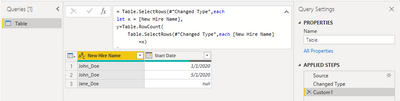
Best Regards
Allan
If this post helps, then please consider Accept it as the solution to help the other members find it more quickly.
- Mark as New
- Bookmark
- Subscribe
- Mute
- Subscribe to RSS Feed
- Permalink
- Report Inappropriate Content
Hi, @Anonymous
Based on your description, I created data to reproduce your scenario. The pbix file is attached in the end.
Table:
You may add a new step like below.
= Table.SelectRows(#"Changed Type",each
let x = [New Hire Name],
y=Table.RowCount(
    Table.SelectRows(#"Changed Type",each [New Hire Name]=x)
)
in
(y>1 and [Start Date]<>null) or y=1
)
Result:
Best Regards
Allan
If this post helps, then please consider Accept it as the solution to help the other members find it more quickly.
- Mark as New
- Bookmark
- Subscribe
- Mute
- Subscribe to RSS Feed
- Permalink
- Report Inappropriate Content
You could just use the Fill Down function in the GUI on the Date column, and then your next step would be Table.Distinct(PriorStep)


- Mark as New
- Bookmark
- Subscribe
- Mute
- Subscribe to RSS Feed
- Permalink
- Report Inappropriate Content
Hi @Anonymous
without more specifics hard to say, but take a look at this. It turns this:
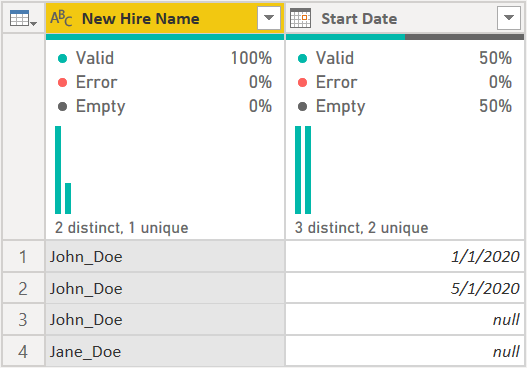
into this:
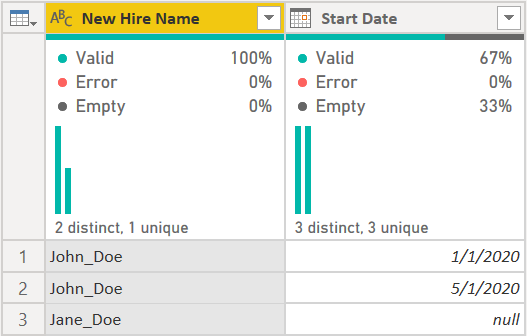
I used this code:
let
    Source = Table.FromRows(Json.Document(Binary.Decompress(Binary.FromText("i45W8srPyIt3yU9V0lEy1DfUNzIwMlCK1UERN8UhnleakwMRS8xLRRGLBQA=", BinaryEncoding.Base64), Compression.Deflate)), let _t = ((type nullable text) meta [Serialized.Text = true]) in type table [#"New Hire Name" = _t, #"Start Date" = _t]),
    #"Changed Type" = Table.TransformColumnTypes(Source,{{"Start Date", type date}}),
    #"Grouped Rows" =
        Table.Group(
            #"Changed Type",
            {"New Hire Name"},
            {
                {"AllRows",
                each if Table.RowCount(_) = 1 then _ else
                    Table.Distinct(
                        Table.SelectRows(_, each [Start Date] <> null)
                    ),
                type table [New Hire Name=nullable text, Start Date=nullable date]
                }
            }
        ),
    #"Expanded AllRows" = Table.ExpandTableColumn(#"Grouped Rows", "AllRows", {"Start Date"}, {"Start Date"})
in
    #"Expanded AllRows"
The logic I used was this:
- Group all data by the New Hire Name
- Count the rows in the nested tables. If there is just one record keep it.
- If there are 2+ records, remove any rows with null, then do a Table.Distinct() over that result to remove any duplicate records. So if John Doe had two rows that were 5/1/2020, my logic would keep only one of those.
- Expanded the Start Date column again.
If that isn't what you want, please be more specific on how the logic should work.
How to use M code provided in a blank query:
1) In Power Query, select New Source, then Blank Query
2) On the Home ribbon, select "Advanced Editor" button
3) Remove everything you see, then paste the M code I've given you in that box.
4) Press Done
5) See this article if you need help using this M code in your model.
Did I answer your question? Mark my post as a solution!
Did my answers help arrive at a solution? Give it a kudos by clicking the Thumbs Up!
DAX is for Analysis. Power Query is for Data Modeling
Proud to be a Super User!
MCSA: BI Reporting

- Mark as New
- Bookmark
- Subscribe
- Mute
- Subscribe to RSS Feed
- Permalink
- Report Inappropriate Content
@Anonymous
What is your logic to remove the record?
Do want to remove the lines for new hire names that have at least one record with start date?
________________________
If my answer was helpful, please consider Accept it as the solution to help the other members find it
Click on the Thumbs-Up icon if you like this reply 🙂
⭕ Subscribe and learn Power BI from these videos
⚪ Website ⚪ LinkedIn ⚪ PBI User Group
- Mark as New
- Bookmark
- Subscribe
- Mute
- Subscribe to RSS Feed
- Permalink
- Report Inappropriate Content
I need to show if a new hire has been hired again, but also need to show if their name wasn't included in the new hire list provided to me. I am basically given two new hire list and one has a bunch of info with it including start dates and the other is pretty much just their name. If they are in the second list that has no info, but not in the first list, I need to keep it so I can get the rest of their info, but if they are in the first list multiple times, I need to keep all instances of their name in that list.

- Mark as New
- Bookmark
- Subscribe
- Mute
- Subscribe to RSS Feed
- Permalink
- Report Inappropriate Content
this might be a nestedjoin problem. you can provide some sample data of these two tables.

- Mark as New
- Bookmark
- Subscribe
- Mute
- Subscribe to RSS Feed
- Permalink
- Report Inappropriate Content
@Anonymous ,
It doesn't like you need to remove the duplicated, actually you don't have any.
Does it work if you remove when there is more than 1 row for the New Hire column and delete the null row ?
Did I answer your question? Mark my post as a solution!
Proud to be a Super User!
- Mark as New
- Bookmark
- Subscribe
- Mute
- Subscribe to RSS Feed
- Permalink
- Report Inappropriate Content
I am not sure I understand your response.
Helpful resources

Fabric Community Sticker Challenge - Barcelona 2026
If you love stickers, then you will definitely want to check out our community sticker challenge, Barcelona edition!

Power BI Monthly Update - July 2026
Check out the July 2026 Power BI update to learn about new features.

Power BI DataViz World Championships - June 2026
A new Power BI DataViz World Championship is coming this June! Don't miss out on submitting your entry.

| User | Count |
|---|---|
| 4 | |
| 2 | |
| 2 | |
| 2 | |
| 1 |


