FabCon is coming to Atlanta
Join us at FabCon Atlanta from March 16 - 20, 2026, for the ultimate Fabric, Power BI, AI and SQL community-led event. Save $200 with code FABCOMM.
Register now!The Power BI Data Visualization World Championships is back! Get ahead of the game and start preparing now! Learn more
- Data Factory forums
- Forums
- Get Help with Data Factory
- Pipelines
- Re: Fabric Data Pipeline - Copy activity stays in ...
- Subscribe to RSS Feed
- Mark Topic as New
- Mark Topic as Read
- Float this Topic for Current User
- Bookmark
- Subscribe
- Printer Friendly Page


- Mark as New
- Bookmark
- Subscribe
- Mute
- Subscribe to RSS Feed
- Permalink
- Report Inappropriate Content
Fabric Data Pipeline - Copy activity stays in queued status
I have a data pipeline with a copy activity that copies data from a table in sql server into Fabric - Warehouse. The copy activity stays in queued status for a very long time and never gets picked up for processing. What could be the reason? How can I troubleshoot this issue? A similar pipeline that copies data into a lakehouse works fine.


- Mark as New
- Bookmark
- Subscribe
- Mute
- Subscribe to RSS Feed
- Permalink
- Report Inappropriate Content
Hi @vidhyan
Thank you sharing the details.
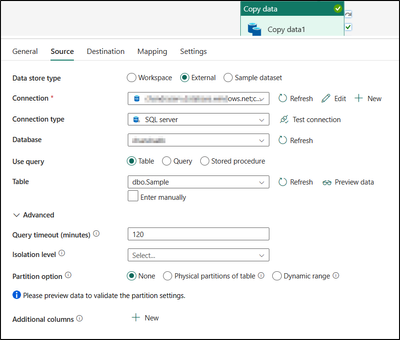
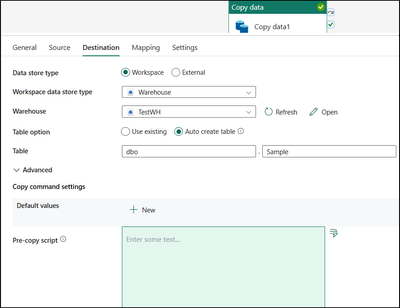
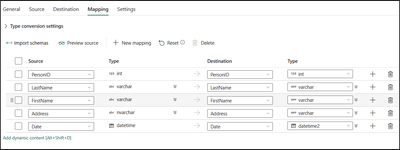
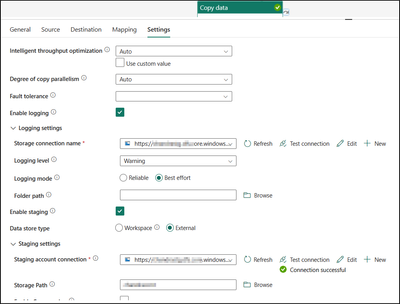
I have successfully replicated the scenario and confirmed the pipeline functioned as expected. Please find the attached screenshots.
Source:
Destination:
Mapping:
Settings:
Copy data details:
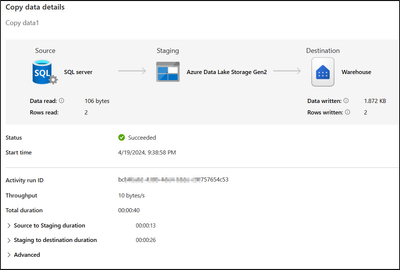
Could you please recheck the pipeline configuration, data source connections. Also under settings tab try to select workspace instead of external for Data store type and try to execute the pipeline.
If the issue still persists, please do let us know. Glad to help.
Note : If you are copying the data using cloud connection for loading the data to Warehouse, Microsoft Fabric support onelake as staging.
I hope this information helps.
Thank you.
- Mark as New
- Bookmark
- Subscribe
- Mute
- Subscribe to RSS Feed
- Permalink
- Report Inappropriate Content
Hi @vidhyan
We haven’t heard from you on the last response and was just checking back to see if you have a resolution yet. In case if you have any resolution please do share that same with the community as it can be helpful to others.
Otherwise, will respond back with the more details and we will try to help.
Thanks.
- Mark as New
- Bookmark
- Subscribe
- Mute
- Subscribe to RSS Feed
- Permalink
- Report Inappropriate Content
Thanks for following up @v-cboorla-msft . After switching the storage account to another one, the copy activity started processing, data is copied to the staging folder in the storage account. But, when it tries to connect to the warehouse to copy the data, it fails with the following error.

- Mark as New
- Bookmark
- Subscribe
- Mute
- Subscribe to RSS Feed
- Permalink
- Report Inappropriate Content
Hi @vidhyan
Sometimes you may have issues connecting to SQL Server and you may get messages such as the following: A network-related or instance-specific error occurred while establishing a connection to SQL Server. The server was not found or was not accessible. Verify that the instance name is correct and that SQL Server is configured to allow remote connections. (provider: Named Pipes Provider, error: 40 - Could not open a connection to SQL Server)

Please refer the link for resolution : Resolving could not open a connection to SQL Server errors.
I hope this information helps. Please do let us know if you have any further questions.
Thank you.
- Mark as New
- Bookmark
- Subscribe
- Mute
- Subscribe to RSS Feed
- Permalink
- Report Inappropriate Content
Hi @vidhyan
We haven’t heard from you on the last response and was just checking back to see if you have a resolution yet. In case if you have any resolution please do share that same with the community as it can be helpful to others.
Otherwise, will respond back with the more details and we will try to help.
Thanks.
- Mark as New
- Bookmark
- Subscribe
- Mute
- Subscribe to RSS Feed
- Permalink
- Report Inappropriate Content
- Mark as New
- Bookmark
- Subscribe
- Mute
- Subscribe to RSS Feed
- Permalink
- Report Inappropriate Content
Thanks for the follow up @v-cboorla-msft . I figured out that the storage account I was using for staging was not reachable. After swtiching the storage account, the activity gets picked up for processing. I see file generated in the staging folder in the storage account. But, the activity fails with the following error when it tries to connect to the warehouse.
ErrorCode=SqlFailedToConnect,'Type=Microsoft.DataTransfer.Common.Shared.HybridDeliveryException,Message=Cannot connect to SQL Database. Please contact SQL server team for further support. Server: 'dkjfghkdfgldgdlfgjldjfg-dfkjghkdrt543dfg9345jgfd.datawarehouse.fabric.microsoft.com', Database: '56756757-d5435-456g-5675-456456456fre', User: ''. Check the connection configuration is correct, and make sure the SQL Database firewall allows the Data Factory runtime to access.,Source=Microsoft.DataTransfer.ClientLibrary,''Type=System.Data.SqlClient.SqlException,Message=A network-related or instance-specific error occurred while establishing a connection to SQL Server. The server was not found or was not accessible. Verify that the instance name is correct and that SQL Server is configured to allow remote connections. (provider: Named Pipes Provider, error: 40 - Could not open a connection to SQL Server),Source=.Net SqlClient Data Provider,SqlErrorNumber=53,Class=20,ErrorCode=-2146232060,State=0,Errors=[{Class=20,Number=53,State=0,Message=A network-related or instance-specific error occurred while establishing a connection to SQL Server. The server was not found or was not accessible. Verify that the instance name is correct and that SQL Server is configured to allow remote connections. (provider: Named Pipes Provider, error: 40 - Could not open a connection to SQL Server),},],''Type=System.ComponentModel.Win32Exception,Message=The network path was not found,Source=,'
- Mark as New
- Bookmark
- Subscribe
- Mute
- Subscribe to RSS Feed
- Permalink
- Report Inappropriate Content
Hi @vidhyan
Thanks for using Microsoft Fabric Community.
Apologies for the issue you are facing.
In order to understand your specific data copy scenario, Could you please share some more details about your copy data activity. This will help me to understand the query and guide in better way. If possible, could you provide information on the following:
Data Transformation Specifications : Are there any transformations being applied to the data during the copy process?
Screenshots : If feasible, sharing screenshots of the source and sink configuration within your data copy activity would be highly beneficial for visualization purposes.
Thanks.

Helpful resources


FabCon Atlanta 2026
Join us at FabCon Atlanta, March 16-20, for the ultimate Fabric, Power BI, AI and SQL community-led event. Save $200 with code FABCOMM.


