Don't miss your chance to take the Fabric Data Engineer (DP-700) exam on us!
Learn moreWe've captured the moments from FabCon & SQLCon that everyone is talking about, and we are bringing them to the community, live and on-demand. Starts on April 14th. Register now
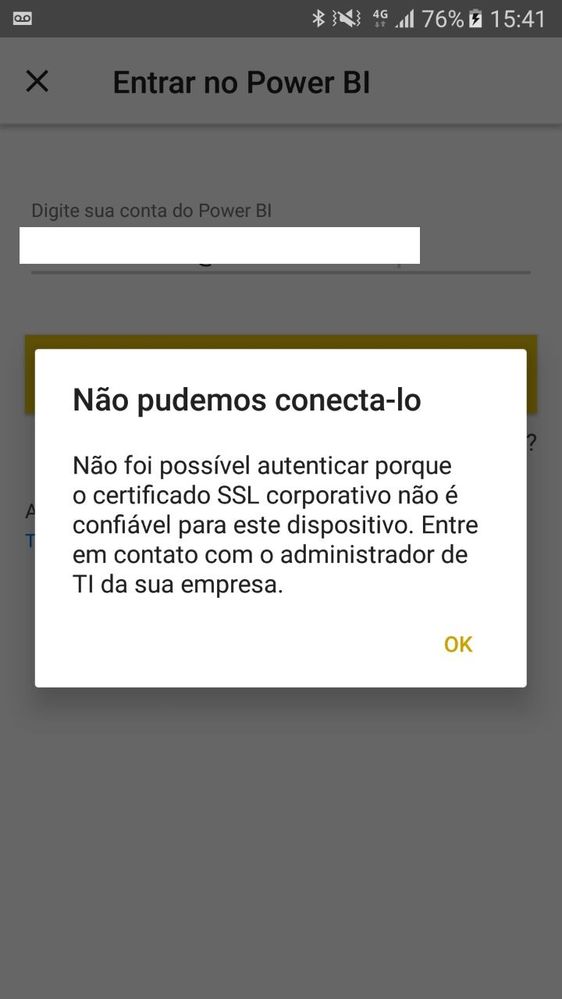
When trying to access power bi by the mobile app, I'm getting the following error on some devices.
"Could not authenticate because the corporate SSL certificate is not trusted for this device. Contact your business IT administrator."
Only in some android devices this has been occurring. The devices that I had problem are the samsung s6, s7 and motorola g4 plus.
On other android devices it works normally including in samsung s8.
We are using a custom authentication server, but the certificate works for several other devices and OS. We did not have this problem with iOS
Would anyone know how to help me?
I'm using the most up-to-date power bi app version
Would anyone know how to help me?
Is what you are experiencing similar to what is explained here https://powerbi.microsoft.com/en-us/blog/how-authentication-with-analysis-services-live-connections-...
or
you can check this guide on authenticationhttps://pbiwebprod-docs.azurewebsites.net/hr-hr/documentation/powerbi-developer-authenticate-to-powe...
Hi,
First of all thank you for reporting this issue!
Could you please provide us a little bit more details about this problem?
Could you please send this info to your support mail?
mpbisup@microsoft.com
Thanks,
Michael.
Hi,
I am having the same issue as above. I am using Samsung S9 and Android 8.
Could you please let me know if this case is resolved ?
thanks
Anbu
If you have recently started exploring Fabric, we'd love to hear how it's going. Your feedback can help with product improvements.
A new Power BI DataViz World Championship is coming this June! Don't miss out on submitting your entry.
Share feedback directly with Fabric product managers, participate in targeted research studies and influence the Fabric roadmap.