Get Fabric or SQL Certified for Free.
Get certified for free when you join Fabric Data Days 2026 and dive into Fabric, Power BI, SQL, AI, and other essential data skills.
Join now- Power BI forums
- Get Help with Power BI
- Desktop
- Service
- Report Server
- Power Query
- Mobile Apps
- Developer
- DAX Commands and Tips
- Custom Visuals Development Discussion
- Health and Life Sciences
- Power BI Spanish forums
- Translated Spanish Desktop
- Training and Consulting
- Instructor Led Training
- Dashboard in a Day for Women, by Women
- Galleries
- Data Stories Gallery
- Themes Gallery
- Contests Gallery
- QuickViz Gallery
- Quick Measures Gallery
- Visual Calculations Gallery
- Fabric Apps Gallery
- Notebook Gallery
- Translytical Task Flow Gallery
- TMDL Gallery
- R Script Showcase
- Webinars and Video Gallery
- Ideas
- Custom Visuals Ideas (read-only)
- Issues
- Issues
- Events
- Upcoming Events
July 28 - August 9 | Final Round of the Power BI Dataviz World Championships. This is your chance. Learn more
- Power BI forums
- Forums
- Get Help with Power BI
- Developer
- power bi loop
- Subscribe to RSS Feed
- Mark Topic as New
- Mark Topic as Read
- Float this Topic for Current User
- Bookmark
- Subscribe
- Printer Friendly Page


- Mark as New
- Bookmark
- Subscribe
- Mute
- Subscribe to RSS Feed
- Permalink
- Report Inappropriate Content
power bi loop
Present data
id response
1 a
1 b
1 a
2 a
3 b
Required Data
id response Maxcountbasedata
1 a a
1 b a
1 a a
2 a a
3 b b
Solved! Go to Solution.

- Mark as New
- Bookmark
- Subscribe
- Mute
- Subscribe to RSS Feed
- Permalink
- Report Inappropriate Content
Hi @BIswajit_Das ,
I created a sample pbix file(see the attachment), please check if that is what you want.
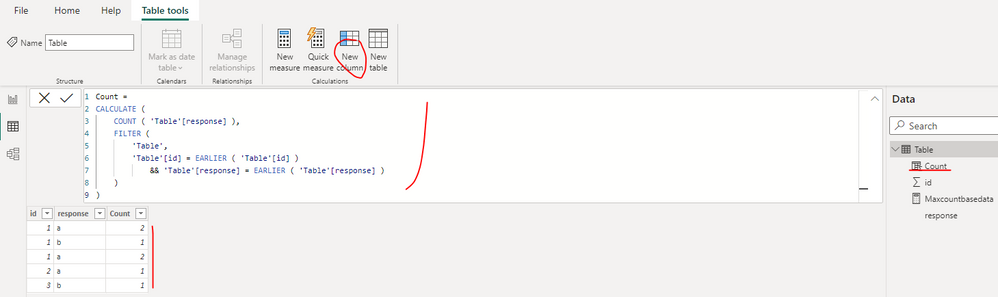
1. Create a calculated column as below to get the count of per response under per id
Count =
CALCULATE (
    COUNT ( 'Table'[response] ),
    FILTER (
        'Table',
        'Table'[id] = EARLIER ( 'Table'[id] )
            && 'Table'[response] = EARLIER ( 'Table'[response] )
    )
)
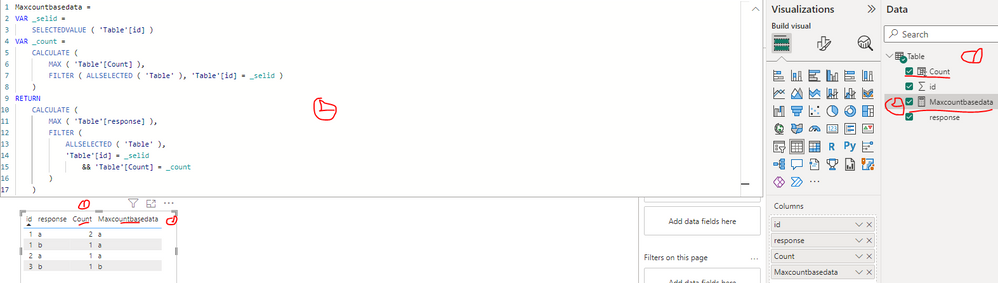
2. Create a measure as below to get the response which have the max count
Maxcountbasedata =
VAR _selid =
    SELECTEDVALUE ( 'Table'[id] )
VAR _count =
    CALCULATE (
        MAX ( 'Table'[Count] ),
        FILTER ( ALLSELECTED ( 'Table' ), 'Table'[id] = _selid )
    )
RETURN
    CALCULATE (
        MAX ( 'Table'[response] ),
        FILTER (
            ALLSELECTED ( 'Table' ),
            'Table'[id] = _selid
                && 'Table'[Count] = _count
        )
    )
Best Regards
- Mark as New
- Bookmark
- Subscribe
- Mute
- Subscribe to RSS Feed
- Permalink
- Report Inappropriate Content
Hi @BIswajit_Das ,
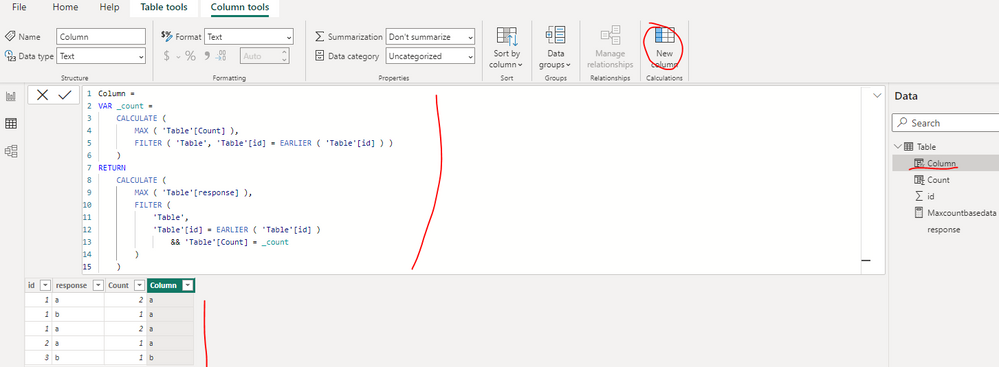
You can create a calculated column as below to replace the measure, please find the details in the attachment.
Column =
VAR _count =
    CALCULATE (
        MAX ( 'Table'[Count] ),
        FILTER ( 'Table', 'Table'[id] = EARLIER ( 'Table'[id] ) )
    )
RETURN
    CALCULATE (
        MAX ( 'Table'[response] ),
        FILTER (
            'Table',
            'Table'[id] = EARLIER ( 'Table'[id] )
                && 'Table'[Count] = _count
        )
    )
Best Regards
- Mark as New
- Bookmark
- Subscribe
- Mute
- Subscribe to RSS Feed
- Permalink
- Report Inappropriate Content
Actually i need the measure value in a column
- Mark as New
- Bookmark
- Subscribe
- Mute
- Subscribe to RSS Feed
- Permalink
- Report Inappropriate Content
Hi @BIswajit_Das ,
You can create a calculated column as below to replace the measure, please find the details in the attachment.
Column =
VAR _count =
    CALCULATE (
        MAX ( 'Table'[Count] ),
        FILTER ( 'Table', 'Table'[id] = EARLIER ( 'Table'[id] ) )
    )
RETURN
    CALCULATE (
        MAX ( 'Table'[response] ),
        FILTER (
            'Table',
            'Table'[id] = EARLIER ( 'Table'[id] )
                && 'Table'[Count] = _count
        )
    )
Best Regards
- Mark as New
- Bookmark
- Subscribe
- Mute
- Subscribe to RSS Feed
- Permalink
- Report Inappropriate Content
I liked this solution
- Mark as New
- Bookmark
- Subscribe
- Mute
- Subscribe to RSS Feed
- Permalink
- Report Inappropriate Content
I have this now
x y z
1 a a
1 b a
1 a a
2 a a
3 b b
And i need to create a visual like
for a for b
2/3 (z-count/distintcount-x) 1/3
Is there any way to do this??
- Mark as New
- Bookmark
- Subscribe
- Mute
- Subscribe to RSS Feed
- Permalink
- Report Inappropriate Content
Hi @BIswajit_Das ,
I created a sample pbix file(see the attachment), please check if that is what you want.
1. Create a z field dimension table
Z = VALUES('Table'[z])2. Create a measure as below
Measure =
VAR _selvalue =
    SELECTEDVALUE ( 'Z'[z] )
VAR _countx =
    DISTINCTCOUNT ( 'Table'[x] )
VAR _countz =
    CALCULATE (
        DISTINCTCOUNT ( 'Table'[x] ),
        FILTER ( 'Table', 'Table'[z] = _selvalue )
    )
RETURN
    DIVIDE ( _countz, _countx, 0 )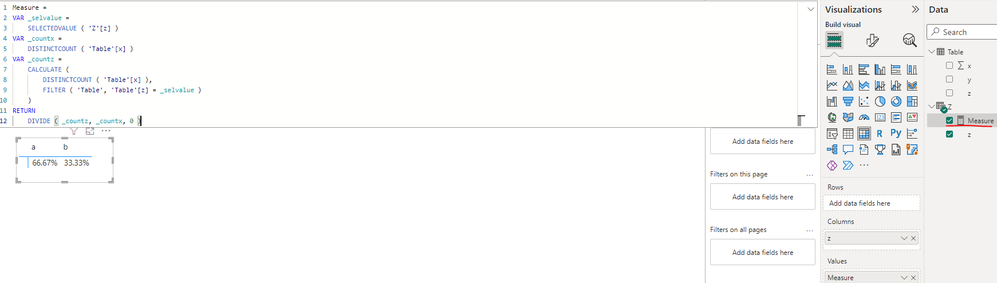
If you have new problem or requirement, you can post a new case in the community. Then more people will see it and resolve it shortly.
Best Regards
- Mark as New
- Bookmark
- Subscribe
- Mute
- Subscribe to RSS Feed
- Permalink
- Report Inappropriate Content
actually my requirement is to set visuals like 2/3 and 0/3
I've posted this on new massage please check the below link
"https://community.powerbi.com/t5/Desktop/power-bi-visual/m-p/3109670/highlight/true#M1053860"
- Mark as New
- Bookmark
- Subscribe
- Mute
- Subscribe to RSS Feed
- Permalink
- Report Inappropriate Content
Hi @BIswajit_Das ,
I just reply you in the new case: power bi visual - Microsoft Power BI Community
Best Regards
- Mark as New
- Bookmark
- Subscribe
- Mute
- Subscribe to RSS Feed
- Permalink
- Report Inappropriate Content
Can we help with this post
https://community.powerbi.com/t5/Desktop/Power-Bi-Table/m-p/3111393
Thanks you
- Mark as New
- Bookmark
- Subscribe
- Mute
- Subscribe to RSS Feed
- Permalink
- Report Inappropriate Content
Thanks it's really helpfull
- Mark as New
- Bookmark
- Subscribe
- Mute
- Subscribe to RSS Feed
- Permalink
- Report Inappropriate Content
Hi @BIswajit_Das ,
I created a sample pbix file(see the attachment), please check if that is what you want.
1. Create a calculated column as below to get the count of per response under per id
Count =
CALCULATE (
    COUNT ( 'Table'[response] ),
    FILTER (
        'Table',
        'Table'[id] = EARLIER ( 'Table'[id] )
            && 'Table'[response] = EARLIER ( 'Table'[response] )
    )
)
2. Create a measure as below to get the response which have the max count
Maxcountbasedata =
VAR _selid =
    SELECTEDVALUE ( 'Table'[id] )
VAR _count =
    CALCULATE (
        MAX ( 'Table'[Count] ),
        FILTER ( ALLSELECTED ( 'Table' ), 'Table'[id] = _selid )
    )
RETURN
    CALCULATE (
        MAX ( 'Table'[response] ),
        FILTER (
            ALLSELECTED ( 'Table' ),
            'Table'[id] = _selid
                && 'Table'[Count] = _count
        )
    )
Best Regards
- Mark as New
- Bookmark
- Subscribe
- Mute
- Subscribe to RSS Feed
- Permalink
- Report Inappropriate Content
Thanks a lot It's really helpful
But i need the measure value in a column to use it on the shape map
Is there any way to so
Helpful resources

Fabric Community Sticker Challenge - Barcelona 2026
If you love stickers, then you will definitely want to check out our community sticker challenge, Barcelona edition!

Power BI Monthly Update - July 2026
Check out the July 2026 Power BI update to learn about new features.

Power BI DataViz World Championships - June 2026
A new Power BI DataViz World Championship is coming this June! Don't miss out on submitting your entry.

| User | Count |
|---|---|
| 2 | |
| 1 | |
| 1 | |
| 1 | |
| 1 |


| User | Count |
|---|---|
| 4 | |
| 3 | |
| 2 | |
| 1 | |
| 1 |


