cancel
Showing results for 
Search instead for 
Did you mean: 

Next up in the FabCon + SQLCon recap series: The roadmap for Microsoft SQL and Maximizing Developer experiences in Fabric. All sessions are available on-demand after the live show. Register now

Reply
Anonymous
Not applicable

Visualizing (Bar chart) two data points using two 2 date columns from the same table.

Hello,


Can you help me here?


I have 2 date columns (in the same table) and want to visualize 2 data fields as a Bar chart (side by side). see below screenshots.


Submision Date - Data field : Recieved projects

Completed Dates - Data Field: Delivered Projects


Shree185_0-1627167756882.png


Thank you!


3 REPLIES 3
V-lianl-msft
Community Support
Community Support

According to my test, this cannot be done. There cannot be multiple fields on the X axis. It is recommended that you create two charts and overlap them.

Fowmy
Super User
Super User

@Anonymous 

Can you share the sample or dummy data for this chart?


Did I answer your question? Mark my post as a solution! and hit thumbs up


Subscribe and learn Power BI from these videos

Website LinkedIn PBI User Group

Anonymous
Not applicable

@Fowmy 


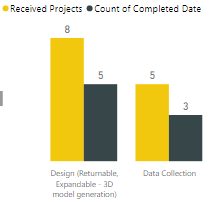
Provided data for this. I want to show barchart to show to count of Data values using two diffrent date columns.  I want use month filter to show month wise data. Please let me know if you have any questions for me.


Thank you!


Data ValuesReceived ProjectsCount of Completed DateCompleted DateSubmission Date
Data Collection227/2/2021 0:006/30/2021 0:00
2D Creation (Fully Detailed Print Drawings)116/25/2021 0:006/22/2021 0:00
Container Stuffing Validation (Cargo Wiz, Pack Assistant, Creo)117/5/2021 0:006/11/2021 0:00
Data Collection1  6/8/2021 0:00
Data Collection1  6/23/2021 0:00
Data Collection117/29/2021 0:006/23/2021 0:00
Design (Returnable, Expandable - 3D model generation)1  6/10/2021 0:00
Design (Returnable, Expandable - 3D model generation)1  6/11/2021 0:00
Design (Returnable, Expandable - 3D model generation)1  6/29/2021 0:00
Design (Returnable, Expandable - 3D model generation)116/7/2021 0:006/1/2021 0:00
Design (Returnable, Expandable - 3D model generation)116/16/2021 0:006/8/2021 0:00
Design (Returnable, Expandable - 3D model generation)116/24/2021 0:006/11/2021 0:00
Design (Returnable, Expandable - 3D model generation)116/25/2021 0:006/8/2021 0:00
Design (Returnable, Expandable - 3D model generation)117/6/2021 0:006/11/2021 0:00
MPN Setup1  6/30/2021 0:00
Others116/25/2021 0:006/7/2021 0:00
Others116/26/2021 0:006/7/2021 0:00
Others117/6/2021 0:006/1/2021 0:00
Others117/7/2021 0:006/8/2021 0:00
Packaging Solution (Multiple activities - Data Collection, Concept, FEA, Print Drawings,  SWES Creation, etc)116/11/2021 0:006/1/2021 0:00
Packaging Solution (Multiple activities - Data Collection, Concept, FEA, Print Drawings,  SWES Creation, etc)116/14/2021 0:006/4/2021 0:00
Packaging Work Order (Define, Collect, Validate, Update and Upload)1  6/18/2021 0:00

Helpful resources

Announcements
New to Fabric survey Carousel

New to Fabric Survey

If you have recently started exploring Fabric, we'd love to hear how it's going. Your feedback can help with product improvements.

Power BI DataViz World Championships carousel

Power BI DataViz World Championships - June 2026

A new Power BI DataViz World Championship is coming this June! Don't miss out on submitting your entry.

March Power BI Update Carousel

Power BI Community Update - March 2026

Check out the March 2026 Power BI update to learn about new features.