cancel
Showing results for 
Search instead for 
Did you mean: 

Vote for your favorite vizzies from the Power BI Dataviz World Championship submissions. Vote now!

Reply
Anonymous
Not applicable

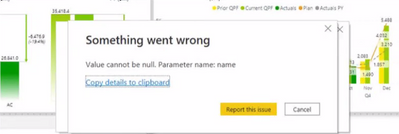
Value cannot be null. Parameter Name: name

Hi all,


I am facing issue when am trying to change my live connection to direct query throwing error with below message. Can you please any one help on this? What could be the issue? Thanks in advance.

KumarPatel_0-1637348176719.png


3 REPLIES 3
V-lianl-msft
Community Support
Community Support

Hi ,


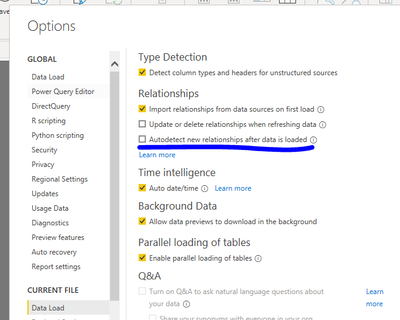
Live connection loads the whole data model, but direct query is not. This may be caused by chaotic relationships. Please try to uncheck "Autodetect new relationships after data is loaded" in the settings.

Vlianlmsft_0-1637547481662.png


Best Regards,
Liang
If this post helps, then please consider Accept it as the solution to help the other members find it more quickly.


Hello @V-lianl-msft,


I am seeing the same issue as the original poster. When I follow your directions I cannot click in "Current File" -> "Data Load" I get the error in the image below. However I cannot switch it to DQ because I get the same error as poster. Any advise?


BSLATTER_0-1637779499605.png


I am seeing the same issue. I suspect it has something to do with the model I am connecting to, it is using parameters to handle Incremental Refresh.

@V-lianl-msftdo you know if there are any limitations of connecting to a model with DirectQuery? I have looked through Microsoft's documentation on this (link), and am not seeing anything related to Parameters other than Parameters not being supported for Server/Database names.

This appears to be a bug.

Helpful resources

Announcements
Power BI DataViz World Championships

Power BI Dataviz World Championships

Vote for your favorite vizzies from the Power BI World Championship submissions!

Sticker Challenge 2026 Carousel

Join our Community Sticker Challenge 2026

If you love stickers, then you will definitely want to check out our Community Sticker Challenge!

January Power BI Update Carousel

Power BI Monthly Update - January 2026

Check out the January 2026 Power BI update to learn about new features.

FabCon Atlanta 2026 carousel

FabCon Atlanta 2026

Join us at FabCon Atlanta, March 16-20, for the ultimate Fabric, Power BI, AI and SQL community-led event. Save $200 with code FABCOMM.