Get certified for free when you join Fabric Data Days 2026 and dive into Fabric, Power BI, SQL, AI, and other essential data skills.
Join nowJuly 7 - July 17 | Round 2 of the Power BI Dataviz World Championships. Don't miss your chance! Learn more
Hi all,
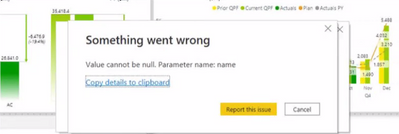
I am facing issue when am trying to change my live connection to direct query throwing error with below message. Can you please any one help on this? What could be the issue? Thanks in advance.
Hi ,
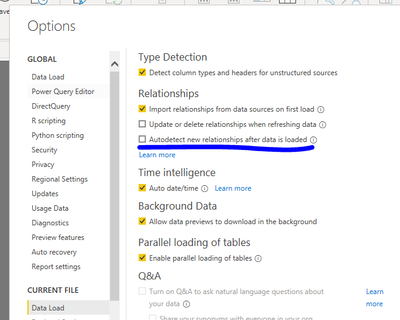
Live connection loads the whole data model, but direct query is not. This may be caused by chaotic relationships. Please try to uncheck "Autodetect new relationships after data is loaded" in the settings.
Best Regards,
Liang
If this post helps, then please consider Accept it as the solution to help the other members find it more quickly.
Hello @V-lianl-msft,
I am seeing the same issue as the original poster. When I follow your directions I cannot click in "Current File" -> "Data Load" I get the error in the image below. However I cannot switch it to DQ because I get the same error as poster. Any advise?
I am seeing the same issue. I suspect it has something to do with the model I am connecting to, it is using parameters to handle Incremental Refresh.
@V-lianl-msftdo you know if there are any limitations of connecting to a model with DirectQuery? I have looked through Microsoft's documentation on this (link), and am not seeing anything related to Parameters other than Parameters not being supported for Server/Database names.
This appears to be a bug.
Join us in Barcelona for FabCon and SQLCon, the Fabric, Power BI, SQL, and AI community event. Save €200 with code FABCMTY200.
Join Data Days 2026: 60 days of free live/on-demand sessions, challenges, study groups, and certification opportunities.
| User | Count |
|---|---|
| 2 | |
| 1 | |
| 1 | |
| 1 | |
| 1 |
| User | Count |
|---|---|
| 4 | |
| 4 | |
| 3 | |
| 2 | |
| 2 |