Join us at FabCon Atlanta from March 16 - 20, 2026, for the ultimate Fabric, Power BI, AI and SQL community-led event. Save $200 with code FABCOMM.
Register now!Vote for your favorite vizzies from the Power BI Dataviz World Championship submissions. Vote now!
Hi all,
I want to connect to this Open Data Portal run by Socrata from the EDD: https://data.edd.ca.gov/Industry-Information-/Quarterly-Census-of-Employment-and-Wages-QCEW-/fisq-v9....
However, it is so large that I want to specify in the query a filter (?$filter=year >2020).
When I try and use the SODA API endpoint even eithout any filtering language, I get the error below - it won't recognize it as a valid source/connection.
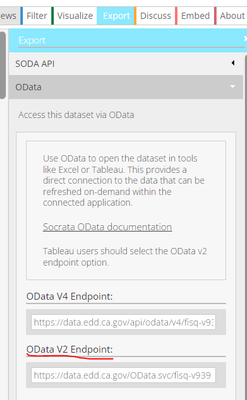
When I try and connect using the OData V2 endpoint, it works when I don't add any filtering language and simply add the link as the connection. However, when I try and add the query language to filter, it shows the error below.
Can anyone help me with this?
Thank you,
Alice
Solved! Go to Solution.
Oh man, I solved my own problem by learning more SQL than I ever knew! For anyone who searches the same key words because they're having the same problem.... here is the solution:
Connect to the V2 endpoint of the OData feed. Then use the right SQL language (I was not using it!). See bolded below:
= OData.Feed("https://data.edd.ca.gov/OData.svc/fisq-v939?$filter=year gt 2020 and area_name eq 'San Francisco County'", null, [Implementation="2.0"])
Oh man, I solved my own problem by learning more SQL than I ever knew! For anyone who searches the same key words because they're having the same problem.... here is the solution:
Connect to the V2 endpoint of the OData feed. Then use the right SQL language (I was not using it!). See bolded below:
= OData.Feed("https://data.edd.ca.gov/OData.svc/fisq-v939?$filter=year gt 2020 and area_name eq 'San Francisco County'", null, [Implementation="2.0"])
Vote for your favorite vizzies from the Power BI World Championship submissions!
If you love stickers, then you will definitely want to check out our Community Sticker Challenge!
Check out the January 2026 Power BI update to learn about new features.
| User | Count |
|---|---|
| 2 | |
| 2 | |
| 2 | |
| 1 | |
| 1 |
| User | Count |
|---|---|
| 4 | |
| 4 | |
| 3 | |
| 2 | |
| 2 |