cancel
Showing results for 
Search instead for 
Did you mean: 

The Power BI Data Visualization World Championships is back! Get ahead of the game and start preparing now! Learn more

Reply
Anonymous
Not applicable

Use RLS in power bi url

Hi everyone, 


I have embedded a power bi report inside salesforce with an url inside an iframe, like the picture below : 

ihoumel_0-1632612936409.png

But now, I have integrated RLS in my report and I would like to know if it is possible to use the roles created, directly in the url as filter parameters ? 


I've searched on the web and they suggested to use embed token but I don't know where and how to use it inside a salesforce page.


Thank you for your help !

1 ACCEPTED SOLUTION
Anonymous
Not applicable

Hello @Anonymous, @Greg_Deckler 


I figured out how to use RLS in an embedded scenario. In fact, since I used secure embed the RLS is automatically supported as it is written in this article : https://docs.microsoft.com/en-us/power-bi/collaborate-share/service-embed-secure 


I have just to be sure that the persons who have access to this report have only read permissions. 

It is working really well for me ! 


Thanks

View solution in original post

4 REPLIES 4
Anonymous
Not applicable

HI @Anonymous,

AFAIK, current power bi not able to integrate RLS with URL. I'd like to suggest use URL filters instead.

Filter a report using query string parameters in the URL - Power BI | Microsoft Docs

Regards,

Xiaoxin Sheng

Greg_Deckler
Community Champion
Community Champion

@Anonymous How did you generate the embed token, is it a Publish to web embed token or something else? RLS cannot be achieved using URL parameters.


Follow on LinkedIn
@ me in replies or I'll lose your thread!!!
Instead of a Kudo, please vote for this idea
Become an expert!: Enterprise DNA
External Tools: MSHGQM
YouTube Channel!: Microsoft Hates Greg
Latest book!:
DAX For Humans

DAX is easy, CALCULATE makes DAX hard...
Anonymous
Not applicable

Hello @Anonymous, @Greg_Deckler 


I figured out how to use RLS in an embedded scenario. In fact, since I used secure embed the RLS is automatically supported as it is written in this article : https://docs.microsoft.com/en-us/power-bi/collaborate-share/service-embed-secure 


I have just to be sure that the persons who have access to this report have only read permissions. 

It is working really well for me ! 


Thanks

Anonymous
Not applicable

Hi @Greg_Deckler,


In fact I didn't generate the embed token yet. 

I started looking at this link : https://docs.microsoft.com/en-us/power-bi/developer/embedded/embedded-row-level-security

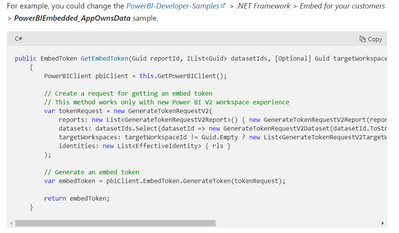
But I don't know where to inject this code in the visualforce page : 

ihoumel_0-1632684344186.png

Any idea ? 


Or maybe another way to use the rls in an embedded power bi report ? 


Thank you very much 


Helpful resources

Announcements
Power BI DataViz World Championships

Power BI Dataviz World Championships

The Power BI Data Visualization World Championships is back! Get ahead of the game and start preparing now!

December 2025 Power BI Update Carousel

Power BI Monthly Update - December 2025

Check out the December 2025 Power BI Holiday Recap!

FabCon Atlanta 2026 carousel

FabCon Atlanta 2026

Join us at FabCon Atlanta, March 16-20, for the ultimate Fabric, Power BI, AI and SQL community-led event. Save $200 with code FABCOMM.