This is best Fabric, Power BI, SQL and AI community event. How do we know? The last event sold out! Save €200 with code FABCMTY200.
Register nowA new Data Days event is coming soon! This time we’re going bigger than ever. Fabric, Power BI, SQL, AI and more. Don't miss out.
Hi,
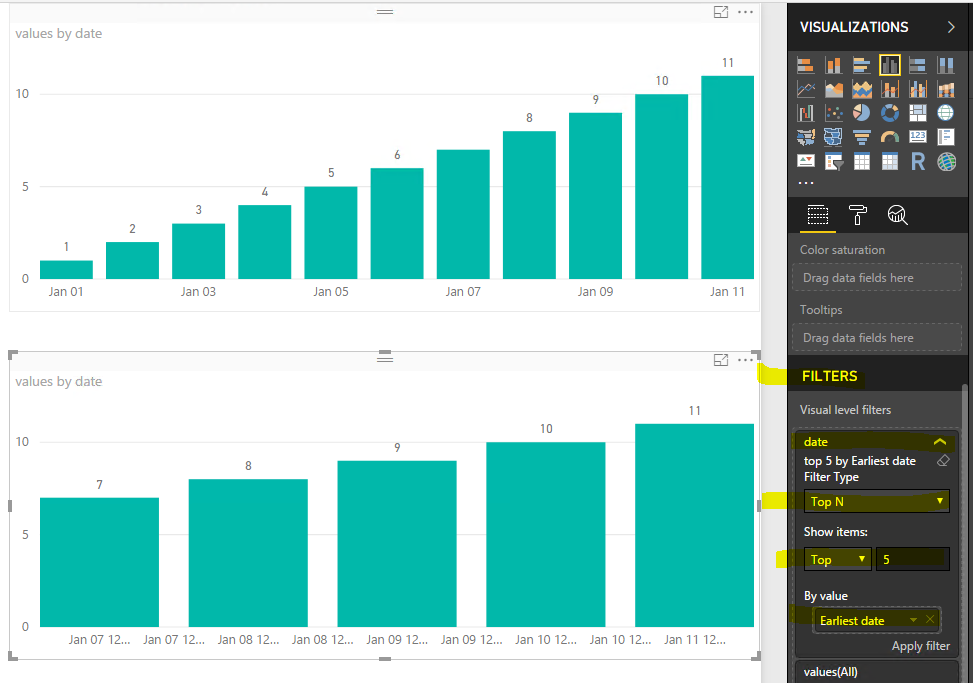
I have a dataset with DateTime and Reading (int) columns. I want to show the readings over the time axis as a line graph but only for last 50 datetime values as the data is too large to show in the line graph and the user is only interested to see last 50 values. I am not sure if I can use the RANKX function as follows? This does not work as it ask to provide some aggregate function around datetime field that I am not sure which one should it be.
Rank = RANKX(ALL(DatasetName), DatasetName[Datetime])
Could you please suggest any alternative to achieve the above?
Thanks @Eric_Zhang For some reason this filter was not working on the real-time streaming dataset (on datetime field), it doesn't return anything. But for static dataset the filter does work fine. Do you know why it wouldn't work on the streaming data? Thanks
Check out the May 2026 Power BI update to learn about new features.
Sign up to receive a private message when registration opens and key events begin.
If you have recently started exploring Fabric, we'd love to hear how it's going. Your feedback can help with product improvements.