Don't miss your chance to take the Fabric Data Engineer (DP-600) exam for FREE! Find out how by attending the DP-600 session on April 23rd (pacific time), live or on-demand.
Learn moreNext up in the FabCon + SQLCon recap series: The roadmap for Microsoft SQL and Maximizing Developer experiences in Fabric. All sessions are available on-demand after the live show. Register now
@AlexHolmeset wrote:
Any idea whats wronge here?
What type is the AAD registered Application in your case? If the clientId is from a "Server-side Web app", then specify an extra option -clientsercet. Otherwise register a "Native app" and use the clientid alone.
@AlexHolmeset wrote:
Any idea whats wronge here?
What type is the AAD registered Application in your case? If the clientId is from a "Server-side Web app", then specify an extra option -clientsercet. Otherwise register a "Native app" and use the clientid alone.
I have registered it as a server-side web app. -Clientsecret is not a availible paramter for the Connect-powerbi commandlet. Il see if i can register as a native app.
What im trying to achieve is to connect/work with PowerBi trough powershell.
https://www.powershellgallery.com/packages/Microsoft.PowerBI.PowerShell/1.2
Worked when using using Native app. Thanks.
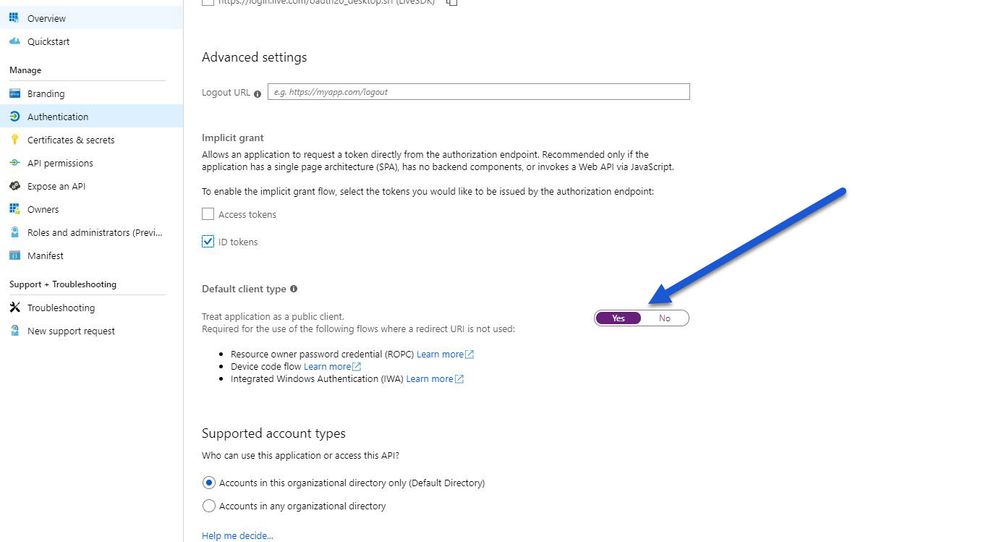
As the Azure App Registration UI is changed from legacy.
So you need to enable the addition setting called Default Client Type to Yes
to make sure your native app will works.
Thank you it was life saver for me!
If you have recently started exploring Fabric, we'd love to hear how it's going. Your feedback can help with product improvements.
A new Power BI DataViz World Championship is coming this June! Don't miss out on submitting your entry.
| User | Count |
|---|---|
| 1 | |
| 1 | |
| 1 | |
| 1 | |
| 1 |