I have a custom visual that is a combination of a line chart and Gantt. I am using table data view mapping. I'm using .withTable() to generate my selectionIds. Each datapoint is given its own selectionId. Each Gantt time-series block is made up of multiple datapoints. For each block, the individual selectionIds are stored in an array. When I select a block (see second screenshot below), the correct number of datapoints are selected in external visuals, but the data points themselves are incorrect. For example: Item 1, Phase 2 is selected and is made up of 161 datapoints, but the table has datapoints selected that are for different items and phases. There's probably something pretty obvious that I'm missing, but I'm not sure what it is.
If anyone is willing to take a look, shoot me a message and I'll send you my code and a demo .pbix.
Thanks!

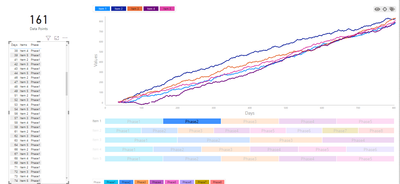
Here is my code that generates the selectionIds and stores them in each time-series block.
 private static getGanttDataPoints(options: VisualUpdateOptions, highlights: powerbi.PrimitiveValue[], viewModel: IViewModel, host: IVisualHost): IGanttDataPoint[] {
        let rows: powerbi.DataViewTableRow[] = options.dataViews[0].table.rows;
        let fieldIndices: IFieldIndices = viewModel.fieldIndices;

        let ganttDataPoints: IGanttDataPoint[] =
            rows.map((d: powerbi.DataViewTableRow, i: number) => ({
                axes: +this.rowToDataRoleValue(rows[i], fieldIndices.axisIndex),
                ganttItem: this.rowToDataRoleValue(rows[i], fieldIndices.ganttItemIndex),
                ganttLegend: this.rowToDataRoleValue(rows[i], fieldIndices.ganttLegendIndex),
                ganttBlock: this.rowToDataRoleValue(rows[i], fieldIndices.ganttBlockLabelIndex),
                ganttItemSort: +this.rowToDataRoleValue(rows[i], fieldIndices.ganttItemSortIndex),
                ordinalSeries: null,
                selectionId: host.createSelectionIdBuilder()
                    .withTable(options.dataViews[0].table, i)
                    .createSelectionId(),
                identityIndices: i,
                start: null,
                end: null,
                color: null
            }))
                .sort((a: IGanttDataPoint, b: IGanttDataPoint) => a.ganttItem.localeCompare(b.ganttItem) || +a.axes - +b.axes);

        //get the ordinalseries values
        ganttDataPoints
            .forEach((d: IGanttDataPoint, i: number, s: IGanttDataPoint[]) => {
                if (i === 0) { //first row gets ordinalseries = 1
                    d.ordinalSeries = 1;
                } else if (s[i - 1].ganttItem === d.ganttItem //if current row has the same ganttitem and ganttlegend as previous row, give it the same ordinalseries
                    && s[i - 1].ganttLegend === d.ganttLegend) {
                    d.ordinalSeries = s[i - 1].ordinalSeries;
                } else { //otherwise increase the ordinalseries by 1
                    d.ordinalSeries = s[i - 1].ordinalSeries + 1;
                }
            });

        //reduce the dataset into time-series blocks
        //populate remaining datapoints
        ganttDataPoints = ganttDataPoints
            .reduce((blocks: IGanttDataPoint[], ganttData: IGanttDataPoint, i: number, s: IGanttDataPoint[]) => {
                if (!blocks[ganttData.ordinalSeries]) {
                    ganttData.start = <number>ganttData.axes
                    ganttData.end = max(ganttDataPoints.filter((d: IGanttDataPoint) => +d.ordinalSeries === +ganttData.ordinalSeries).map((d: IGanttDataPoint) => <number>d.axes))
                    ganttData.axes = <number[]>s.filter((d: IGanttDataPoint) => +d.ordinalSeries === +ganttData.ordinalSeries).map((d: IGanttDataPoint) => d.axes)
                    ganttData.identityIndices = <any>s.filter((d: IGanttDataPoint) => +d.ordinalSeries === +ganttData.ordinalSeries).map((d: IGanttDataPoint) => d.identityIndices)
                    ganttData.selectionId = <any>s.filter((d: IGanttDataPoint) => +d.ordinalSeries === +ganttData.ordinalSeries).map((d: IGanttDataPoint) => d.selectionId)
                    ganttData.color = ganttData.ganttLegend ? viewModel.legendItems.gantt.filter((l: IGanttLegendItem) => l.legendItem === ganttData.ganttLegend)[0].color : viewModel.settings.colorSelector.ganttColor0
                    blocks[ganttData.ordinalSeries] = ganttData;
                }
                return blocks;
            }, [])
            .filter((d, i) => i != 0); //above reduce starts with an empty array, remove

        return ganttDataPoints;
    }
@v-viig,
Madison GiammariaProud to be a Super User
😄LinkedInDo you frequently use Deneb to provide insights to your stakeholders? Have you considered sponsoring this free and open source custom visual? More info here!


