Get certified for free when you join Fabric Data Days 2026 and dive into Fabric, Power BI, SQL, AI, and other essential data skills.
Join nowJuly 28 - August 9 | Final Round of the Power BI Dataviz World Championships. This is your chance. Learn more
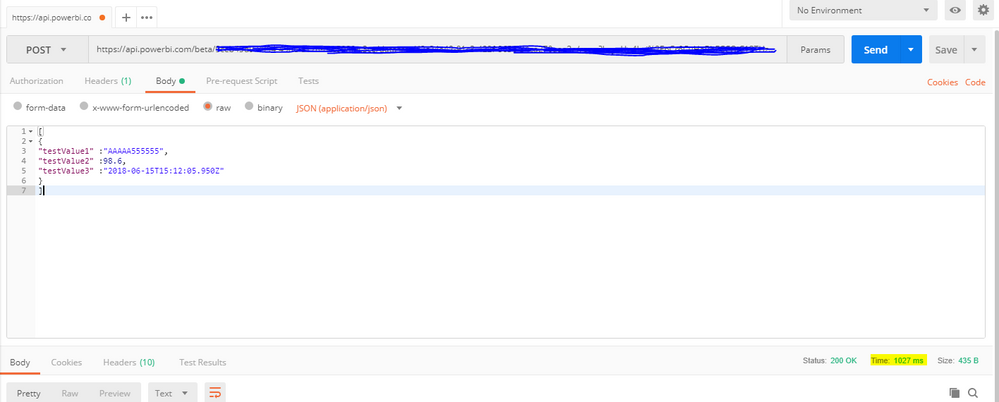
I've created a test push dataset in power BI. Using Postman, the time it takes to complete the request is roughly 1 second. It varies slightly but seems to be consistently 1 second. I've tried it in both PowerShell and Java, using Java.net's httpsURLconnection Class, but they are not any faster. This is too slow for my purposes. Could anyone advise on what I can do?
I don't think there is a better way to speed up the REST call.
Things that I can think out is when deploying the Power BI, make sure you have the nearest storage selected.
Read more here:
For tenant location part.
Regards,
Michael
This was my first experience with REST APIs, I didn't realise that you could send multiple rows per POST Request. Once I got the syntax right to send multiple rows, I had no need for multiple POST Requests per second.
According to this microsoft link , Power BI's REST API is limited to120 POST rows requests per minute per dataset
Join us in Barcelona for FabCon and SQLCon, the Fabric, Power BI, SQL, and AI community event. Save €200 with code FABCMTY200.
If you love stickers, then you will definitely want to check out our community sticker challenge, Barcelona edition!
Check out the July 2026 Power BI update to learn about new features.
| User | Count |
|---|---|
| 2 | |
| 2 | |
| 1 | |
| 1 | |
| 1 |
| User | Count |
|---|---|
| 4 | |
| 3 | |
| 2 | |
| 1 | |
| 1 |