cancel
Showing results for 
Search instead for 
Did you mean: 

Data Days is here! Join us now for 60+ days of learning, challenges, and connection. Learn more

Reply
vmurali1
Frequent Visitor

Requesting help with Dax Calculation

Team,

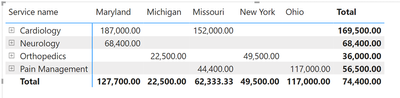
I have matrix  that looks like this (See image 1):
vmurali1_1-1676850638697.png


In the rows we have the service name. In the columns we have locations, and the value field is "Product Cost per Case" (Here is how I created this measure)

Product cost = Sum (item price)

Total # of cases = distinctcount (Case#)

Product cpc = Product cost/total# of cases

Now, here is what I am looking for:

In each value field, I want to show the opportunity cost instead of a product cost per case.

Opportunity cost = (Total CPC value – product CPC of that specific field/location) * Total # of cases for that specific field/location

Let’s take orthopedics, MI as an example

Opportunity cost = (36000-22500) *1

Can someone please assist me how to do the above calculation as a measure or any other means ?


Please see image 2 for the data structure


vmurali1_2-1676850659533.png


Appreiate your help. 


2 REPLIES 2
Greg_Deckler
Community Champion
Community Champion

@vmurali1 Maybe:

Opportunity Cost =
  VAR __Service = MAX('Table'[Service name])
  VAR __Total = SUMX(FILTER(ALL('Table'),[Service name] = __Service),[Item price])
  VAR __LocationTotal = SUM('Table'[Item price])
  VAR __Result = (__Total - __LocationTotal) * 1
RETURN
  __Result


Follow on LinkedIn
@ me in replies or I'll lose your thread!!!
Instead of a Kudo, please vote for this idea
Become an expert!: Enterprise DNA
External Tools: MSHGQM
YouTube Channel!: Microsoft Hates Greg
Latest book!:
DAX For Humans

DAX is easy, CALCULATE makes DAX hard...

Hey, 
Thank you for your response. It did not work. The "*1" is nothing but the # of cases so, i went ahead and replaced that with the # of cases measure that i already have and it still shows error. 

Helpful resources

Announcements
Fabric Data Days is here Carousel

Fabric Data Days 2026

Don't miss out on Data Days, June 15 through August 7. Learn Fabric, Power BI, SQL, AI and more.

May Power BI Update Carousel

Power BI Monthly Update - May 2026

Check out the May 2026 Power BI update to learn about new features.

Power BI DataViz World Championships carousel

Power BI DataViz World Championships - June 2026

A new Power BI DataViz World Championship is coming this June! Don't miss out on submitting your entry.

Top Kudoed Authors