This time we’re going bigger than ever. Fabric, Power BI, SQL, AI and more. We're covering it all. You won't want to miss it.
Learn moreLevel up your Power BI skills this month - build one visual each week and tell better stories with data! Get started
Hi All,
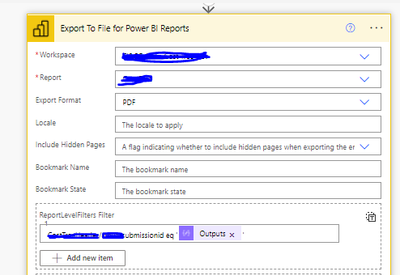
I am trying to email a report with the help of PowerAutomate using the action Export To Files for Power BI Reports (more info can be found here )
that is how the action looks like with a filter (TableName/ColumnName)-
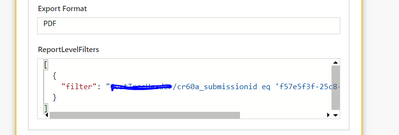
In history -
The reports I am getting are empty, without any data. What is missing here?
Hi @mokumar ,
When such issues happen it's most of the time has to do with the filter string itself.
The best way to sort out what's wrong in open the same report in Power BI portal, append the same filter string to the browser URL as explained here: https://docs.microsoft.com/en-us/power-bi/collaborate-share/service-url-filters
Once you get it to work as expected, the exact same string (without the "?filter=" part, and no need for the URL encoding, only special characters if exists) should work when you export through Power Automate.
my url filter Clusterdaily/RecordDate%20gt%202023-12-23T00:00:00Z%20and%20Clusterdaily/Cluster%20eq%20'01-C'
is working fine but not working when i am using it in export through power automate
Clusterdaily/RecordDate gt 2023-12-23T00:00:00Z and Clusterdaily/Cluster eq '01-C'
I donyt think you can use multiple filters when exporting PBI via PowerAutomate
Check out the April 2026 Power BI update to learn about new features.
Sign up to receive a private message when registration opens and key events begin.
If you have recently started exploring Fabric, we'd love to hear how it's going. Your feedback can help with product improvements.
| User | Count |
|---|---|
| 4 | |
| 2 | |
| 2 | |
| 1 | |
| 1 |