Don't miss your chance to take the Fabric Data Engineer (DP-700) exam on us!
Learn moreNext up in the FabCon + SQLCon recap series: The roadmap for Microsoft SQL and Maximizing Developer experiences in Fabric. All sessions are available on-demand after the live show. Register now
Hi All,
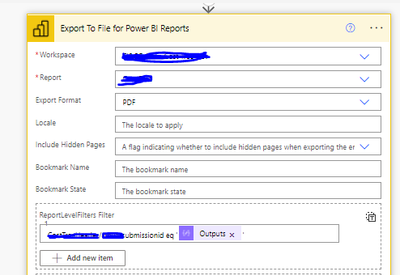
I am trying to email a report with the help of PowerAutomate using the action Export To Files for Power BI Reports (more info can be found here )
that is how the action looks like with a filter (TableName/ColumnName)-
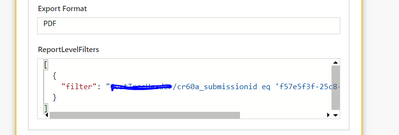
In history -
The reports I am getting are empty, without any data. What is missing here?
Hi @mokumar ,
When such issues happen it's most of the time has to do with the filter string itself.
The best way to sort out what's wrong in open the same report in Power BI portal, append the same filter string to the browser URL as explained here: https://docs.microsoft.com/en-us/power-bi/collaborate-share/service-url-filters
Once you get it to work as expected, the exact same string (without the "?filter=" part, and no need for the URL encoding, only special characters if exists) should work when you export through Power Automate.
my url filter Clusterdaily/RecordDate%20gt%202023-12-23T00:00:00Z%20and%20Clusterdaily/Cluster%20eq%20'01-C'
is working fine but not working when i am using it in export through power automate
Clusterdaily/RecordDate gt 2023-12-23T00:00:00Z and Clusterdaily/Cluster eq '01-C'
I donyt think you can use multiple filters when exporting PBI via PowerAutomate
If you have recently started exploring Fabric, we'd love to hear how it's going. Your feedback can help with product improvements.
A new Power BI DataViz World Championship is coming this June! Don't miss out on submitting your entry.
Share feedback directly with Fabric product managers, participate in targeted research studies and influence the Fabric roadmap.
| User | Count |
|---|---|
| 1 | |
| 1 | |
| 1 | |
| 1 | |
| 1 |