Get Fabric or SQL Certified for Free.
Get certified for free when you join Fabric Data Days 2026 and dive into Fabric, Power BI, SQL, AI, and other essential data skills.
Join now- Power BI forums
- Get Help with Power BI
- Desktop
- Service
- Report Server
- Power Query
- Mobile Apps
- Developer
- DAX Commands and Tips
- Custom Visuals Development Discussion
- Health and Life Sciences
- Power BI Spanish forums
- Translated Spanish Desktop
- Training and Consulting
- Instructor Led Training
- Dashboard in a Day for Women, by Women
- Galleries
- Data Stories Gallery
- Themes Gallery
- Contests Gallery
- QuickViz Gallery
- Quick Measures Gallery
- Visual Calculations Gallery
- Fabric Apps Gallery
- Notebook Gallery
- Translytical Task Flow Gallery
- TMDL Gallery
- R Script Showcase
- Webinars and Video Gallery
- Ideas
- Custom Visuals Ideas (read-only)
- Issues
- Issues
- Events
- Upcoming Events
July 28 - August 9 | Final Round of the Power BI Dataviz World Championships. This is your chance. Learn more
- Power BI forums
- Forums
- Get Help with Power BI
- Developer
- Re: Report testing Automation (using Playwright) -...
- Subscribe to RSS Feed
- Mark Topic as New
- Mark Topic as Read
- Float this Topic for Current User
- Bookmark
- Subscribe
- Printer Friendly Page

- Mark as New
- Bookmark
- Subscribe
- Mute
- Subscribe to RSS Feed
- Permalink
- Report Inappropriate Content
Report testing Automation (using Playwright) - unable to click button
I have been asked to figure out report automation testing for our analtyic reports on our internal company site.
The reports are done in Power BI.
I need to be able to search for something, drill through, get a value on the report and check it against a database.
I haven't been able to find where others are doing something like this.
I tried using the selenium IDE and recorder, Cypress, and Playwright.
I am having the most success with Playwright but continue to hit some road blocks.
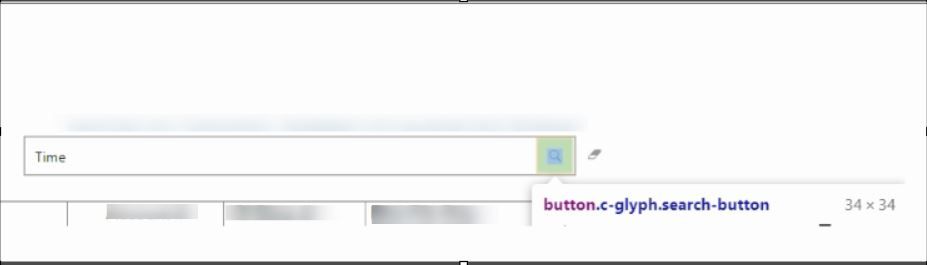
I have a search button and a clear button on the report. I can 't get Playwright to click on either one of the buttons.
I have tried from the "page" and from the "frame" objects the different possible methods/events with no luck.
I am succesful in finding the frame with the following lines of code
const frame = page.frames().find(frame => frame.name() === 'visual-sandbox');
console.log(frame.name());
After typing in the search button the value to search, I tried to do a "enter" which should also trigger the search button.
I have tried so many things that I didn't keep a running list.
Examples below, I tried doing the same from the "await frame ...."
await page.click('//button[normalize-space(.)="Cear"]');
await page.dispatchEvent('button#c-glyph.search-button', 'click');
await page.click('search-button');
await page.press('#sandbox-host > div', "Enter");


const [response] = await Promise.all([
page.waitForNavigation(), // The navigation promise resolves after navigation has finished
page.click('#sandbox-host > div > button.c-glyph.search-button'),
//]);
I got the furthest with the following line where it looks like it knew what I was asking.
const hrefElement = await frame.$('#sandbox-host > div > button.c-glyph.search-button');
await hrefElement.click();
(node:31864) UnhandledPromiseRejectionWarning: TimeoutError: elementHandle.click: Timeout 30000ms exceeded.
=========================== logs ===========================
[api] attempting click action
[api] waiting for element to be visible, enabled and not moving
[api] element is visible, enabled and does not move
[api] scrolling into view if needed
[api] done scrolling
[api] checking that element receives pointer events at (948.83,198.06)
[api] element does not receive pointer events
[api] retrying click action
[api] waiting for element to be visible, enabled and not moving
[api] element is visible, enabled and does not move
[api] scrolling into view if needed
[api] done scrolling
[api] checking that element receives pointer events at (948.83,198.06)
[api] element does not receive pointer events
[api] retrying click action
[api] waiting for element to be visible, enabled and not moving
[api] element is visible, enabled and does not move
[api] scrolling into view if needed
[api] done scrolling
[api] checking that element receives pointer events at (948.83,198.06)
[api] element does not receive pointer events
[api] retrying click action
[api] waiting for element to be visible, enabled and not moving
[api] element is visible, enabled and does not move
[api] scrolling into view if needed
[api] done scrolling
[api] checking that element receives pointer events at (948.83,198.06)
[api] element does not receive pointer events
[api] retrying click action
[api] waiting for element to be visible, enabled and not moving
[api] element is visible, enabled and does not move
[api] scrolling into view if needed
[api] done scrolling
[api] checking that element receives pointer events at (948.83,198.06)
[api] element does not receive pointer events
[api] retrying click action
[api] waiting for element to be visible, enabled and not moving
[api] element is visible, enabled and does not move
[api] scrolling into view if needed
[api] done scrolling
[api] checking that element receives pointer events at (948.83,198.06)
[api] element does not receive pointer events
[api] retrying click action
[api] waiting for element to be visible, enabled and not moving
[api] element is visible, enabled and does not move
[api] scrolling into view if needed
[api] done scrolling
[api] checking that element receives pointer events at (948.83,198.06)
[api] element does not receive pointer events
[api] retrying click action
[api] waiting for element to be visible, enabled and not moving
[api] element is visible, enabled and does not move
[api] scrolling into view if needed
[api] done scrolling
[api] checking that element receives pointer events at (948.83,198.06)
[api] element does not receive pointer events
[api] retrying click action
[api] waiting for element to be visible, enabled and not moving
[api] element is visible, enabled and does not move
[api] scrolling into view if needed
[api] done scrolling
[api] checking that element receives pointer events at (948.83,198.06)
[api] element does not receive pointer events
[api] retrying click action
[api] waiting for element to be visible, enabled and not moving
[api] element is visible, enabled and does not move
[api] scrolling into view if needed
[api] done scrolling
[api] checking that element receives pointer events at (948.83,198.06)
[api] element does not receive pointer events
[api] retrying click action
[api] waiting for element to be visible, enabled and not moving
[api] element is visible, enabled and does not move
[api] scrolling into view if needed
[api] done scrolling
[api] checking that element receives pointer events at (948.83,198.06)
[api] element does not receive pointer events
[api] retrying click action
[api] waiting for element to be visible, enabled and not moving
[api] element is visible, enabled and does not move
[api] scrolling into view if needed
[api] done scrolling
[api] checking that element receives pointer events at (948.83,198.06)
[api] element does not receive pointer events
[api] retrying click action
[api] waiting for element to be visible, enabled and not moving
[api] element is visible, enabled and does not move
[api] scrolling into view if needed
[api] done scrolling
[api] checking that element receives pointer events at (948.83,198.06)
[api] element does not receive pointer events
[api] retrying click action
[api] waiting for element to be visible, enabled and not moving
[api] element is visible, enabled and does not move
[api] scrolling into view if needed
[api] done scrolling
[api] checking that element receives pointer events at (948.83,198.06)
[api] element does not receive pointer events
[api] retrying click action
[api] waiting for element to be visible, enabled and not moving
[api] element is visible, enabled and does not move
[api] scrolling into view if needed
[api] done scrolling
[api] checking that element receives pointer events at (948.83,198.06)
[api] element does not receive pointer events
[api] retrying click action
[api] waiting for element to be visible, enabled and not moving
[api] element is visible, enabled and does not move
[api] scrolling into view if needed
[api] done scrolling
[api] checking that element receives pointer events at (948.83,198.06)
[api] element does not receive pointer events
[api] retrying click action
[api] waiting for element to be visible, enabled and not moving
[api] element is visible, enabled and does not move
[api] scrolling into view if needed
[api] done scrolling
[api] checking that element receives pointer events at (948.83,198.06)
[api] element does not receive pointer events
[api] retrying click action
[api] waiting for element to be visible, enabled and not moving
[api] element is visible, enabled and does not move
[api] scrolling into view if needed
[api] done scrolling
[api] checking that element receives pointer events at (948.83,198.06)
[api] element does not receive pointer events
[api] retrying click action
[api] waiting for element to be visible, enabled and not moving
Note: use DEBUG=pw:api environment variable and rerun to capture Playwright logs.
Looking at the Chrome Dev Tools inspection, this is what I get for different portions of the element for search button.
	SearchButtonOutter
	"copy selector"
	#sandbox-host > div > button.c-glyph.search-button

	"copy JS Path"
	document.querySelector("#sandbox-host > div > button.c-glyph.search-button")

	"copy element":
	<button class="c-glyph search-button" name="search-button">
	                                          <span class="x-screen-reader">Search</span>
	                                        </button>

	SearchButtonInner
	there isn't anything to copy for the element, but I can get this from the inspect styles section
	.visual-textFilter25A4896A83E0487089E2B90C9AE57C8A .text-filter-search button.search-button:before {
I could use some help on the right way to reference the click method for the buttons. I have attached screen shots to show you what I am trying to click on.

Solved! Go to Solution.
- Mark as New
- Bookmark
- Subscribe
- Mute
- Subscribe to RSS Feed
- Permalink
- Report Inappropriate Content
Not sure why my reply back wasn't working. Third attempt. Thanks Greg for the link to the article. No, I had not seen that. My testing needs to mimic the user's experence within the visuals. Our reports do use DAX queries but not from the original source. I can see maybe trying to incorporate the DAX Sudio to query against the original source and then verify it against the visual. It is definitely something I will check out. To mimic the user's maniuplation of the visuals I will still need to automate the objects on the report in the website.
In case someone else is trying to get the button action to happen, I did get this to work with the frame object but not the page. I did the following:
const test = await frame.evaluate(() =>
document.querySelector("#sandbox-host > div > button.c-glyph.search-button").click()
);


- Mark as New
- Bookmark
- Subscribe
- Mute
- Subscribe to RSS Feed
- Permalink
- Report Inappropriate Content
@wadezone Have you seen this article? https://powerpivotpro.com/2018/09/automated-testing-using-dax-for-power-bi/
Follow on LinkedIn
@ me in replies or I'll lose your thread!!!
Instead of a Kudo, please vote for this idea
Become an expert!: Enterprise DNA
External Tools: MSHGQM
YouTube Channel!: Microsoft Hates Greg
Latest book!: DAX For Humans
DAX is easy, CALCULATE makes DAX hard...
- Mark as New
- Bookmark
- Subscribe
- Mute
- Subscribe to RSS Feed
- Permalink
- Report Inappropriate Content
Hello @Greg_Deckler ,
Thanks for sharing the link. Do you think that the approach suggested in your link would work on a report which has been authored on top of a shared dataset?
Please bear in mind that the report has DAX functions which I would like to test.
Thanks,
Sau
- Mark as New
- Bookmark
- Subscribe
- Mute
- Subscribe to RSS Feed
- Permalink
- Report Inappropriate Content
Not sure why my reply back wasn't working. Third attempt. Thanks Greg for the link to the article. No, I had not seen that. My testing needs to mimic the user's experence within the visuals. Our reports do use DAX queries but not from the original source. I can see maybe trying to incorporate the DAX Sudio to query against the original source and then verify it against the visual. It is definitely something I will check out. To mimic the user's maniuplation of the visuals I will still need to automate the objects on the report in the website.
In case someone else is trying to get the button action to happen, I did get this to work with the frame object but not the page. I did the following:
const test = await frame.evaluate(() =>
document.querySelector("#sandbox-host > div > button.c-glyph.search-button").click()
);

Helpful resources

FabCon & SQLCon – Barcelona 2026
Join us in Barcelona for FabCon and SQLCon, the Fabric, Power BI, SQL, and AI community event. Save €200 with code FABCMTY200.

Fabric Community Sticker Challenge - Barcelona 2026
If you love stickers, then you will definitely want to check out our community sticker challenge, Barcelona edition!

Power BI Monthly Update - July 2026
Check out the July 2026 Power BI update to learn about new features.

Power BI DataViz World Championships - June 2026
A new Power BI DataViz World Championship is coming this June! Don't miss out on submitting your entry.

| User | Count |
|---|---|
| 2 | |
| 1 | |
| 1 | |
| 1 | |
| 1 |


