
cancel
Showing results for 
Search instead for 
Did you mean: 

The Power BI Data Visualization World Championships is back! Get ahead of the game and start preparing now! Learn more

Reply
Jcorbalan
Regular Visitor

Remove labels api

Hello,

We have the same issue with labels as in this post: How to remove Sensitivity Label - What permission/... - Microsoft Fabric Community but we are not sure if we are using the API correctly (we get a response code 401) as seen here: Admin - InformationProtection RemoveLabelsAsAdmin - REST API (Power BI Power BI REST APIs) | Microso...

We have many questions about that:
- Is it just a try page or we can use it to remove our labels?

- If so, what is the url we need to use to use it?
- Do we need to fill the header and parameter fields or is it enought to use the body field with the type and id?
Thanks!!


2 REPLIES 2
Jcorbalan
Regular Visitor

Thanks for your answer. 

If I use postman, how can I find the address to connect to the API?

Regards

Anonymous
Not applicable

Hi  @Jcorbalan ,


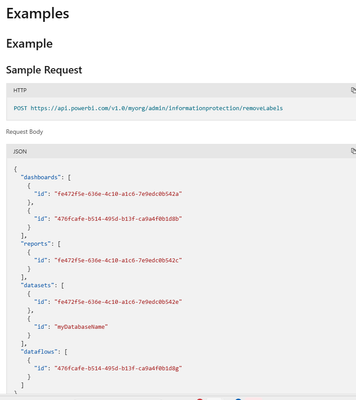
According to your requirement description, this documentation page supports directly doing "Try it" to try this rest API, you can click here and follow the request header and body of the example below to mimic and place your own label to do these operations.

vyangliumsft_0-1713240169112.png

vyangliumsft_1-1713240169115.png

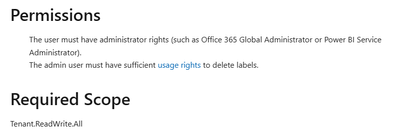
Regarding the permissions needed, if you are logged in with an AAD account, then your AAD account will need these permissions

  • The user must have administrator rights (such as Office 365 Global Administrator or Power BI Service Administrator).
  • The admin user must have sufficient usage rights to delete labels.

There is a corresponding description in this part of the document

vyangliumsft_2-1713240190200.png

Also, if you want to use these APIs more formally and execute them in bulk, you can use postman to test and execute them as a professional job.

Postman API Platform | Sign Up for Free


Best Regards,

Liu Yang

If this post helps, then please consider Accept it as the solution to help the other members find it more quickly.


Helpful resources

Announcements
Power BI DataViz World Championships

Power BI Dataviz World Championships

The Power BI Data Visualization World Championships is back! Get ahead of the game and start preparing now!

December 2025 Power BI Update Carousel

Power BI Monthly Update - December 2025

Check out the December 2025 Power BI Holiday Recap!

FabCon Atlanta 2026 carousel

FabCon Atlanta 2026

Join us at FabCon Atlanta, March 16-20, for the ultimate Fabric, Power BI, AI and SQL community-led event. Save $200 with code FABCOMM.